
Monthly SEO Report: What an Agency Should Show You (KPIs, Template and Red Flags)
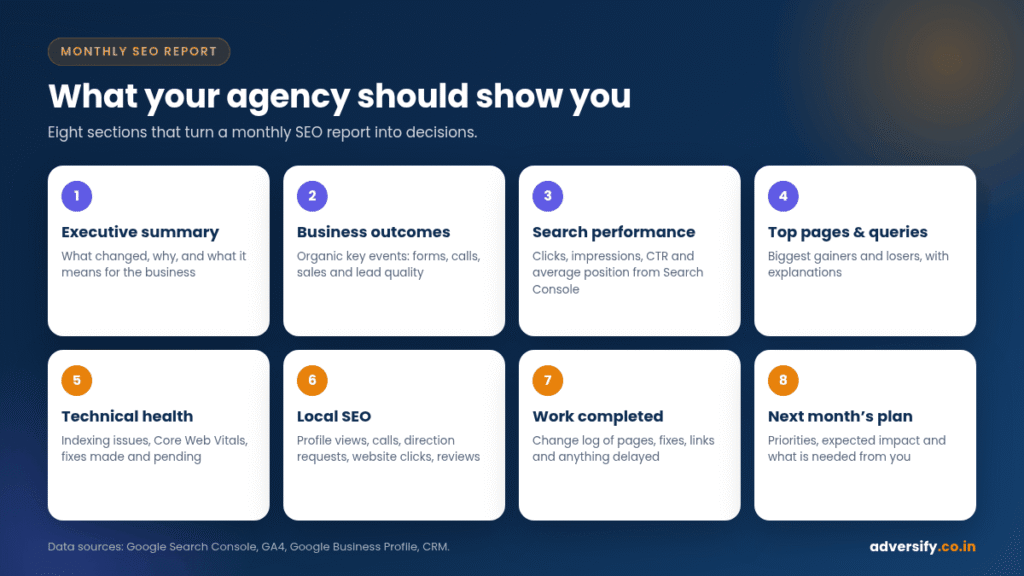
Every month, most businesses that pay for SEO receive a report. Some are genuinely useful: they explain what happened, why, and what comes next. Many are not. They arrive as a 30-page PDF of charts, a list of keyword positions and a line that says “traffic is up”, with no link to enquiries, sales or the work that was actually done. A good monthly SEO report should help you make decisions. It should tell you whether SEO is contributing to your business, what the agency did with your budget, what is working, what is not and what the plan is for next month. This guide explains what an agency should show you, which Google Search Console and Google Analytics 4 (GA4) metrics matter, how to tell useful reporting from vanity reporting, a template you can ask your agency to follow and the red flags to watch for. Key takeaways A monthly SEO report exists to support decisions, not to fill pages. It should connect search visibility to leads, sales or other business outcomes. Every report should cover three layers: business outcomes, search performance and the work completed, followed by a plan for next month. Google Search Console shows how your site performs in Google Search (clicks, impressions, CTR and average position). GA4 shows what visitors do on your site, including key events such as form submissions. Compare like with like: month on month for momentum, and year on year for seasonal businesses. Vanity metrics such as total keywords tracked or raw backlink counts, shown without context, tell you little about value. You should own your Search Console and GA4 accounts so you can check any number in the report yourself. What a monthly SEO report is for An SEO report is a communication tool. Its job is to answer four questions clearly: Is SEO helping the business? Are organic visitors turning into enquiries, calls or sales? How is our search visibility changing? Are we appearing for more relevant searches, and are more people clicking? What did the agency do this month? Which fixes, pages and improvements were delivered? What happens next? What are the priorities for next month, and what is needed from you? If a report cannot answer those four questions in the first page or two, it is probably built to look busy rather than to inform. Google’s guidance on hiring an SEO suggests asking how an SEO measures success and whether they will share all the changes they make to your site, along with the reasoning behind their recommendations. A monthly report is where those promises should show up. The three layers every report should cover Think of a good report as a pyramid. Business outcomes sit at the top, search performance in the middle and the work done at the base. Each layer explains the one above it. Eight sections that make a monthly SEO report useful. Ask your agency to follow this order. Layer 1: Business outcomes This is what you are paying for. Depending on your business, it may be form enquiries, phone calls, booked appointments, quote requests or online sales from organic search. In GA4 these actions are tracked as key events, which Google describes as events that measure an action that is particularly important to the success of your business. If key events are not set up, fixing that should be one of the agency’s first tasks. Layer 2: Search performance This layer shows how visible you are in Google and how many people click through. It comes mainly from Google Search Console, supported by GA4 data filtered to organic search. Layer 3: Work completed and next steps This is the change log: technical fixes, new or updated pages, internal links added, Business Profile updates, links earned and anything that was planned but not done, with the reason. It finishes with next month’s plan. Google Search Console metrics to expect Google Search Console is a free tool from Google that shows how your site performs in Google Search. Its Performance report provides four core metrics, defined by Google as follows: Metric Google’s definition (summarised) How to read it in a report Clicks The number of times a user clicked through to your site from Google Search results The most direct measure of organic visits from Google Impressions How many times your site appeared in search results A leading indicator of growing visibility, often rising before clicks CTR Clicks divided by impressions Helps spot pages whose titles and snippets are not attracting clicks Average position The average position of the topmost result from your site Useful for trends on specific queries; easy to misread as a site-wide figure A few points help you read these numbers correctly: Average position moves with impressions. When your site starts appearing for many new, lower-ranking queries, the site-wide average position can drop even though visibility has improved. Look at position for your priority queries and pages instead. Recent data can change. Google notes that the newest data in the Performance report can be preliminary and may change. AI features are included. Google says sites appearing in AI features such as AI Overviews and AI Mode are included in Search Console’s Performance report, within the “Web” search type (Google Search Central). Split by page and query. Totals hide detail. A useful report shows the top pages and queries that gained or lost clicks, and why. Index and technical health Search Console also includes the Page indexing report, which shows which of your pages Google has indexed and why others are not indexed, and the Core Web Vitals report, which groups URLs by real-world user experience performance. A monthly report does not need every detail, but it should flag important pages that dropped out of the index, new errors and what is being done about them. GA4 metrics to expect Search Console tells you what happens in Google Search. GA4 tells you what happens after someone lands on your site. In a monthly SEO report, GA4 data should
Best SEO Agency in Dallas? How Dallas and Texas Businesses Can Choose the Right Partner
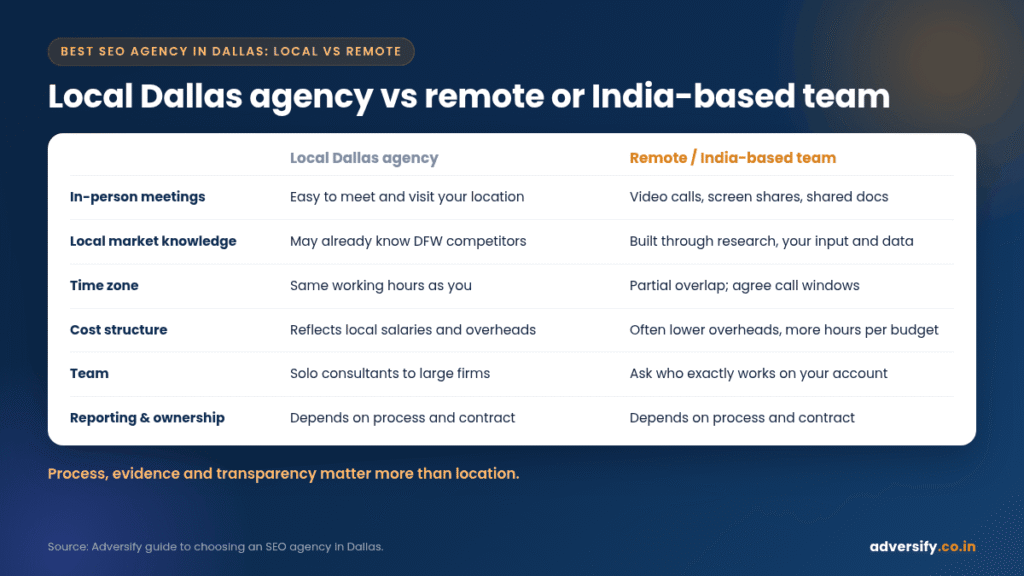
Search for the best SEO agency in Dallas and you will find dozens of “top 10” lists, award badges and agencies that all describe themselves as number one. The trouble is that no list can know your business, your competitors in Dallas-Fort Worth or your budget. The best agency for a roofing company in Plano is unlikely to be the best agency for a SaaS start-up in Uptown or a multi-location dental group across North Texas. This guide does not rank companies, and it does not claim any agency (including us) is the best. Instead, it gives Dallas and Texas business owners a practical way to choose the right partner: what local SEO in DFW involves, local vs remote teams, a weighted scorecard, questions to ask, red flags and pricing factors. Key takeaways The “best SEO agency in Dallas” is the one that fits your goals, market and budget, not the one at the top of a list. Judge agencies on process, evidence and transparency. For most Dallas businesses that serve local customers, local SEO (Google Business Profile, reviews, location pages and local relevance) matters as much as classic website SEO. A Dallas office is not a requirement. Remote and India-based teams can do excellent work if communication, time zone overlap and account ownership are agreed up front. Use a weighted scorecard so every agency on your shortlist is judged on the same criteria. Google says no one can guarantee a #1 ranking. Treat ranking guarantees as a reason to walk away. Always own your Google Business Profile, Search Console, analytics, domain and website. What “best SEO agency in Dallas” should actually mean “Best” usually means “an agency I can trust to bring in more customers without wasting my money”. No badge proves that; it shows up in how the agency works. A strong SEO partner for a Dallas business will usually: Ask about your services, margins, customers and service area before proposing anything. Follow Google Search Essentials and avoid tactics that Google’s spam policies warn against, such as link schemes and scaled low-value content. Explain what it will do in the first 90 days and why, in plain English. Set realistic expectations instead of promising positions or dates. Report on leads, calls and sales, not only rankings and traffic. Leave you in full control of your accounts and data. Google’s own guide on hiring an SEO recommends interviewing potential SEOs and suggests questions such as whether they can show examples of previous work, whether they follow Google Search Essentials, what results they expect and in what timeframe, what experience they have in your industry and your country or city, and how you can expect to communicate with them. The rest of this guide turns that advice into a process you can run. Know what you need before you shortlist agencies Before you contact anyone, write a one-page brief. It makes proposals easier to compare and quickly reveals which agencies are listening. Define your business goal “Rank higher” is not a goal. “Get more booked HVAC service calls in Dallas, Richardson and Garland” or “grow organic demo requests from Texas manufacturers” is. Write down the action that matters most (a call, a form, a booking, a purchase) and roughly what one new customer is worth to you. Map your service area Dallas-Fort Worth is a large, spread-out region. A business with one storefront in Deep Ellum has a different local SEO challenge from a plumber who drives to Frisco, Arlington and Irving, or a firm with offices in Dallas, Houston and Austin. List the cities and neighbourhoods you genuinely serve and whether customers come to you or you go to them. Decide what type of SEO you need Business type Main SEO focus What to look for in an agency Local service business (plumber, dentist, law firm, salon) Local SEO, Google Business Profile, reviews, service and location pages Clear local SEO process, GBP experience, honest review strategy Multi-location brand across Texas Location pages, one profile per location, consistent business details, internal linking Experience managing several profiles and scalable page templates Ecommerce store shipping across the US Technical SEO, category and product pages, structured data, site speed Technical depth and experience with your platform B2B or SaaS company Content strategy, topic research, conversion paths, thought leadership Strong writers or editors, understanding of long sales cycles Set a realistic budget range A range helps agencies propose the right scope. A good agency will tell you honestly what that budget can and cannot achieve. Local SEO for Dallas-Fort Worth: what a good agency will cover If you serve customers in a specific area, local results in Google Search and Maps are often where the leads are. Google explains that local results are mainly based on relevance, distance and prominence. Relevance is how well your profile matches the search, distance is how far you are from the searcher, and prominence is how well known your business is, which Google says is also based on information such as links to your business and reviews. An agency cannot change your distance from a searcher, so good local SEO focuses on relevance and prominence. Google Business Profile done properly Your Google Business Profile is usually the first thing a Dallas customer sees. A capable agency should check it against Google’s guidelines for representing your business. These say your name should reflect your real-world business name, that virtual offices are not eligible, and that service-area businesses should have one profile for the central office or location with a designated service area. Agencies that suggest stuffing “Best Dallas SEO” or other keywords into your business name, or creating profiles at addresses where you do not operate, are putting your listing at risk. Good GBP work typically includes choosing accurate primary and secondary categories, completing services and hours, adding real photos, setting your service areas correctly, posting updates and tracking calls, direction requests and website clicks in the profile’s performance report. Reviews and reputation Reviews influence both prominence and
How to Evaluate a Professional SEO Company in India: Scorecard, Audit Test and Red Flags
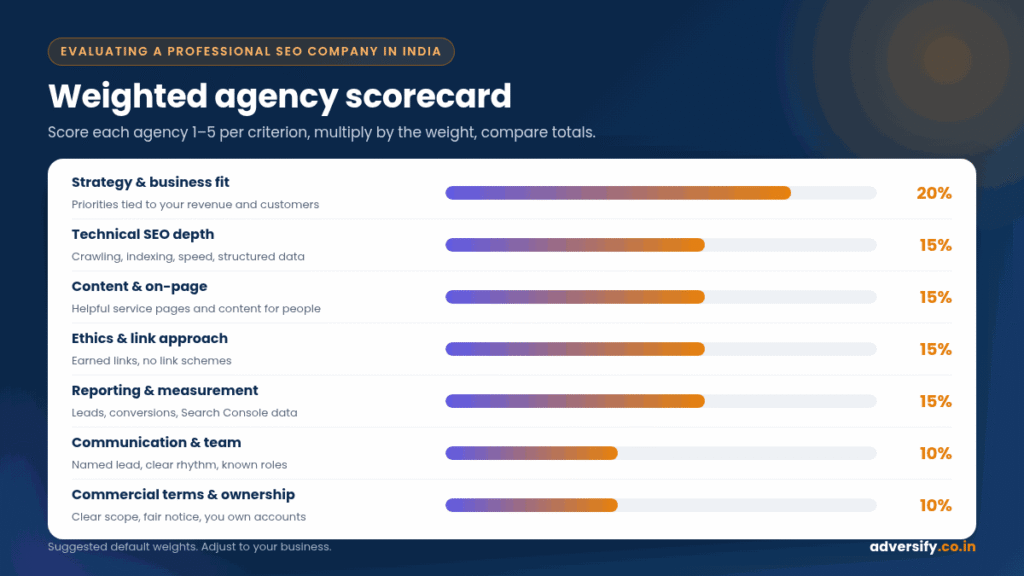
India has a huge SEO market. Thousands of agencies, freelancers and “growth hackers” offer search engine optimisation, and almost all of them say they are a professional SEO company in India. Proposals arrive full of the same words: white-hat, ROI-driven, data-led, guaranteed growth. So how do you separate genuinely professional teams from the rest before you commit a year of budget? This guide gives you an evaluation framework you can actually use. Instead of another list of agency names, you will get a weighted scorecard, a due-diligence checklist, a way to test an agency with a paid audit, the proposal sections to scrutinise, and the reporting standard you should expect once work begins. It works whether you are a startup, an SME or an established brand, and whether you are shortlisting two agencies or ten. Key takeaways Professional SEO is defined by process and transparency, not promises. Judge agencies on how they work, not on what they claim. Use a weighted scorecard covering strategy, technical depth, content, ethics, reporting, communication and commercial terms, so every shortlisted agency is judged the same way. Google’s own advice is to interview SEOs, check references and ask for examples of previous work. Do all three. A small paid audit or discovery phase is the best test of an agency’s thinking before a long retainer. No one can guarantee a #1 ranking on Google, according to Google itself. Treat guarantees as a reason to walk away. Make sure you own your Google Search Console, analytics, website and content from day one. What “professional” really means in SEO SEO has no licence or mandatory certification in India, so anyone can call themselves an SEO company. Professionalism therefore shows up in behaviour. A professional SEO company: Starts with your business goals and customers, not with a fixed package. Follows Google Search Essentials, the published rules for what makes content eligible to appear in Google Search (Google Search Central). Explains every change it makes and why. Gives realistic timeframes. Google’s SEO Starter Guide notes that some changes can take effect in a few hours while others could take several months (Google Search Central). Reports on business outcomes such as enquiries and sales, not only on rankings. Leaves you in control of your accounts and assets. Google’s page on hiring an SEO describes what a good SEO can help with: reviewing your site’s content or structure, technical advice on development, content development, managing campaigns, keyword research, SEO training and expertise in specific markets and geographies. It also warns that an irresponsible SEO can damage your site and reputation (Google Search Central). The framework below is designed to tell the two apart. The weighted scorecard for evaluating SEO companies Score each shortlisted agency from 1 to 5 on every criterion, multiply by the weight, and add up the totals. The weights below are a sensible default; adjust them to your situation. An e-commerce site may weight technical SEO higher, while a local clinic may weight local SEO and content higher. A suggested weighting for comparing SEO agencies. Score each criterion from 1 to 5 and multiply by the weight. Criterion Suggested weight What a score of 5 looks like What a score of 1 looks like Strategy and business fit 20% Asks about margins, best services, customers and cities; proposes priorities tied to revenue Sends a standard package before asking anything Technical SEO depth 15% Can explain crawling, indexing, site speed, structured data and migrations in plain language Only talks about “keywords and backlinks” Content and on-page 15% Has a plan for service pages and helpful content written for people Promises a fixed number of short articles per month Ethics and link approach 15% Earns mentions and links through content, PR and relationships; avoids link schemes Sells bulk backlinks, PBNs or “DA 50+ links” packages Reporting and measurement 15% Reports leads, conversions, organic traffic and Search Console data with commentary Sends a ranking screenshot with no context Communication and team 10% Named account lead, clear meeting rhythm, you know who does the work Changing contacts, slow replies, vague roles Commercial terms and ownership 10% Clear scope, fair notice period, you own every account and asset Long lock-ins, agency-owned accounts, hidden extras A scorecard does two things. It stops a charming sales call from outweighing a weak proposal, and it gives you a written reason for your decision that you can share with partners or management. Step 1: Shortlist with simple public checks Before booking calls, spend fifteen minutes on each candidate: Look at their own website. Is it fast, clear and well structured? An SEO company with a slow, thin site has a credibility problem. Read their blog. Is it original and useful, or generic filler? Their content shows how they will write for you. Check case studies. Do they name clients, timeframes and specific outcomes, or only show unlabelled graphs? Check reviews. Look at reviews on their Google Business Profile and other platforms, and read the detailed ones, not just the stars. Look at the people. Can you see who leads strategy and how long the team has worked in SEO? Keep three to five agencies for the next step. More than that and comparison becomes noise. Step 2: Run a structured discovery call Google suggests a set of questions to ask a potential SEO, including asking for examples of previous work and success stories, whether they follow the Google Search Essentials, what results they expect and in what timeframe, how long they have been in business, and how they will communicate with you and share the changes they make (Google Search Central). Build on that with questions that reveal how an agency thinks: Question Strong answer Weak answer What would you look at first on our site? Specific: indexing, key service pages, intent match, local signals, speed “We will do a full audit” with no detail Which of our services would you prioritise, and why? Links priorities to demand, competition and your margins “All of them, equally”
SEO Services for Small Business: What to Include, What to Prioritise and a 90-Day Plan
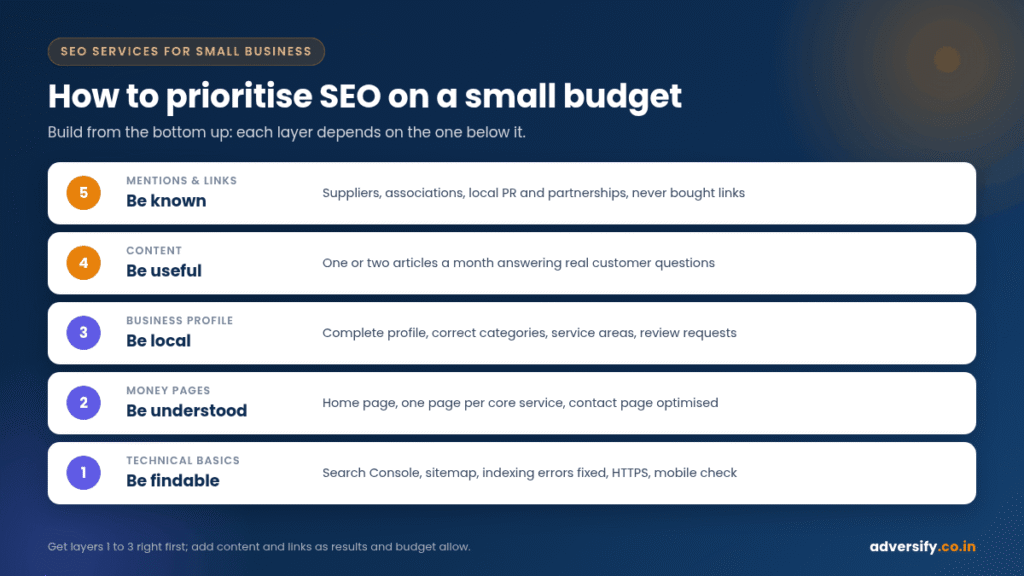
For a small business, SEO can feel like a black box. One agency quotes a monthly retainer with a long list of deliverables, a freelancer offers “complete SEO” for a fraction of that, and a friend tells you to just post on Instagram. Meanwhile, you still don’t know what SEO services for small business are supposed to include, which parts matter most when the budget is limited, or how to tell whether any of it is working. This guide answers those questions. It breaks small business SEO into its core services, shows how to prioritise them on a small budget, lays out a practical 90-day plan, compares doing it yourself with hiring a small business SEO agency, and explains what to measure each month. It is written for owners of shops, clinics, consultancies, service businesses and small ecommerce stores in India, although most of it applies anywhere. Key takeaways SEO services for a small business should cover five areas: technical foundations, on-page optimisation, useful content, local visibility and measurement. Link building comes later and should be earned, not bought. On a small budget, fix what stops Google from finding and understanding your site first, then improve the few pages that bring enquiries, then add content. A 90-day plan should end with a healthy site, optimised money pages, a working Business Profile, a handful of useful articles and a clear baseline to measure against. Google says small local businesses can probably do much of the work themselves. An agency earns its fee when it saves time, fixes what you can’t and works consistently every month. Measure SEO by enquiries, calls and sales first, then by clicks and impressions in Search Console. Rankings are a signal, not the goal. Prioritise from the bottom up: technical basics, money pages and your Business Profile come before content and links. What SEO actually means for a small business Search engine optimisation is the work of helping search engines find, understand and show your website to people searching for what you offer. For a small business, it is less about competing with national brands and more about being the obvious, trustworthy choice for a specific set of searches: your services, in your area, for your kind of customer. Google’s own SEO Starter Guide is a good place to start, and it is refreshingly practical. It also sets realistic expectations: Google says changes you make can take anywhere from a few hours to several months to be reflected, and that you will likely want to wait a few weeks to assess whether your work had a beneficial effect. That patience is part of the job. One more point that surprises many owners: Google states that it never accepts money to include or rank sites in its organic results, and that advertising with Google has no effect on them (Google Search Central: Do you need an SEO?). SEO is earned visibility. You pay for the work, not for the position. The core SEO services a small business needs Whether you do the work yourself or hire someone, these are the building blocks. A good proposal from a small business SEO agency should explain which of them it covers and in what depth. Service What it covers Why it matters for a small business Technical foundations Indexing, sitemap, HTTPS, mobile layout, page speed, broken pages and redirects If Google can’t crawl or index a page, nothing else you do on it counts Keyword and page mapping Finding the searches customers use and matching each one to a single page Stops your own pages competing with each other and shows where pages are missing On-page optimisation Titles, meta descriptions, headings, copy, images and internal links Helps Google and customers understand each page at a glance Content Service pages and articles that answer real customer questions Gives you more ways to be found and builds trust before the first call Local SEO Google Business Profile, consistent business details, reviews, location pages Most small businesses win or lose on local and “near me” searches Links and mentions Genuine references from suppliers, associations, local media and partners Builds prominence over time; bought links create risk Measurement and reporting Search Console, analytics, call and form tracking, monthly review Shows what is working so the budget goes where it pays Technical foundations Technical SEO for a small site is rarely complicated, but it has to be right. Check that your important pages are indexed, that there is an XML sitemap submitted in Search Console, that the site loads over HTTPS and works well on a phone. Google’s Core Web Vitals give clear targets for page experience: Largest Contentful Paint within 2.5 seconds, Interaction to Next Paint under 200 milliseconds and Cumulative Layout Shift under 0.1 (Google Search Central: Core Web Vitals). Many small WordPress sites miss these because of heavy themes, oversized images or too many plugins. On-page optimisation Each important page should have a clear, specific title, a helpful meta description, one main heading and copy that says plainly what you offer, where and for whom. Link related pages together so visitors and Google can move between your services, location pages and articles. Content Small businesses have an advantage here: you answer customer questions every day. Turn the most common ones into pages and articles. Google’s guidance on helpful content asks whether your content shows first-hand expertise and whether someone reading it will leave feeling they learned enough to achieve their goal (Google Search Central: Creating helpful, reliable, people-first content). A plumber explaining what causes low water pressure, in plain language, meets that bar better than a generic 2,000-word article. Local SEO If you serve customers in a particular area, your Google Business Profile is often your most important search asset. We covered how to prioritise local work on a tight budget in detail in our guide to affordable local SEO services, so we won’t repeat it here. In short: complete and verify your profile, keep your details consistent and build a steady
Hiring an SEO Company in New Delhi: Services, Questions, Red Flags and Pricing Factors
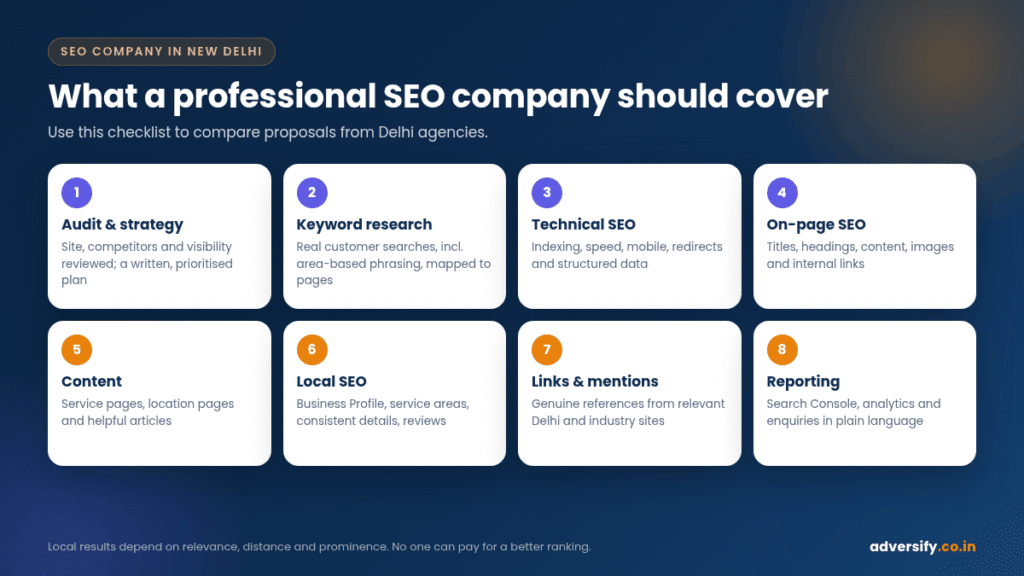
New Delhi has no shortage of SEO agencies. Search for an SEO company in New Delhi and you will find hundreds of firms, freelancers and “digital marketing experts”, many promising page one in a few weeks. For a business owner in Karol Bagh, Saket, Dwarka or Connaught Place, the hard part isn’t finding an agency. It is telling the good ones apart from the ones that will waste a year of budget, or worse, put your website at risk. This guide is written for that decision. It explains what a professional SEO company should actually do for you, how local SEO works across Delhi’s many neighbourhoods, the questions worth asking in a first meeting, the red flags to walk away from, and the factors that drive what you pay. We have also included how we work at Adversify, so you have a concrete example to compare other proposals against. Key takeaways Google’s own advice is that hiring an SEO can improve your visibility and save you time, but an irresponsible SEO can damage your site and reputation. Choose carefully. A good SEO company in New Delhi should cover technical health, on-page work, content, local SEO and honest reporting, and explain every change it makes. Local results depend on relevance, distance and prominence. In a city as spread out as Delhi, distance matters, so your Business Profile, service areas and location pages need to reflect where you really serve. No one can guarantee a number one ranking on Google. Guarantees, “special relationships” with Google and bulk backlink packages are reasons to walk away. You should own your website, Google Business Profile, Search Console and analytics. Give the agency access; never let it hold your accounts. Eight areas a professional SEO company should cover. Use it to compare proposals from Delhi agencies. Do you need an SEO company at all? Not always. Google itself says that if you run a small local business, you can probably do much of the work yourself, starting with its SEO Starter Guide (Google Search Central: Do you need an SEO?). A single-location shop with a simple website can get a long way with a complete Google Business Profile, accurate details and genuine reviews. Hiring makes more sense when one or more of these is true: You are planning a new website or a redesign. Google specifically mentions this as a great time to hire, because the site can be built to be search-friendly from the start. You compete in a crowded Delhi category such as legal services, healthcare, real estate, education or home services, where many businesses are already investing in SEO. Your website has technical problems you can’t diagnose: pages not indexed, slow loading, duplicate content or a messy structure. You serve several parts of Delhi NCR, or customers across India, and need a content and location strategy, not just a profile. Also know what an SEO company cannot do. Google states that it never accepts money to include or rank sites in organic results, and that advertising with Google has no effect on them. An agency can improve your site; it cannot buy you a position. What services to expect from an SEO company in New Delhi Google lists the kind of useful services that SEOs provide, including reviewing site content or structure, technical advice on hosting, redirects, error pages and JavaScript, content development, keyword research, SEO training, expertise in specific markets and geographies, and optimising for generative AI. A complete service for a Delhi business usually looks like this. Service area What it involves What you should receive Audit and strategy Review of your site, competitors in your Delhi category and current search visibility A prioritised list of issues and a written plan, not a 90-page tool export Keyword research Finding the searches your customers use, including area-based and Hinglish phrasing where relevant A keyword map that assigns each target to one page Technical SEO Crawling and indexing, site speed, mobile layout, redirects, structured data A fix list with owners and dates, and confirmation when items are done On-page SEO Titles, headings, content, images and internal links on your key pages A record of every page changed and why Content Service pages, location pages and articles that answer real customer questions An agreed content calendar with topics approved by you Local SEO Google Business Profile, service areas, consistent business details, reviews Profile updates, review process and local visibility tracking Links and mentions Earning genuine references from relevant Delhi and industry websites A list of links earned, with the sites named Reporting Search Console, analytics and enquiry data, explained in plain language A monthly report that connects work done to leads, not just rankings Not every business needs every line at the same intensity, but the proposal should say which it covers and in what depth. Our own SEO services follow this structure, scaled across Bronze, Silver, Gold and Platinum plans. Local SEO for Delhi areas: why “New Delhi” is not one market Delhi is large and spread out. A customer in Rohini searching for “physiotherapist near me” is unlikely to travel to Saket, and a customer in Lajpat Nagar may never see a business in Pitampura in the map results. That is because Google says local results are mainly based on three factors (Google Business Profile Help: Tips to improve your local ranking): Relevance: how well your Business Profile matches what someone is searching for. Distance: how far your business is from the person searching. Prominence: how well-known your business is, which Google says is also based on information such as how many websites link to your business and how many reviews you have. The same page states that there is no way to request or pay for a better local ranking. So a good SEO company in New Delhi will work on what you can influence, and be honest about distance. Storefront business or service-area business? If customers visit you, for example a restaurant in Hauz Khas Village or a clinic
GEO vs SEO: What Changes, What Stays the Same and What to Ignore
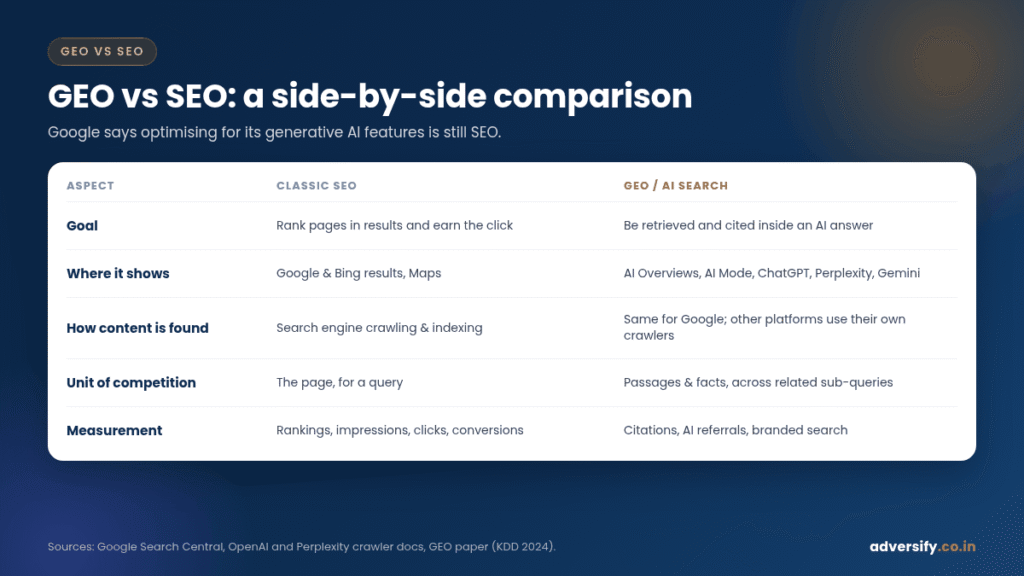
Every few years search marketing gets a new acronym. Right now it is GEO, short for generative engine optimisation: the work of getting your business mentioned and cited in AI-generated answers from tools such as Google’s AI Overviews and AI Mode, ChatGPT search, Perplexity and Gemini. Some agencies now sell GEO as a replacement for SEO. Others say it is just SEO with a new label. The truth sits between those two positions, and it matters for how you spend your marketing budget. This article compares GEO vs SEO honestly: where the term came from, what Google and other platforms actually say, what genuinely changes when answers are generated by AI, what stays exactly the same, and how a business in India should adjust its plan without chasing hacks. Key takeaways GEO was formalised in a 2023 research paper (published at KDD 2024) as a way to improve how visible a source is inside AI-generated answers. Google says its generative AI features are rooted in its core Search ranking and quality systems, and that from its perspective optimising for generative AI search is still SEO. What stays the same: crawlable, indexable pages, helpful original content, clear structure, a good page experience and a trustworthy brand. What changes: you’re optimising to be cited inside an answer rather than only to rank in a list, other AI platforms use their own crawlers, and measurement is less straightforward. Ignore shortcuts. Google says you don’t need llms.txt files, special markup or “chunked” content for its AI features, and that seeking inauthentic mentions isn’t as helpful as it might seem. Classic SEO and GEO compared on goal, surfaces, discovery, competition and measurement. What is GEO? The term “Generative Engine Optimization” was introduced in a research paper by Pranjal Aggarwal (IIT Delhi) and colleagues from Princeton and elsewhere, first posted in November 2023 and published at the ACM SIGKDD conference in 2024 (arXiv: GEO: Generative Engine Optimization). The authors describe “generative engines” as systems that retrieve sources and use large language models to write an answer with inline citations, and GEO as a framework to help content creators improve their visibility in those answers. A few findings from that paper are often quoted, so it is worth being precise about them: The authors report that methods such as citing sources, adding quotations from relevant sources and adding statistics improved source visibility by up to around 40% in their experiments. Keyword stuffing, a classic poor SEO tactic, performed poorly in their tests. The benefit varied by subject area, so no single tactic worked everywhere. The experiments were run on a benchmark set of queries using a test generative engine and Perplexity, not on Google’s AI Overviews. In practice, “GEO” is now used much more broadly to mean any work aimed at visibility in AI answers. You will also see AEO (answer engine optimisation), AI SEO and LLM optimisation used for overlapping ideas. What is SEO, in the same terms? Search engine optimisation is the work of helping search engines crawl, understand and rank your pages, and helping people choose your result. It includes technical health, content, on-page structure, internal links, earning mentions and links from other sites and, for local businesses, Google Business Profile work. Our SEO services page explains how we approach it. What Google says about GEO Google has addressed this directly. In its guide to optimising for generative AI features, Google says the best practices for SEO continue to be relevant because its generative AI features are rooted in its core Search ranking and quality systems. It adds that from Google Search’s perspective, optimising for generative AI search is optimising for the search experience, and thus still SEO (Google Search Central: Optimizing your website for generative AI features). Google’s AI features documentation makes a similar point: there are no additional requirements to appear in AI Overviews or AI Mode, and to be eligible as a supporting link a page must be indexed and eligible to be shown in Google Search with a snippet (Google Search Central: AI features and your website). Google also explains two techniques behind these features: retrieval-augmented generation, where its systems retrieve relevant pages from the Search index to ground the answer, and query fan-out, where the model issues several related searches to gather more results. Both start from the same index that classic SEO has always targeted. That is Google’s view of Google. ChatGPT, Perplexity and other assistants work differently in their details, which is where some genuine differences come in. GEO vs SEO: side-by-side comparison Aspect Classic SEO GEO / AI search visibility Goal Rank pages in a list of results and earn the click Be retrieved, cited or recommended inside an AI-generated answer Where it shows Google and Bing results, Maps, image and video results AI Overviews, AI Mode, ChatGPT search, Perplexity, Gemini, Copilot How content is found Crawling and indexing by search engine bots Same for Google; other platforms use their own crawlers and search indexes Unit of competition The page, for a query Passages and facts within pages, across many related sub-queries What helps Helpful content, technical health, relevance, links, page experience All of that, plus clear answers, verifiable facts and consistent brand information Measurement Rankings, impressions, clicks, conversions Citations and mentions, AI referral traffic, branded search, Search Console data for Google features Maturity Decades of documentation and tools Fast-changing; fewer reliable tools What doesn’t change 1. If you can’t be crawled and indexed, you can’t be cited Google lists ensuring crawling is allowed in robots.txt and by any CDN or hosting infrastructure as an SEO fundamental that still applies to AI features. In its May 2025 post on succeeding in AI search, Google repeats that pages need to meet the technical requirements, which includes Googlebot not being blocked, pages returning HTTP 200 and having indexable content (Google Search Central Blog: Top ways to ensure your content performs well in Google’s AI experiences). 2. Helpful, original content still wins Google says that creating unique, non-commodity
Website Migration SEO Checklist: A Step-by-Step Guide to Moving Without Losing Traffic
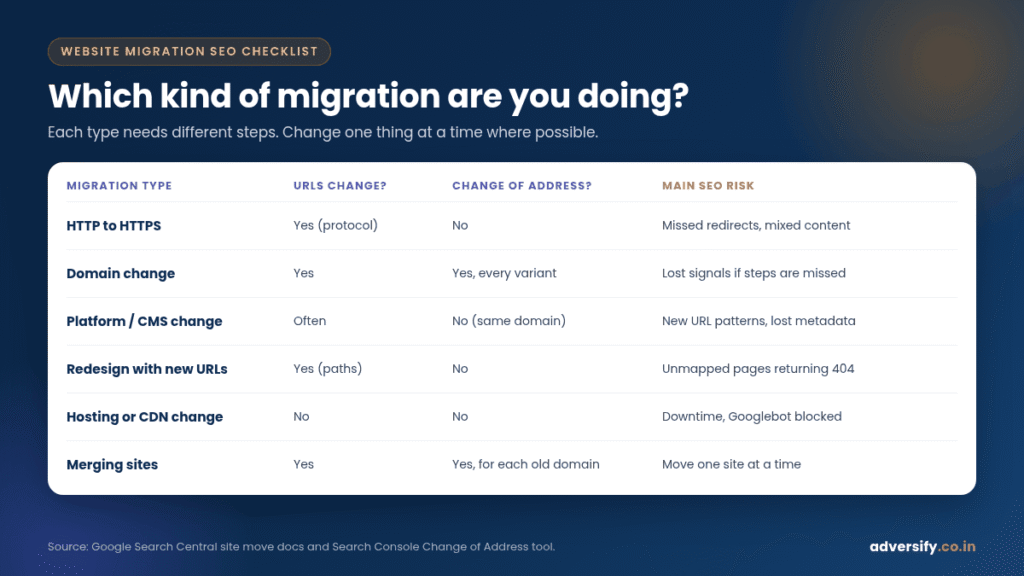
A website migration is one of the riskiest things you can do to your organic traffic, and one of the most common. Businesses move from HTTP to HTTPS, change their domain after a rebrand, switch from a custom CMS or Wix to WordPress, change hosting, or redesign the site and change URLs along the way. Done well, Google follows you to the new address and rankings settle. Done carelessly, months of traffic and enquiries can disappear while everyone wonders why. This website migration SEO checklist walks through every stage: deciding what kind of migration you are doing, preparing the new site, building a redirect map, launching, using the Search Console Change of Address tool when it applies, and monitoring the move afterwards. It is based on Google’s own site move documentation, plus the practical checks we run on client migrations. Key takeaways Work out which type of migration you are doing first. HTTPS, domain, platform, hosting and redesign moves need different steps. Google recommends server-side permanent redirects (301 or 308) from each old URL to its new equivalent, redirecting directly to the final URL rather than through chains. Don’t redirect many old URLs to the home page. Google says this can confuse users and may be treated as a soft 404. Use the Change of Address tool in Search Console only for domain or subdomain moves, not for HTTP to HTTPS or path changes. Keep redirects for as long as possible, generally at least one year, and expect rankings to fluctuate for a while. Google says a medium-sized site can take a few weeks or more to settle. Six common migration types, whether URLs change, when the Change of Address tool applies and the main SEO risk. What counts as a website migration? “Migration” is used loosely, but from an SEO point of view it means any change that affects how search engines find, crawl or index your pages. Google’s documentation separates moves that change URLs from moves that don’t (Google Search Central: How to move a site). Migration type Example URLs change? Change of Address tool? Main SEO risk HTTP to HTTPS http://example.in to https://example.in Yes (protocol) No Mixed content, missed redirects, old canonicals Domain change oldbrand.in to newbrand.com Yes Yes Lost signals if redirects or Search Console steps are missed Platform / CMS change Custom PHP or Wix to WordPress Often No (same domain) New URL patterns, lost content and metadata Redesign with URL changes /services.php?id=4 to /seo-services/ Yes (paths) No Unmapped pages returning 404 Hosting or CDN change New server, same URLs No No Downtime, firewall blocking Googlebot, slow server Merging sites Two brand sites into one Yes Yes, for each old domain Consolidation confusion; move one site at a time Google’s advice is to change one thing at a time where possible. If you want a new domain, a new CMS and a new design, Google suggests doing them one after the other rather than all at once. That makes it much easier to find the cause if traffic drops. If a redesign is part of your plans, our guide to website redesign services in India covers how to keep a redesign SEO-safe. Phase 1: Plan the migration Step 1: Define the scope and set a date Write down exactly what is changing: domain, protocol, CMS, URL structure, design, hosting, or a combination. Pick a launch date during a quieter period for your business if you can. Google suggests timing moves to coincide with lower traffic, so fewer people are affected by any issues and more server resources are available for Googlebot. Step 2: Record a baseline Before anything changes, export and save: Search Console performance data (queries and pages) for the last 16 months Google Analytics landing page traffic and conversions The list of indexed pages and any errors in the Page indexing report Rankings for your most important keywords Your top pages by backlinks, from the Links report in Search Console Without a baseline, you can’t tell after launch whether a change is normal fluctuation or a real problem. Step 3: Build a complete URL inventory Google suggests starting with your important URLs: those in your sitemaps, pages with the most traffic in your server logs or analytics, and pages with internal and external links in Search Console. Then add everything else your CMS knows about. Don’t forget images, PDFs, videos, CSS and JavaScript files, because Google notes that embedded content needs to move in the same way as pages. A crawler such as Screaming Frog, which Google mentions in its own migration resources, makes this much faster for anything beyond a small site. Step 4: Verify everything in Search Console Verify both the old and new sites, including all variants: www and non-www, HTTP and HTTPS. Make sure your verification method will survive the move. If you verify with an HTML file or a meta tag in your theme, it must be present on the new site too. Phase 2: Prepare the new site Step 5: Build and test on staging Build the new site on a staging copy and test every page, form and download. Many teams block crawling or add noindex during development. Google says that is fine, but you must plan exactly what robots.txt should look like at launch and keep a list of the URLs where you’ll remove noindex. A forgotten noindex is one of the most common and damaging migration mistakes. Step 6: Carry over the SEO elements Title tags and meta descriptions for every important page Headings and body content, especially on pages that rank today Image alt text Structured data, updated to the new URLs Internal links, updated to point directly at new URLs hreflang annotations, if you run multilingual pages Google also says each new URL should have a self-referencing rel=”canonical” tag. Our guide to internal linking for WordPress explains how to rebuild link structure on a new WordPress site. Step 7: Handle deleted and merged content properly If some old pages are not
Affordable Local SEO Services: What a Small Budget Should Actually Buy
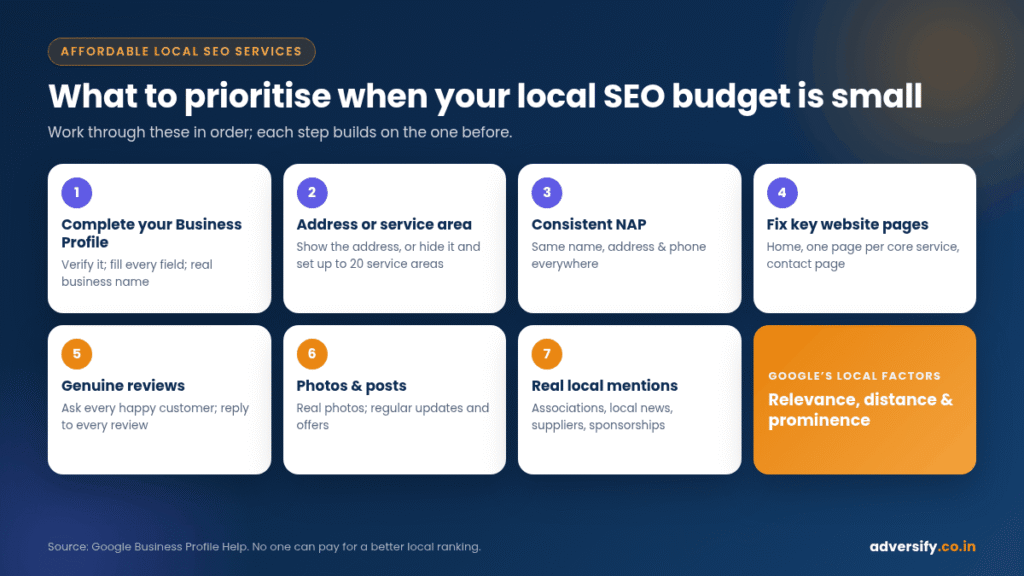
Most small businesses don’t need a ₹1 lakh-a-month SEO campaign. A clinic in Noida, a bakery in Lajpat Nagar, a CA firm in Gurugram or an AC repair service in Ghaziabad mainly needs one thing: to show up when people nearby search for what they offer. That is what local SEO does, and it is why so many owners search for affordable local SEO services. The catch is that “affordable” can mean good value or it can mean a ₹2,999 package that adds your business to hundreds of junk directories and calls it SEO. This guide explains what affordable local SEO can realistically cover for small businesses in India and Delhi NCR, what to prioritise when the budget is tight, the red flags of offers that are too cheap to be real, and when doing it yourself makes more sense than hiring an agency. Key takeaways Google says local results are mainly based on relevance, distance and prominence. A small budget should focus on the parts you can influence: relevance and prominence. The highest-value low-cost work is a complete, accurate Google Business Profile, consistent business details across the web, a clear service page for each core service and a steady flow of genuine reviews. Affordable should mean a narrow, honest scope, not fake reviews, bulk directory links or “guaranteed number one” promises. Google states that there is no way to request or pay for a better local ranking, so be wary of anyone who claims otherwise. Many owners can handle the basics themselves. An agency earns its fee when you need technical fixes, content, location pages and consistent monthly effort. Seven priorities for a small local SEO budget, in order. Google’s local factors are relevance, distance and prominence. What does local SEO actually do? When someone searches “dentist near me” or “CA in Sector 62 Noida”, Google usually shows a map with a handful of businesses, followed by regular results. Local SEO is the work of improving how often your business appears in both, and how convincing it looks when it does. Google explains that local results are mainly based on three factors (Google Business Profile Help: Tips to improve your local ranking): Relevance: how well your Business Profile matches what someone is searching for. Distance: how far your business is from the person searching. If they don’t share their location, Google uses what it knows about where they are. Prominence: how well-known your business is, which Google says is also based on information such as links to your business and the number of reviews you have. You can’t move your shop closer to every customer, so distance is largely fixed. Relevance and prominence are where a small budget makes a difference. The same Google page is clear on one more point: there is no way to request or pay for a better local ranking. What affordable local SEO services should realistically cover An affordable plan has to be focused. Here is what a sensible small-business scope usually looks like, and what is normally left for bigger budgets. Usually included in a small-budget plan Usually needs a bigger budget Google Business Profile set-up or clean-up, categories, services, photos and regular posts Multiple locations, each with its own profile and page Consistent name, address and phone (NAP) across your site and key listings Large citation campaigns across many directories On-page fixes to the home page and main service pages Full website rebuild or redesign A small set of local keywords tracked, for example 10 to 20 Hundreds of keywords across many cities A review request process and help replying to reviews Regular in-depth content and digital PR Basic technical checks: indexing, speed, mobile layout Complex technical SEO or migrations A simple monthly report Custom dashboards and call tracking integrations As a reference point, our own local SEO plans start with a single-location Bronze plan that includes Google Business Profile optimisation with 4 posts a month, 15 tracked local keywords, 20 local citations and one location page, on a month-to-month basis. Higher tiers add locations, keywords and citations. We share that scope not as a sales pitch but so you have a concrete example to compare other proposals against. For overall pricing context, our guide to SEO cost in India explains what drives monthly fees. What to prioritise on a small budget: step by step If you can only afford a few hours of work a month, do it in this order. Each step builds on the one before. Step 1: Claim, verify and complete your Google Business Profile Google says verified businesses are more likely to show up in search results, and that businesses with complete and accurate information are more likely to show up in local results. Fill in every relevant field: exact business name, address (or service area), phone, website, hours, holiday hours, primary and secondary categories, services and attributes. Follow the rules carefully. Google’s guidelines say your business name should match your real-world name as used on your signage, website and stationery, without extra keywords or locations (Google Business Profile Help: Guidelines for representing your business). Adding “Best Dentist Noida” to your name is a common cause of suspension, which we cover in our guide on what to do if your Google Business Profile is suspended. Step 2: Set your address or service area correctly If customers visit you, show your address. If you visit them, such as a plumber, pest control service or home tutor, Google says you should remove your address and set a service area instead. You can add up to 20 service areas by city, postal code or area, and Google advises that the overall area shouldn’t extend more than about two hours of driving time from where your business is based (Google Business Profile Help: Manage your service areas). Listing every city in Delhi NCR “just in case” does not help. Step 3: Make your business details consistent everywhere Your name, address and phone number should be the same on your website,
Internal Linking for WordPress: A Practical Guide to Structure, Anchors and Audits
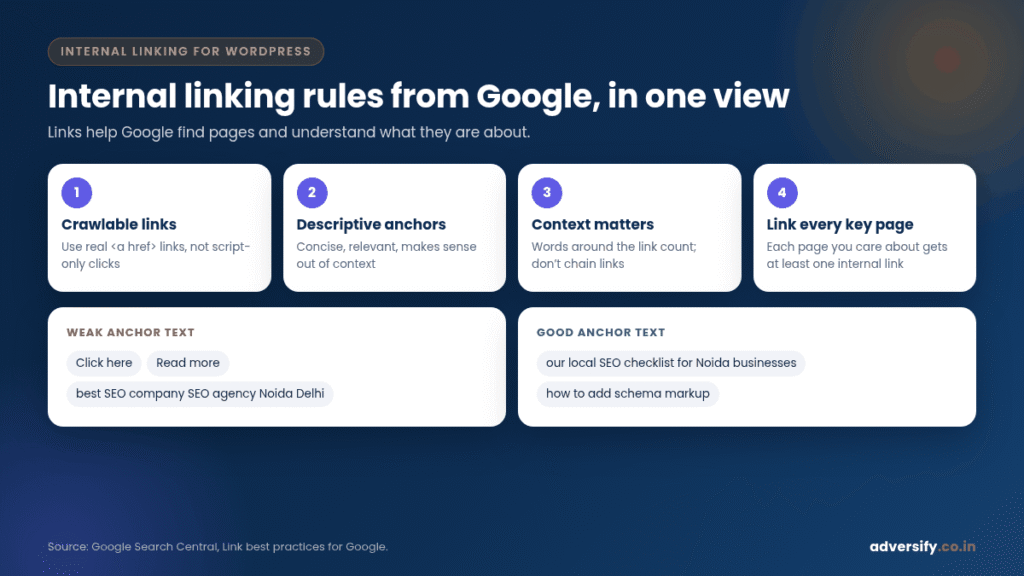
Most WordPress sites we audit have the same quiet problem. The owner has published dozens of useful posts and service pages, but they barely link to each other. New posts sit on their own, older guides are buried ten pages deep in the blog archive, and the service pages that actually make money get almost no links from the content that attracts visitors. Fixing that is one of the cheapest SEO improvements available, because it uses pages you already have. This guide explains how internal linking for WordPress works, what Google officially says about links and anchor text, how to plan a simple structure, how to add and audit links in the block editor, and the mistakes to avoid. Key takeaways Google uses links to find pages and to understand how relevant they are. It says every page you care about should have a link from at least one other page on your site. Google can reliably crawl only standard <a href> links. Links that depend on JavaScript click events, without an href, may not be followed. Write descriptive, concise anchor text. Google says “click here” and “read more” are too generic, and stuffing keywords into anchors is a spam risk. Plan links around topic clusters: a main service page or guide, supported by related posts that link to it and to each other. There is no ideal number of links per page. Google’s own advice is that if it feels like too many, it probably is. Audit regularly: find orphan pages, fix broken links and redirected links, and make sure your money pages receive links from your most visited posts. Google’s link best practices in one view, with weak and good anchor text examples. What internal links are and why they matter An internal link is any link from one page on your site to another page on the same site. Your menu, footer, breadcrumbs, category pages and links inside your post content all count. External links, by contrast, point to other websites. Google explains that it uses links as a signal when determining the relevancy of pages and to find new pages to crawl (Google Search Central: Link best practices for Google). Internal links therefore do three jobs: Discovery. They help Google find new and updated pages. Google says that if your pages are properly linked, it can usually discover most of your site, and that a sitemap helps discovery but doesn’t guarantee every listed URL will be crawled and indexed (Google: Learn about sitemaps). Context. The anchor text and the words around it tell people and Google what the linked page is about. Navigation. They move readers from an informational post to a related guide or the service they need, which is where enquiries come from. Google’s guidance on AI features in Search also lists making content easily findable through internal links among the SEO fundamentals that still matter (AI features and your website). What Google says about links: the rules that matter Use crawlable links Google says it can generally only crawl a link if it’s an <a> HTML element with an href attribute. Links without an href, or “links” that only work through script events, can’t be extracted reliably. In WordPress this is rarely an issue for normal text links, but watch out for page-builder buttons, sliders, tabs and mega menus that use JavaScript instead of real links. Check them with the URL Inspection tool in Search Console (URL Inspection tool). Write good anchor text Google describes good anchor text as descriptive, reasonably concise and relevant to both the page it’s on and the page it links to. It gives “Click here to learn more” and “Read more” as examples of anchors that are too generic, and suggests reading the anchor text out of context to see if it still makes sense. Give links context, and don’t stuff keywords Google says the words before and after a link matter, and advises against chaining several links next to each other. It also warns against cramming every related keyword into anchor text, reminding site owners that keyword stuffing violates its spam policies. Link every page you care about Google’s internal linking advice is to think about which other pages on your site could help readers understand a page, and link to them in context. It says every page you care about should have a link from at least one other page on your site, and that there’s no magical ideal number of links per page. Use image alt text when images are links For images used as links, Google uses the image’s alt attribute as anchor text. If you link a banner or button image, give it descriptive alt text. Anchor text Verdict Why “Click here” Weak Says nothing about the destination “Read more” Weak Generic; Google uses it as an example of bad anchor text “our local SEO checklist for Noida businesses” Good Descriptive and concise; makes sense on its own “best SEO company SEO services SEO agency Noida Delhi” Bad Keyword stuffing; reads unnaturally “how to add schema markup” Good Tells the reader exactly what they’ll learn Plan your structure before adding links Random links help a little. Planned links help a lot. The simplest model for most business sites is the topic cluster. Pillar pages and cluster posts Pillar page: your main page on a topic, usually a service page (for example, Local SEO Services) or a long, comprehensive guide. Cluster posts: blog posts that answer specific questions within that topic (for example, a local SEO checklist, how to handle negative reviews, how to fix a suspended Business Profile, how to add LocalBusiness schema). Links: every cluster post links to the pillar with descriptive anchor text; the pillar links out to the most useful cluster posts; related cluster posts link to each other where it genuinely helps the reader. Yoast calls these main articles “cornerstone content” and recommends linking to them from other articles on the same topic (Yoast: Internal linking suggestions). An
Google Business Profile Suspended? How to Fix It and Appeal the Right Way
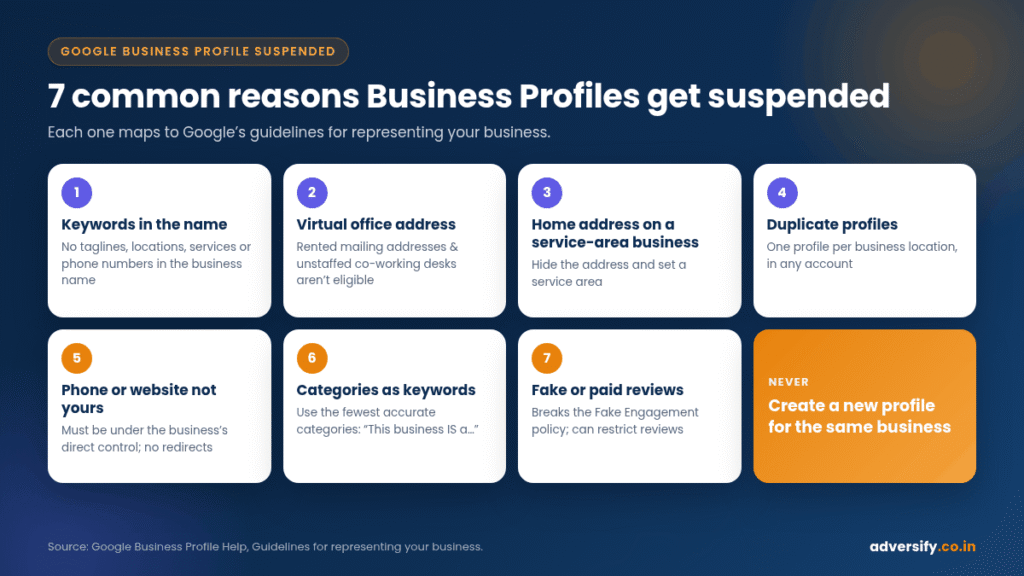
Few things worry a local business owner more than opening Google Maps and finding their listing gone, or logging in to see a “suspended” warning. Calls drop, directions requests stop and reviews you spent years collecting are suddenly out of sight. The good news is that many suspensions can be fixed, as long as you find the real cause and appeal properly the first time. This guide explains why a Google Business Profile is suspended, how to work out which rule was broken, how to fix it, and exactly how to submit an appeal using Google’s official process. Everything here is based on Google’s own Business Profile help pages, linked throughout, so you can check the rules for yourself. Key takeaways Google says it may suspend or disable Business Profiles that don’t follow its guidelines, and that you can appeal if you believe the profile should be reinstated. Do not create a new profile for the same business. Google states this explicitly on its appeal pages. Fix the cause before appealing. Common problems include keywords in the business name, virtual offices, a visible home address for a service-area business, duplicate profiles and phone numbers or links that don’t belong to the business. Appeals can only be submitted once, so attach strong evidence: business registration, licence, tax certificates or utility bills that show the same name and address as the profile. Google says appeal reviews can take up to 5 business days. If it’s denied, you may be able to request an additional review with new evidence. Seven common suspension causes, each tied to Google’s guidelines for representing your business. What a suspended Google Business Profile means Google’s help centre says it may suspend or disable Business Profiles that don’t follow its guidelines (Google Business Profile Help: Fix suspended or disabled profiles). In practice, when a profile is removed, Google says the public can’t go to the profile and the owner and managers can’t act on it. If Google reinstates the profile, it reinstates both the profile and its owners and managers. Suspensions can also come from the account level. Google explains that if your Google Account is restricted for a policy violation, the Business Profiles you manage are suspended and you won’t be able to create or claim other profiles. In that case you must fix the account restriction first. There is also a separate type of action for reviews. Under its Fake Engagement policy, Google says it may restrict a profile, for example by stopping new reviews for a set period, unpublishing existing reviews for a period, or showing a warning that fake reviews were removed (Business Profile restrictions for policy violations). That is a restriction, not necessarily a full suspension, but it is handled through an appeal as well. What you see Likely level What to do first Profile shows as suspended or disabled in your dashboard; listing missing from Maps Profile suspension Find the guideline issue, fix it, appeal the profile All profiles you manage suspended; can’t create or claim new ones Google Account restriction Appeal the account on your My accounts page, then appeal each profile Can’t receive new reviews; warning about removed fake reviews Review restriction (Fake Engagement) Stop any incentivised or fake review activity, then appeal the restriction An edit to name, address, phone or website rejected Content decision Appeal the edit, but only after any suspension is resolved Why Google suspends Business Profiles: the common causes Google’s Guidelines for representing your business on Google say that to make sure a profile won’t be suspended, you must avoid prohibited content and behaviour, reflect your business accurately and comply with the product guidelines. These are the issues we see most often in profiles that end up suspended, each tied to a specific rule. 1. Keywords or extra details in the business name Google says your name should reflect your business’s real-world name, as used on your storefront, website and stationery, and that including unnecessary information in the name isn’t permitted and could result in suspension. Its examples of what a name must not include are marketing taglines, store codes, phone numbers or URLs, service or product information, location information and fully capitalised words. “Sharma Dental Clinic” is fine; “Sharma Dental Clinic Best Dentist Noida Sector 18 Implants” is not. 2. A virtual office or unstaffed co-working address Google states that a virtual office, a rented mailing address your business doesn’t operate from, isn’t eligible for a Business Profile. Offices at co-working spaces can only be listed if they have clear signage, receive customers during business hours and are staffed by your team. P.O. boxes and remote mailboxes aren’t acceptable addresses either. 3. A service-area business showing a home address If you travel to customers (plumbers, electricians, home tutors, pest control, cleaning services), Google says you should hide your business address and set a service area. Its own example is a plumber who runs the business from home: clear the address from the profile. Google also says a service area generally shouldn’t extend beyond about 2 hours of driving time from where the business is based, although larger areas can be appropriate for some businesses. 4. Duplicate profiles Google says there should only be one profile per business, and that you should not create more than one page for each location, in a single account or across multiple accounts. Duplicates often appear after a business moves, changes phone number or has staff create a “new” listing without checking. 5. Phone numbers and websites that don’t belong to the business The phone number must be under the direct control of the business, and Google says not to use numbers or URLs that redirect or refer users to landing pages or numbers other than the actual business’s. Premium-rate numbers are not acceptable. Using a lead-generation call-tracking number from a third party, or a website link that redirects elsewhere, can create problems. 6. Categories used as keywords Google asks you to use as few categories as possible, choose