
Every month, most businesses that pay for SEO receive a report. Some are genuinely useful: they explain what happened, why, and what comes next. Many are not. They arrive as a 30-page PDF of charts, a list of keyword positions and a line that says “traffic is up”, with no link to enquiries, sales or the work that was actually done.
A good monthly SEO report should help you make decisions. It should tell you whether SEO is contributing to your business, what the agency did with your budget, what is working, what is not and what the plan is for next month. This guide explains what an agency should show you, which Google Search Console and Google Analytics 4 (GA4) metrics matter, how to tell useful reporting from vanity reporting, a template you can ask your agency to follow and the red flags to watch for.
Key takeaways
- A monthly SEO report exists to support decisions, not to fill pages. It should connect search visibility to leads, sales or other business outcomes.
- Every report should cover three layers: business outcomes, search performance and the work completed, followed by a plan for next month.
- Google Search Console shows how your site performs in Google Search (clicks, impressions, CTR and average position). GA4 shows what visitors do on your site, including key events such as form submissions.
- Compare like with like: month on month for momentum, and year on year for seasonal businesses.
- Vanity metrics such as total keywords tracked or raw backlink counts, shown without context, tell you little about value.
- You should own your Search Console and GA4 accounts so you can check any number in the report yourself.
What a monthly SEO report is for
An SEO report is a communication tool. Its job is to answer four questions clearly:
- Is SEO helping the business? Are organic visitors turning into enquiries, calls or sales?
- How is our search visibility changing? Are we appearing for more relevant searches, and are more people clicking?
- What did the agency do this month? Which fixes, pages and improvements were delivered?
- What happens next? What are the priorities for next month, and what is needed from you?
If a report cannot answer those four questions in the first page or two, it is probably built to look busy rather than to inform. Google’s guidance on hiring an SEO suggests asking how an SEO measures success and whether they will share all the changes they make to your site, along with the reasoning behind their recommendations. A monthly report is where those promises should show up.
The three layers every report should cover
Think of a good report as a pyramid. Business outcomes sit at the top, search performance in the middle and the work done at the base. Each layer explains the one above it.
Layer 1: Business outcomes
This is what you are paying for. Depending on your business, it may be form enquiries, phone calls, booked appointments, quote requests or online sales from organic search. In GA4 these actions are tracked as key events, which Google describes as events that measure an action that is particularly important to the success of your business. If key events are not set up, fixing that should be one of the agency’s first tasks.
Layer 2: Search performance
This layer shows how visible you are in Google and how many people click through. It comes mainly from Google Search Console, supported by GA4 data filtered to organic search.
Layer 3: Work completed and next steps
This is the change log: technical fixes, new or updated pages, internal links added, Business Profile updates, links earned and anything that was planned but not done, with the reason. It finishes with next month’s plan.
Google Search Console metrics to expect
Google Search Console is a free tool from Google that shows how your site performs in Google Search. Its Performance report provides four core metrics, defined by Google as follows:
| Metric | Google’s definition (summarised) | How to read it in a report |
|---|---|---|
| Clicks | The number of times a user clicked through to your site from Google Search results | The most direct measure of organic visits from Google |
| Impressions | How many times your site appeared in search results | A leading indicator of growing visibility, often rising before clicks |
| CTR | Clicks divided by impressions | Helps spot pages whose titles and snippets are not attracting clicks |
| Average position | The average position of the topmost result from your site | Useful for trends on specific queries; easy to misread as a site-wide figure |
A few points help you read these numbers correctly:
- Average position moves with impressions. When your site starts appearing for many new, lower-ranking queries, the site-wide average position can drop even though visibility has improved. Look at position for your priority queries and pages instead.
- Recent data can change. Google notes that the newest data in the Performance report can be preliminary and may change.
- AI features are included. Google says sites appearing in AI features such as AI Overviews and AI Mode are included in Search Console’s Performance report, within the “Web” search type (Google Search Central).
- Split by page and query. Totals hide detail. A useful report shows the top pages and queries that gained or lost clicks, and why.
Index and technical health
Search Console also includes the Page indexing report, which shows which of your pages Google has indexed and why others are not indexed, and the Core Web Vitals report, which groups URLs by real-world user experience performance. A monthly report does not need every detail, but it should flag important pages that dropped out of the index, new errors and what is being done about them.
GA4 metrics to expect
Search Console tells you what happens in Google Search. GA4 tells you what happens after someone lands on your site. In a monthly SEO report, GA4 data should be filtered to organic traffic. GA4’s default channel group defines Organic Search as visits via non-ad links in organic search results, including Google’s AI Overviews and AI Mode.
| GA4 metric | What it means | Why it belongs in the report |
|---|---|---|
| Sessions (Organic Search) | Visits that arrived from organic search | Shows the overall size of organic traffic |
| Engaged sessions | Sessions that last longer than 10 seconds, have a key event or have 2 or more page or screen views | Separates real visits from quick exits |
| Engagement rate | The percentage of sessions that were engaged | A quality check on organic traffic; bounce rate is its opposite |
| Key events | Important actions such as form submissions, calls or purchases | The closest link between SEO and business results |
| Landing pages | The first page viewed in a session | Shows which pages bring organic visitors and which convert |
The definitions of engaged sessions, engagement rate and bounce rate above come from Google’s help page on engagement rate and bounce rate. If your business takes most enquiries by phone or WhatsApp, ask the agency how those are tracked, because GA4 alone may not capture them.
Local SEO and Google Business Profile metrics
For businesses that serve a local area, the report should include Google Business Profile data. The profile’s performance report shows views and interactions such as calls, direction requests and website clicks. These are actions on your profile, not confirmed leads, so read them alongside your own call and enquiry records. A local section should also note review count and rating changes, new photos and posts, and any profile issues. Our local SEO services page explains what this work covers.
A monthly SEO report template
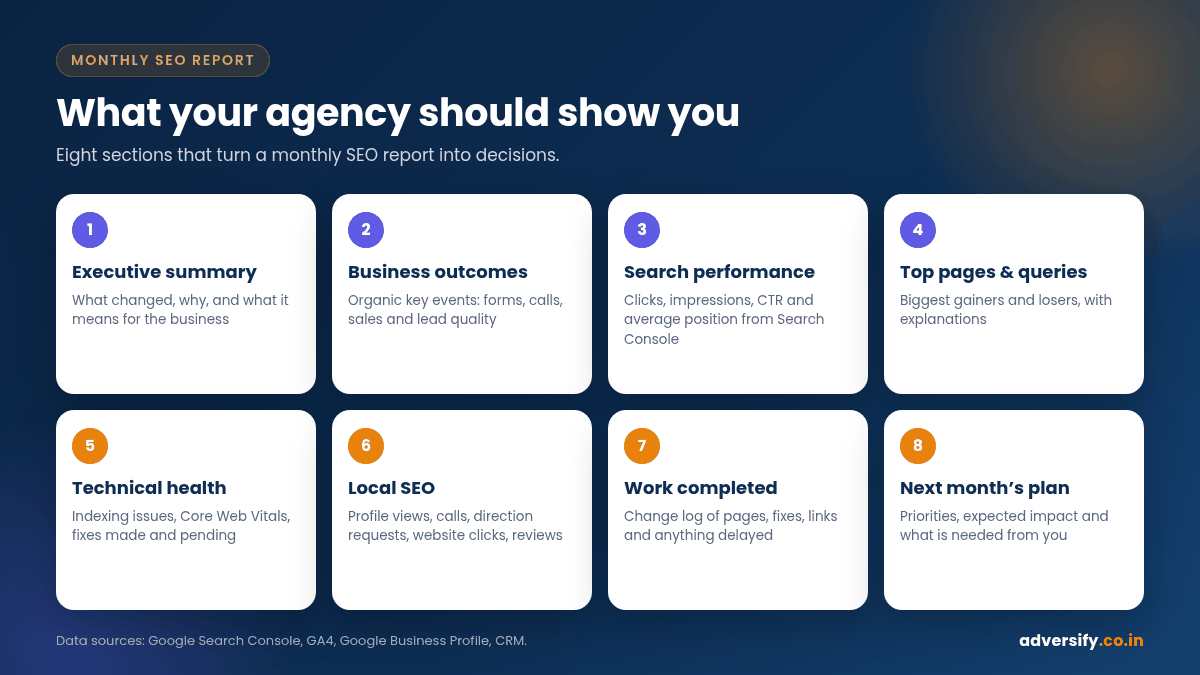
Use this table as a template. Share it with your agency and ask them to fill every row, or explain why a row does not apply to you.
| Section | What to include | Main source |
|---|---|---|
| 1. Executive summary | Three to five sentences: what changed, why and what it means for the business | Agency analysis |
| 2. Business outcomes | Organic key events (forms, calls, sales), lead quality notes, comparison with last month and last year | GA4, CRM or call tracking |
| 3. Search performance | Clicks, impressions, CTR and average position for the site and priority pages | Search Console |
| 4. Top pages and queries | Biggest gainers and losers, with explanations | Search Console |
| 5. Engagement | Organic sessions, engaged sessions, engagement rate and top landing pages | GA4 |
| 6. Technical health | Indexing issues, Core Web Vitals status, fixes made and pending | Search Console, site audits |
| 7. Local SEO | Profile views, calls, direction requests, website clicks and reviews | Google Business Profile |
| 8. Work completed | Change log of pages, fixes, links and profile updates, plus anything delayed | Agency task log |
| 9. Next month’s plan | Priorities, expected impact and what the agency needs from you | Agency plan |
Good reporting vs vanity reporting
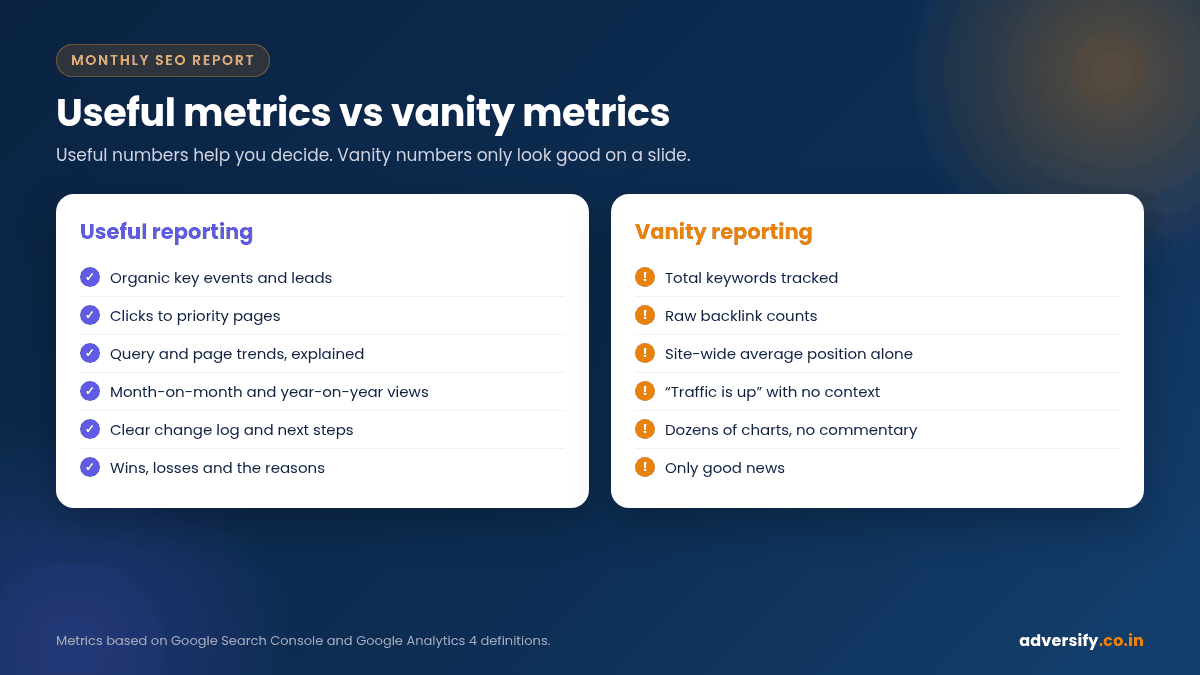
Vanity metrics are numbers that look impressive but do not help you decide anything. They are not always wrong, but on their own they are not proof of value.
| Vanity reporting | Useful reporting |
|---|---|
| “We are tracking 500 keywords and 120 are on page one” | Clicks and key events from the queries that bring customers |
| “We built 40 backlinks this month” | Which relevant sites linked to you, and why they matter |
| “Traffic is up 30%” | Which pages grew, from which queries, and whether that traffic converted |
| A site-wide average position figure on its own | Position trends for priority pages and queries |
| Dozens of charts with no commentary | A short summary that explains what changed and what happens next |
| Only good news | Wins, losses and the reasons behind both |
How to read trends without being misled
Compare the right periods
Month-on-month comparisons show momentum, but they can mislead in seasonal businesses. A wedding venue, a tax adviser or an education provider should look at year-on-year comparisons as well. Ask for both where you have the data.
Watch for tracking changes
A sudden jump or drop may be caused by a tracking change rather than real performance: a new consent banner, a broken tag, a site migration or a change to key event settings. A good agency notes these events in the report so you are not comparing apples with oranges.
Separate brand and non-brand searches
People searching for your business name would often find you anyway. Growth in non-brand searches, such as “AC repair in Noida” rather than your company name, is usually a better sign that SEO is reaching new customers. Ask your agency to show both where practical.
Allow for SEO timelines
Early months often show more impressions before clicks and leads catch up. Our guide on how long SEO takes explains what is realistic month by month.
How to set up reporting with your agency: step by step
- Own the accounts. Create Search Console and GA4 under your own business Google account and add the agency as a user. Google explains the roles in Search Console users and permissions and GA4 access management.
- Agree on goals and key events. Decide which actions count as success and make sure they are tracked.
- Pick five to eight priority pages. Usually your main service or category pages. Track them individually.
- Agree on the template and date. Use the table above and fix a delivery date, such as the fifth working day of each month.
- Record a baseline. Save the starting numbers before work begins so progress can be measured fairly.
- Hold a monthly review call. A 30-minute call to discuss the report is often more valuable than the document itself.
- Review the plan every quarter. Check whether priorities still match your business and adjust.
Red flags in SEO reports
- No link to business outcomes. The report never mentions leads, calls or sales.
- No access to the source data. The agency will not give you access to Search Console or GA4, or the accounts are in its name.
- No change log. You cannot see what work was done for your fee.
- Numbers that cannot be checked. Metrics from tools you cannot see, with no explanation of how they are calculated.
- Constant changes to what is measured. New metrics appear whenever the old ones look bad.
- Only rankings. Positions for hand-picked keywords, with no clicks or conversions.
- Explanations that blame Google every month. Updates happen, but they should not explain every drop.
- Ranking guarantees. Google states that no one can guarantee a #1 ranking on Google.
Questions to ask about your next report
- Which three things had the biggest impact this month, and what evidence shows that?
- How many organic enquiries or sales did we get, and how does that compare with last month and last year?
- Which pages lost clicks, and what is the plan for them?
- What was planned but not completed, and why?
- What do you need from us next month?
How Adversify reports to clients
At Adversify, clients own their Search Console and analytics accounts from day one. Our monthly report starts with a plain-English summary and business outcomes, then covers search performance, technical health, local SEO where relevant, a full change log and next month’s plan, followed by a review call. Our SEO services are offered in plans from Bronze to Platinum, and our guide to SEO cost in India explains how retainers are typically structured. As a real example, our client ERA Global reached 1,200+ visits and 32 page-one keywords in 4 months; see our case study page. Results vary, and we do not guarantee rankings.
Frequently asked questions
What should a monthly SEO report include?
An executive summary, business outcomes such as organic leads and sales, Search Console performance (clicks, impressions, CTR and average position), top pages and queries, engagement data from GA4, technical health, local SEO data where relevant, a change log and next month’s plan.
Which tools should an SEO report be based on?
Mainly Google Search Console and Google Analytics 4, plus Google Business Profile for local businesses and your CRM or call tracking for lead quality. Third-party SEO tools can add context, but core numbers should be ones you can check yourself.
Are keyword rankings still important in an SEO report?
They are useful for tracking priority queries, but they should not be the main measure of success. Clicks, enquiries and sales from organic search matter more.
How often should I get an SEO report?
Monthly is standard for most businesses, with a quarterly review of strategy. Very large or fast-moving sites may also use live dashboards, but a monthly written summary with commentary is still valuable.
Why did my clicks go up but my leads stay flat?
The new traffic may be for informational queries, the landing pages may not convert well, or tracking may be incomplete. A good report investigates which pages gained traffic and whether they lead visitors towards an enquiry.
Should my agency give me access to Search Console and GA4?
Yes. You should own both accounts and add the agency as a user. That lets you verify every number and keep your data if you change agencies.
Want a second opinion on your SEO reports?
If your current reports leave you unsure whether SEO is working, we can help. Ask for a free SEO audit and we will review your Search Console and analytics setup, highlight what your reports should be tracking and show you what we would fix first. Request your free SEO audit or contact our team.
2 Responses