
Few things worry a local business owner more than opening Google Maps and finding their listing gone, or logging in to see a “suspended” warning. Calls drop, directions requests stop and reviews you spent years collecting are suddenly out of sight. The good news is that many suspensions can be fixed, as long as you find the real cause and appeal properly the first time.
This guide explains why a Google Business Profile is suspended, how to work out which rule was broken, how to fix it, and exactly how to submit an appeal using Google’s official process. Everything here is based on Google’s own Business Profile help pages, linked throughout, so you can check the rules for yourself.
Key takeaways
- Google says it may suspend or disable Business Profiles that don’t follow its guidelines, and that you can appeal if you believe the profile should be reinstated.
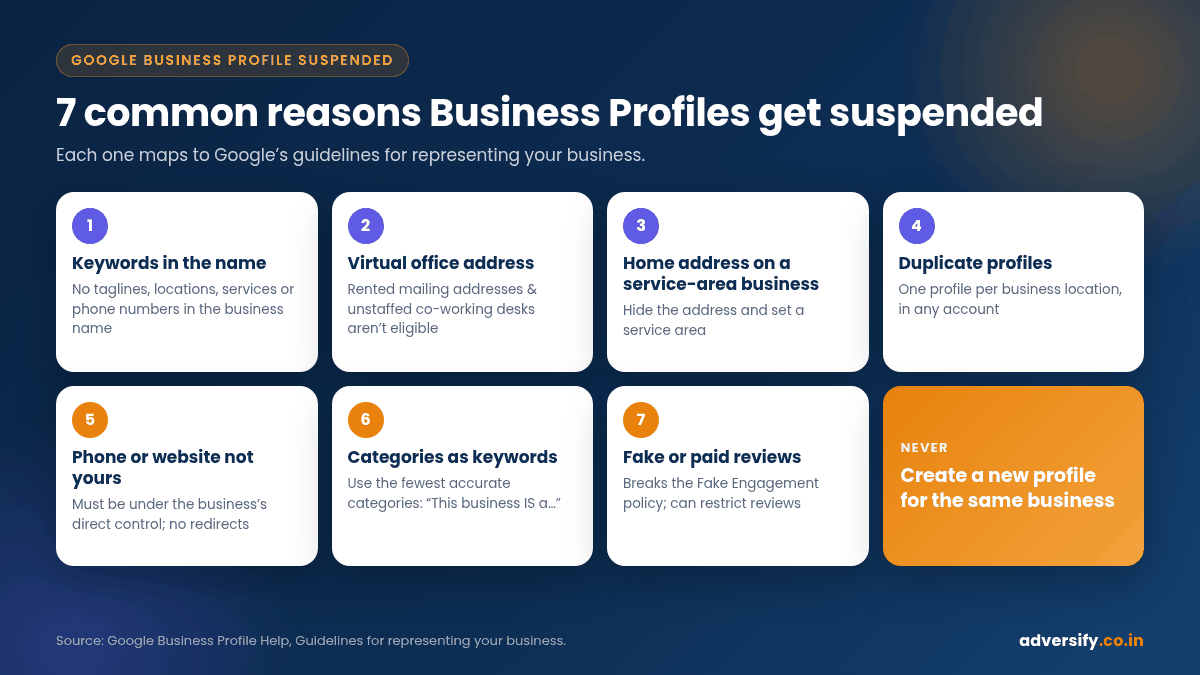
- Do not create a new profile for the same business. Google states this explicitly on its appeal pages.
- Fix the cause before appealing. Common problems include keywords in the business name, virtual offices, a visible home address for a service-area business, duplicate profiles and phone numbers or links that don’t belong to the business.
- Appeals can only be submitted once, so attach strong evidence: business registration, licence, tax certificates or utility bills that show the same name and address as the profile.
- Google says appeal reviews can take up to 5 business days. If it’s denied, you may be able to request an additional review with new evidence.
What a suspended Google Business Profile means
Google’s help centre says it may suspend or disable Business Profiles that don’t follow its guidelines (Google Business Profile Help: Fix suspended or disabled profiles). In practice, when a profile is removed, Google says the public can’t go to the profile and the owner and managers can’t act on it. If Google reinstates the profile, it reinstates both the profile and its owners and managers.
Suspensions can also come from the account level. Google explains that if your Google Account is restricted for a policy violation, the Business Profiles you manage are suspended and you won’t be able to create or claim other profiles. In that case you must fix the account restriction first.
There is also a separate type of action for reviews. Under its Fake Engagement policy, Google says it may restrict a profile, for example by stopping new reviews for a set period, unpublishing existing reviews for a period, or showing a warning that fake reviews were removed (Business Profile restrictions for policy violations). That is a restriction, not necessarily a full suspension, but it is handled through an appeal as well.
| What you see | Likely level | What to do first |
|---|---|---|
| Profile shows as suspended or disabled in your dashboard; listing missing from Maps | Profile suspension | Find the guideline issue, fix it, appeal the profile |
| All profiles you manage suspended; can’t create or claim new ones | Google Account restriction | Appeal the account on your My accounts page, then appeal each profile |
| Can’t receive new reviews; warning about removed fake reviews | Review restriction (Fake Engagement) | Stop any incentivised or fake review activity, then appeal the restriction |
| An edit to name, address, phone or website rejected | Content decision | Appeal the edit, but only after any suspension is resolved |
Why Google suspends Business Profiles: the common causes
Google’s Guidelines for representing your business on Google say that to make sure a profile won’t be suspended, you must avoid prohibited content and behaviour, reflect your business accurately and comply with the product guidelines. These are the issues we see most often in profiles that end up suspended, each tied to a specific rule.
1. Keywords or extra details in the business name
Google says your name should reflect your business’s real-world name, as used on your storefront, website and stationery, and that including unnecessary information in the name isn’t permitted and could result in suspension. Its examples of what a name must not include are marketing taglines, store codes, phone numbers or URLs, service or product information, location information and fully capitalised words. “Sharma Dental Clinic” is fine; “Sharma Dental Clinic Best Dentist Noida Sector 18 Implants” is not.
2. A virtual office or unstaffed co-working address
Google states that a virtual office, a rented mailing address your business doesn’t operate from, isn’t eligible for a Business Profile. Offices at co-working spaces can only be listed if they have clear signage, receive customers during business hours and are staffed by your team. P.O. boxes and remote mailboxes aren’t acceptable addresses either.
3. A service-area business showing a home address
If you travel to customers (plumbers, electricians, home tutors, pest control, cleaning services), Google says you should hide your business address and set a service area. Its own example is a plumber who runs the business from home: clear the address from the profile. Google also says a service area generally shouldn’t extend beyond about 2 hours of driving time from where the business is based, although larger areas can be appropriate for some businesses.
4. Duplicate profiles
Google says there should only be one profile per business, and that you should not create more than one page for each location, in a single account or across multiple accounts. Duplicates often appear after a business moves, changes phone number or has staff create a “new” listing without checking.
5. Phone numbers and websites that don’t belong to the business
The phone number must be under the direct control of the business, and Google says not to use numbers or URLs that redirect or refer users to landing pages or numbers other than the actual business’s. Premium-rate numbers are not acceptable. Using a lead-generation call-tracking number from a third party, or a website link that redirects elsewhere, can create problems.
6. Categories used as keywords
Google asks you to use as few categories as possible, choose ones that complete the sentence “This business IS a”, and not use categories solely as keywords or to describe attributes.
7. Fake or incentivised reviews
Google’s Maps user-generated content policy prohibits fake engagement (Prohibited and restricted content). Buying reviews, offering discounts for five-star ratings or having staff review the business can lead to review removal and profile restrictions.
8. Business types and regulated products
Some businesses have extra rules. For example, Google says businesses offering products or services that require a minimum age, such as alcohol or weapons, aren’t permitted as service-area businesses without a storefront.
9. A name change that doesn’t qualify as rebranding
Google allows a name change on an existing profile only for minor changes where the proper nouns, described services and category stay the same, or for multi-location brands. A completely new name counts as a new business: Google says to mark the old profile as closed and create a new one.
How to fix a suspended Google Business Profile: step by step
Step 1: Check what Google says the reason is
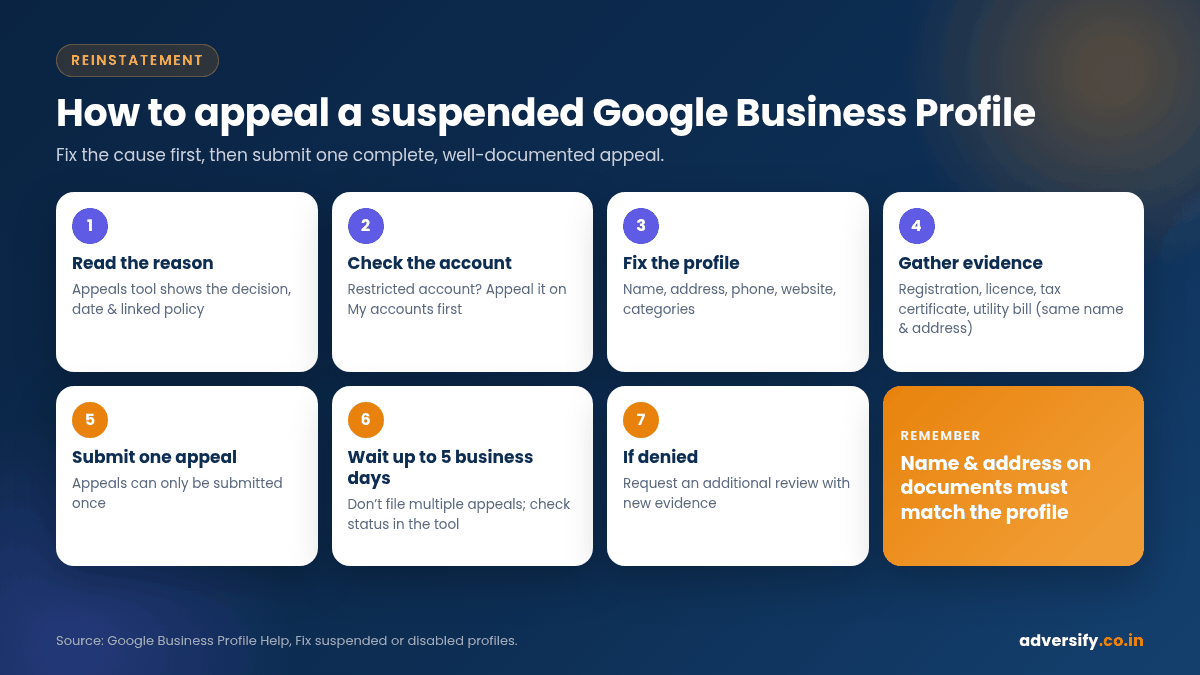
Open the Google Business Profile appeals tool (linked from the fix suspended profiles help page) while signed in to the Google Account that manages the profile. Google says the tool shows the date of the initial decision, the reason for the decision, a link to the violated policy, whether the decision can be appealed and its current status. Read the linked policy carefully before you change anything.
Step 2: Check whether your account is restricted
If every profile you manage is suspended at once, the problem may be your Google Account. Google says to submit an appeal for the account on your My accounts page first. Once the account restriction is lifted, appeal the profile.
Step 3: Fix the profile against the guidelines
Go through the profile line by line and correct anything that breaks the guidelines: remove keywords from the name, hide a home address and set a service area, replace a third-party phone number with your own, reduce categories to the accurate few, remove links from the description. Google’s appeal page says to make sure your profile follows all the guidelines before you submit.
Step 4: Make your real-world proof consistent
Google will compare what you claim with evidence. Make sure the business name and address on your signage, website, invoices and registration documents match each other and the profile. Our local SEO checklist covers keeping your name, address and phone number consistent across directories as well.
Step 5: Gather evidence
Google lists the following as evidence that can help strengthen an appeal:
- Official business registration
- A business licence
- Tax certificates
- Utility bills for the business, such as electricity, phone, water or internet
Google’s tip is to check that the business name and address on each document match the profile you’re appealing. For Indian businesses, this might mean registration documents such as a shop and establishment certificate, Udyam registration or GST certificate, plus a recent business utility bill, as long as the name and address match. Photos of permanent signage at the address can support a storefront appeal.
Step 6: Submit one complete appeal
Google’s process is:
- Open the Google Business Profile appeals tool.
- Confirm the right Google Account, or select Switch account.
- Select the Business Profile you want to appeal, then Continue.
- Select the decision you want to appeal, then Continue.
- Optionally upload evidence with Choose file (you can attach multiple files) and explain in the text box why the profile should be reinstated.
- Tick the box confirming you’re ready and that all evidence is attached, then select Submit appeal.
Google notes that appeals can only be submitted once, so don’t rush. Write a short, factual explanation: what the business is, where it operates, what you’ve corrected and which documents you’ve attached.
Step 7: Wait, and don’t create a new profile
Google says appeal reviews and decisions can take up to 5 business days and asks you not to submit multiple appeals for the same issue before receiving a decision (Appeal Business Profile content and profile restrictions). You can check the status in the appeals tool, where it will show as Submitted, Approved, Not Approved, Can’t be appealed or Eligible for appeal. Google sends the decision by email.
Step 8: If the appeal is denied
Google says that only if your reinstatement request is denied, it may be able to do an additional review, and you can provide additional evidence that wasn’t included in your original appeal. Use this chance to fix anything you missed and add stronger documents. If you manage more than 10 suspended profiles, Google’s tool offers a bulk reinstatement route with a spreadsheet of Business Profile IDs.
A simple appeal checklist
| Check | Done? |
|---|---|
| Read the reason and linked policy in the appeals tool | ☐ |
| Confirmed whether the Google Account itself is restricted | ☐ |
| Business name matches real-world signage, with no keywords or locations added | ☐ |
| Address is a real, staffed location, or hidden with a service area set | ☐ |
| Phone number and website belong directly to the business | ☐ |
| Categories are accurate and minimal | ☐ |
| No duplicate profiles for the same location | ☐ |
| Evidence documents show the same name and address as the profile | ☐ |
| Short, factual explanation written | ☐ |
| Only one appeal submitted; no new profile created | ☐ |
What to do while your profile is suspended
- Keep customers informed. Make sure your website shows your address, phone number, WhatsApp link and hours clearly.
- Use other channels. Social media, existing customer lists and, if needed, a short Google Ads campaign can keep enquiries coming while you wait.
- Don’t make repeated edits. Make the necessary corrections once, then let the review run.
- Don’t respond to suspension by buying reviews or listings. It makes the situation worse.
How to avoid future suspensions
- Use your real-world business name only, exactly as it appears on your signage.
- Keep one profile per location and remove or merge any duplicates through the proper channels.
- If you move, update your address rather than creating a new profile, and keep the signage and documents to prove it.
- Give agency and staff access as managers on the existing profile rather than letting anyone create a new one. Make sure the business owner keeps ownership.
- Ask for reviews honestly and evenly. Google’s tips to get more reviews explain the allowed ways to ask. For dealing with unfair reviews, see our guide on how to handle negative Google reviews.
- Review your profile every month for edits made by the public or by Google, and correct anything inaccurate.
Frequently asked questions
How long does it take to get a suspended Google Business Profile back?
Google says appeal reviews and decisions can take up to 5 business days. If the appeal is denied and you request an additional review, it will take longer. There is no guaranteed timeline for reinstatement.
Will I lose my reviews if my profile is suspended?
While a profile is removed, the public can’t see it. Google says that when it reinstates a profile, it reinstates the profile and its owners and managers. Creating a new profile instead would start you from zero and breaks Google’s guidance.
Can I create a new profile instead of appealing?
No. Google explicitly says not to create a new Business Profile for the same business. Doing so can be treated as a duplicate and make matters worse.
What documents work best for an appeal in India?
Google lists official business registration, a business licence, tax certificates and business utility bills. Whatever you submit, the business name and address must match the profile.
Can an agency guarantee reinstatement?
No. Only Google decides. An agency can help you identify the cause, correct the profile and prepare a strong, well-documented appeal.
Need help with a suspended profile?
If your listing has gone and you’re not sure why, a second pair of eyes before you use your one appeal can make a real difference. Our local SEO team in Noida and Hauz Khas, New Delhi reviews Business Profiles against Google’s guidelines, helps fix the issues and prepares the evidence. Book a free consultation and we’ll tell you honestly what we think caused the suspension and what to fix first.
4 Responses