
A website redesign is one of the few marketing projects that can either lift your enquiries or quietly wipe out years of search traffic. The difference is rarely the design itself. It is whether the team planned the content, the URLs, the redirects and the launch as carefully as they planned the colours and fonts.
This guide is for business owners and marketing managers comparing website redesign services in India. It covers the signs that you genuinely need a redesign, what a proper redesign process looks like, how to keep your Google rankings safe, realistic timelines, what drives cost, and how to choose a website redesign company in India that will protect what you have already built.
Key takeaways
- Redesign for a business reason (enquiries, speed, mobile experience, brand change, security), not just because the site feels old.
- In our experience, most SEO damage during redesigns comes from changed URLs without proper redirects, deleted content and forgotten noindex or robots.txt blocks, not from the new design.
- Keep your existing URLs wherever you can. Where a URL must change, Google recommends server-side permanent redirects (301 or 308), mapped one-to-one, kept for at least a year.
- Google says rankings can fluctuate during a site move and that a medium-sized site can take a few weeks or more to settle, so launch at a quiet time and monitor closely.
- Cost depends on page count, content, custom features, integrations and migration work. Ask for a written scope, not a headline price.
Redesign, refresh or rebuild: which do you need?
“Redesign” covers very different projects. Being clear about which one you need will save money and arguments later.
| Project type | What changes | Typical reason | SEO risk |
|---|---|---|---|
| Visual refresh | Colours, fonts, images, spacing; same pages and URLs | Site looks dated but structure works | Low, if content and headings stay |
| Redesign | New layouts, navigation, page templates, some content rewritten; most URLs kept | Poor conversion, weak mobile experience, new services | Medium; depends on content and URL changes |
| Rebuild or replatform | New CMS or theme framework, new URL structure, migrated content | Old platform is slow, insecure or impossible to edit | Higher; needs full URL mapping and redirects |
| Domain or brand change | New domain name plus everything above | Rebrand, merger, new business name | Highest; needs Change of Address in Search Console as well |
Signs your website needs a redesign
- Enquiries have dropped while traffic hasn’t. People are arriving but not calling, messaging or filling in forms. That usually points to unclear messaging, weak calls to action or slow, awkward pages.
- The mobile experience is poor. Google uses the mobile version of a site for indexing and ranking (Google: mobile-first indexing best practices). If text is tiny, buttons are cramped or content is hidden on phones, that matters for both users and search.
- Core Web Vitals are failing. Google’s web.dev guidance gives “good” thresholds of Largest Contentful Paint within 2.5 seconds, Interaction to Next Paint of 200 milliseconds or less and Cumulative Layout Shift of 0.1 or less (web.dev: Web Vitals). Check the Core Web Vitals report in Search Console.
- You can’t update it yourself. If every small text change needs a developer, the site will fall behind your business.
- Your services or brand have changed. New offerings, new locations or a new positioning that the current structure can’t show clearly.
- Security and maintenance problems. Outdated themes or plugins that can’t be updated without breaking the site.
- Accessibility gaps. Low colour contrast, missing alt text, forms that can’t be used with a keyboard. The W3C’s WCAG 2.2 guidelines are the standard reference.
If only one or two of these apply, a targeted fix (speed work, a new landing page, better calls to action) may be enough. Our website maintenance team often solves speed and plugin issues without a full redesign.
The website redesign process, step by step
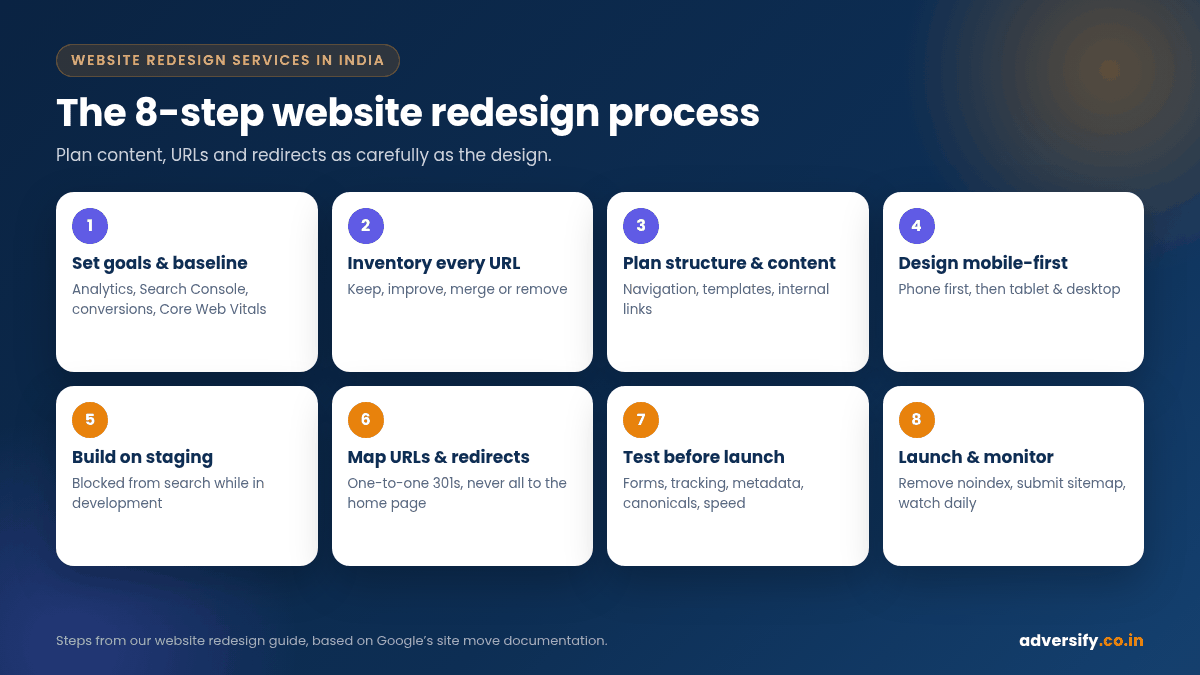
Step 1: Set goals and measure the current site
Write down what the redesign must achieve: more enquiries from mobile, more product sales, a clearer service structure, faster pages. Then record a baseline from Google Analytics and Search Console: top landing pages, top queries, conversions by page, and Core Web Vitals. Without a baseline, nobody can prove whether the new site is better.
Step 2: Audit and inventory every URL
List every page, post, image and PDF that exists today. Google suggests starting with your important URLs by looking at sitemaps, server logs or analytics for high-traffic pages, and the Links report in Search Console for pages that other sites link to (Google: How to move a site). Mark each URL as keep, improve, merge or remove.
Step 3: Plan structure and content
Decide the new navigation and page templates. Group services logically, give each important service its own page, and plan the internal links between them. Rewrite content for clarity, but don’t throw away pages that already rank and convert. Improve them instead.
Step 4: Design mobile-first
Design the phone layout first, then expand it for tablets and desktops. Our guide on how to design responsive websites covers breakpoints, images and testing in detail.
Step 5: Build on a staging site
Build the new site on a private staging copy, not on the live site. Block it from search engines while in development, and make a note to remove that block at launch. Google lists forgotten noindex rules and robots.txt blocks as a common migration mistake.
Step 6: Map URLs and prepare redirects
Create a spreadsheet with every old URL in one column and its new destination in the next. Redirect each old page to the most relevant new page, not to the home page. Google warns that redirecting many old URLs to one irrelevant destination, such as the home page, can confuse users and might be treated as a soft 404.
Step 7: Test before launch
- Every form, call button and WhatsApp link sends to the right place.
- Analytics, Google Ads and Meta Pixel tracking fire on the new pages.
- Titles, meta descriptions, headings and structured data have been carried over or improved.
- Each new URL has a self-referencing canonical tag.
- Page speed and mobile layout pass on real phones, not just a desktop browser resized.
Step 8: Launch and monitor
Switch on the redirects, remove the staging noindex, submit the new XML sitemap in Search Console and test a sample of old URLs. Watch Search Console, analytics and enquiries daily for the first two weeks, then weekly.
How to keep SEO safe during a redesign
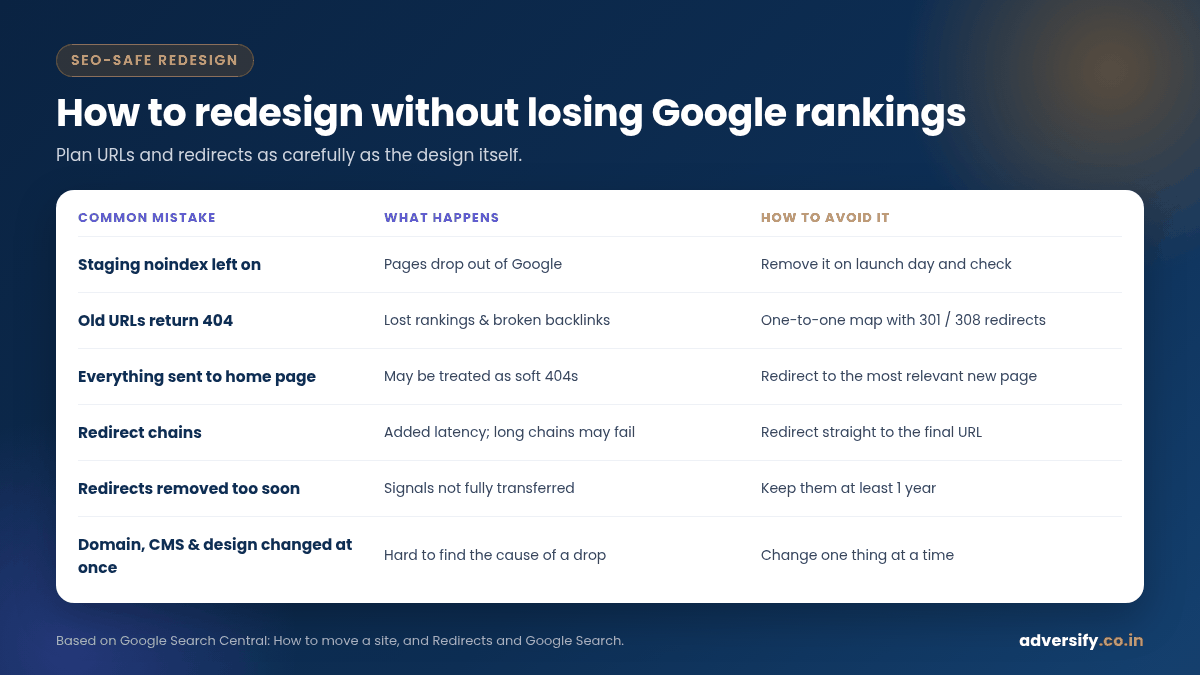
This is the section most website redesign services in India rush through, and it is where most of the damage happens. Google’s site move documentation is the best checklist available, and it applies to URL path changes on the same domain, HTTP to HTTPS moves and domain changes alike.
Keep URLs wherever possible
If a page’s URL doesn’t need to change, don’t change it. A new design can sit on the same URLs. In WordPress, check that the permalink structure under Settings > Permalinks stays the same on the new build (WordPress: Permalinks screen). Changing it from, say, /blog/post-name/ to /post-name/ changes every post URL at once.
Use the right redirects
Google recommends server-side permanent redirects, such as HTTP 301 or 308, when a URL changes for good. Permanent redirects tell Google the new URL should be canonical; temporary redirects such as 302 tell it to keep showing the old one (Google: Redirects and Google Search). Google also says that 301 and other permanent redirects don’t cause a loss in PageRank.
Avoid redirect chains
Redirect old URLs straight to their final destination. Google says Googlebot can follow up to 10 hops but advises redirecting directly, and if a chain is unavoidable, keeping it ideally to no more than 3 hops.
Keep redirects for at least a year
Google recommends keeping redirects as long as possible, generally at least one year, so it can transfer signals to the new URLs. From a user’s point of view, it suggests considering keeping them indefinitely.
Don’t delete content that earns traffic
Pages that rank, earn links or bring enquiries should be kept or merged into an improved page with a redirect. If you do remove content with no replacement, Google says those URLs should return a 404 or 410.
Update internal links
After launch, update internal links so they point directly to the new URLs rather than relying on redirects. Google lists this as part of the move, along with updating profile links and ad campaign landing pages.
| Common mistake | What happens | How to avoid it |
|---|---|---|
| Staging noindex left on after launch | Pages drop out of Google | Add “remove noindex” to the launch checklist and check it the same day |
| Old URLs return 404 with no redirect | Lost rankings and broken backlinks | One-to-one URL map with 301 redirects |
| Everything redirected to the home page | May be treated as soft 404s | Redirect to the most relevant new page |
| Service content cut down to short blurbs | Pages lose relevance for their queries | Keep or improve the depth of ranking pages |
| Tracking codes not installed | No way to compare old and new performance | Test analytics and conversion events before launch |
| Domain, platform and design changed at once | Hard to find the cause of any drop | Change one thing at a time, as Google advises |
How long does a website redesign take?
Every project differs, but a typical small to mid-sized business site moves through these phases. The durations below are indicative, not a promise, and depend heavily on how quickly content and feedback come from your side.
| Phase | Indicative duration | What can slow it down |
|---|---|---|
| Discovery, audit and URL inventory | 1 to 2 weeks | No access to analytics or hosting |
| Structure, wireframes and content plan | 1 to 2 weeks | Unclear goals, many decision-makers |
| Design | 1 to 3 weeks | Several rounds of changes |
| Build, content entry and integrations | 2 to 6 weeks | Late content, custom features, payment or CRM integrations |
| Testing, redirects and launch | 1 week | Large redirect maps, last-minute changes |
| Post-launch monitoring | 4 weeks or more | Google says medium sites can take a few weeks or more to settle |
Google also advises timing a move to coincide with lower traffic where possible. For many Indian businesses, that means avoiding peak festive or admission seasons.
What drives the cost of a website redesign in India
Quotes for the “same” redesign can differ several times over, because the scope is rarely the same. These are the main cost drivers:
- Number of unique templates and pages. Ten pages sharing three templates cost far less than ten completely different layouts.
- Content. Whether you supply text and photos, or the agency writes copy, sources images or runs a photo shoot.
- Custom functionality. Booking systems, calculators, multi-language content, member areas, product filters.
- E-commerce. Product count, variations, payment gateways, shipping rules and order integrations.
- Migration and SEO work. URL mapping, redirects, metadata transfer and post-launch monitoring. This is the part that protects your traffic, so don’t let it be cut.
- Integrations. CRM, WhatsApp, email marketing, ERP or inventory systems.
- Ongoing support. Hosting, updates, backups and security after launch.
Ask every agency for a written scope listing pages, templates, features, content responsibility and the SEO migration tasks included. Your final quote will confirm any applicable taxes.
How to choose a website redesign company in India
- Ask how they protect rankings. They should mention a URL inventory, a redirect map, staging, pre-launch checks and Search Console monitoring without prompting.
- Look at live work on phones. Open their recent sites on your own mobile, check speed and try the contact forms.
- Check who owns what. You should own the domain, hosting account, theme licences and all content.
- Confirm the platform. Make sure you’ll be able to edit text, images and pages yourself after launch. WordPress with a page builder such as Elementor is a common choice for this reason.
- Agree on content responsibility. Late content is the most common cause of delays.
- Ask about post-launch support. Who fixes issues in the first month, and what does ongoing maintenance include?
- Avoid ranking guarantees. A redesign can improve the conditions for SEO; nobody can guarantee rankings.
Frequently asked questions
Will a website redesign hurt my SEO?
It can if URLs change without redirects, content is removed, or noindex rules are left on. A carefully planned redesign that keeps URLs, maps redirects and preserves good content usually limits the risk. Google says some temporary ranking fluctuation is normal during a site move.
How often should a business redesign its website?
There is no fixed rule. Redesign when the site no longer supports your goals: falling conversions, poor mobile experience, failing Core Web Vitals, or a changed business. Regular maintenance can extend a site’s useful life considerably.
Should I change my domain during a redesign?
Only if there is a strong business reason. Google advises changing one thing at a time, so if possible, do the domain move and the redesign as separate steps.
Can I redesign my WordPress site without changing URLs?
Yes. A new theme or Elementor layout can be built on the same pages and permalinks. That is usually the safest approach.
What should I prepare before contacting a redesign agency?
Your goals, access to Google Analytics, Search Console and hosting, a list of sites you like, your brand assets and an honest view of who will write the content.
Planning a redesign? Get a free review first
Before you rebuild anything, it’s worth knowing which pages carry your traffic and enquiries today. Our team in Noida and Hauz Khas, New Delhi offers website design and redesign services with SEO-safe migration built in, backed by our SEO services after launch. Book a free consultation and we’ll review your current site, flag what must be protected and suggest whether you need a refresh, a redesign or a rebuild.
2 Responses