
Search for a web design company in India and you will get thousands of results: large agencies, small studios, freelancers and template resellers, all promising a “modern, SEO-friendly website”. Prices for what looks like the same job can differ by ten times. For a business owner, the real challenge is not finding a website designing company in India. It is writing a clear brief, comparing proposals fairly and signing a contract that protects you after launch.
This guide is a practical hiring playbook. It walks you through preparing a brief, the services a serious website designing agency in India should include, how to compare quotes line by line, the questions to ask, the contract terms that matter, and the red flags that should end a conversation. It does not cover responsive design techniques or redesigns of existing sites; we have separate guides for those, linked below.
Key takeaways
- Write a one-page brief before you contact any agency. Clear goals, pages, features and a budget range make quotes comparable.
- A professional web design company in India should cover discovery, UX, design, development, content support, on-page SEO basics, speed, security, testing and handover, not just “design”.
- Compare proposals by scope, ownership and post-launch support, not by headline price alone.
- Insist that you own the domain, hosting account, website files, theme or plugin licences and all analytics accounts.
- Google recommends involving SEO early, for example when planning a new site. A web design and SEO company in India that builds search-readiness into the site from day one saves rework later.
- Walk away from anyone who guarantees first-page rankings, refuses to share login access or cannot show live work.
Why choosing a website design partner is harder than it looks
A website is not a one-time artwork. It is your sales brochure, enquiry engine, credibility check and, for many businesses, the first place a customer meets you. Two websites can look equally attractive in a mock-up yet behave very differently once real visitors, real search engines and real updates arrive.
The difference usually sits in things you cannot see in a design preview: how cleanly the site is built, whether pages load quickly on a mid-range phone over mobile data, how easy it is for your team to edit content, how well forms and tracking work, and whether search engines can crawl and understand each page. That is why a cheap quote can become the most expensive option once you add fixes, rebuilds and lost enquiries.
Step 1: Prepare a one-page brief before you call anyone
Agencies quote what you describe. If the brief is vague, every proposal will be built on different assumptions, and you will end up comparing apples with mangoes. Spend an hour on a short brief that answers these questions.
| Brief section | What to write | Why it matters |
|---|---|---|
| Business goal | Leads, online sales, bookings, recruitment or credibility | Decides page structure, calls to action and tracking |
| Audience | Who visits, which cities, which languages, which devices | Shapes content, design and performance targets |
| Pages | A list: Home, About, each service, contact, blog, policies | The single biggest driver of effort and cost |
| Features | Forms, WhatsApp button, booking, payments, catalogue, multilingual, CRM link | Each integration adds design, build and testing time |
| Content | Who writes copy and supplies photos: you or the agency | Content delays are the most common reason projects slip |
| Platform preference | WordPress, Shopify, custom, or “advise me” | Affects cost, editing ease and long-term maintenance |
| References | Three sites you like and why; three competitors | Saves rounds of design revisions |
| Budget and timeline | A realistic range and a launch date that matters | Lets agencies propose the right scope instead of guessing |
Share the same brief with every agency on your shortlist. Proposals then become directly comparable, and you can quickly see who actually read it.
Step 2: Know what a complete web design project includes
Many quotes say “website design” but mean very different things. A professional website designing company in India should be able to explain each of the stages below and tell you which ones are included in its price.
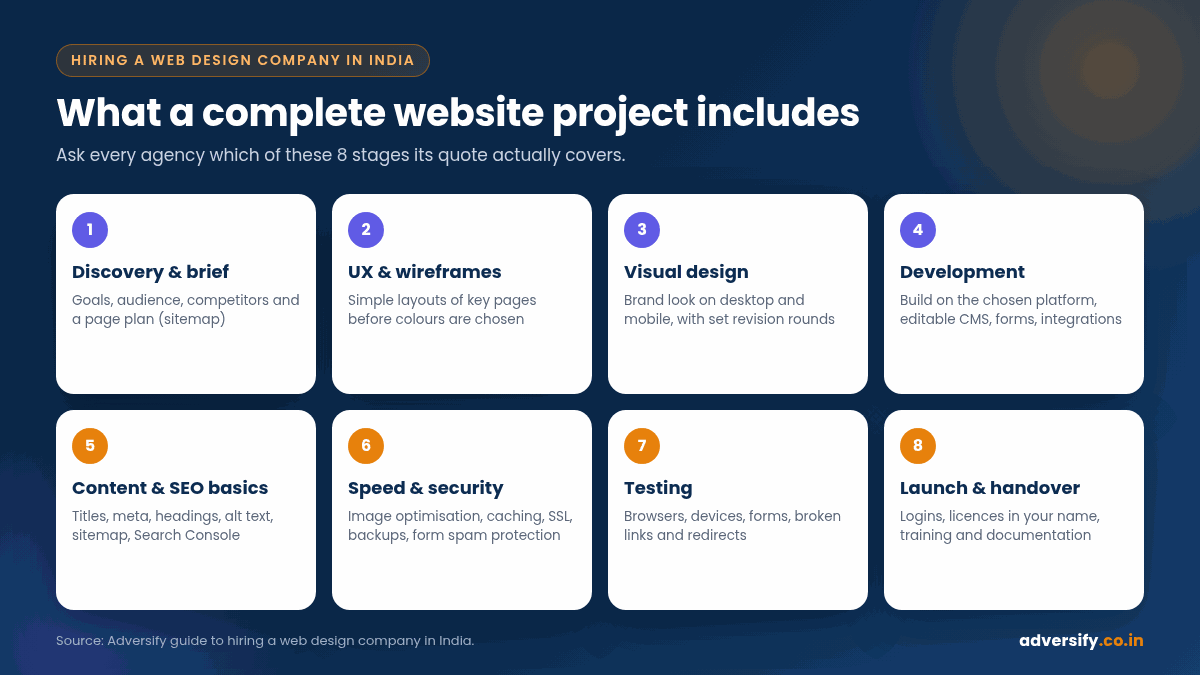
Discovery and planning
A short workshop or questionnaire to understand your business, audience and goals, followed by a sitemap (the list and hierarchy of pages). Good agencies push back here if your page plan will not serve your goals.
UX and wireframes
Simple layouts that show what goes where on key pages before any colours are chosen. This is the cheapest stage to change your mind.
Visual design
Brand colours, typography, imagery and the final look of key templates on desktop and mobile. Ask how many revision rounds are included.
Development
Building the site on the chosen platform, setting up the content management system so your team can edit pages, and adding forms, integrations and analytics.
Content and SEO basics
Page titles, meta descriptions, headings, image alt text, clean URLs, internal links, an XML sitemap and connection to Google Search Console. This is where a web design and SEO company in India adds real value, because these foundations are much easier to get right during the build than after launch. Google’s own guidance on hiring an SEO notes that a good time to bring one in is when you are planning to launch a new site, so the site is designed to be search-engine-friendly from the bottom up (Google Search Central).
Speed, security and accessibility
Image optimisation, caching, SSL, backups, spam protection on forms and sensible accessibility practices such as readable contrast and labelled form fields. The international reference for accessibility is the W3C’s Web Content Accessibility Guidelines, currently WCAG 2.2 (W3C WAI).
Testing, launch and handover
Checks on major browsers and devices, form tests, broken-link checks, redirect setup if you are replacing an older site, then a handover with logins, a short training session and documentation.
Step 3: Agree on the platform early
The platform decides how easily you can update content, how much plugins or apps will cost and who can maintain the site in future. There is no single right answer; the table below gives a neutral starting point.
| Platform type | Usually suits | Watch out for |
|---|---|---|
| WordPress (themes or page builders) | Service businesses, content-heavy sites, blogs, most SMEs | Plugin bloat, updates and security need regular attention |
| Hosted e-commerce (for example Shopify) | Online stores that want hosting and checkout handled | Monthly platform fees and paid apps add up |
| WooCommerce on WordPress | Stores that want full control and content plus commerce | Hosting and maintenance are your responsibility |
| Custom build (framework or headless) | Complex portals, unusual workflows, large scale | Higher cost; dependence on the original developers |
| Website builders | Very small sites, quick launches, tight budgets | Limited flexibility and harder migration later |
Whatever the platform, ask: “If we part ways, can another developer take over this site without rebuilding it?” The answer tells you a lot about lock-in.
Step 4: Compare proposals line by line
When three proposals arrive at three very different prices, resist the urge to pick the middle one. Put them in a simple comparison sheet like this.
| Compare | Good sign | Warning sign |
|---|---|---|
| Page count and templates | Pages listed by name, with unique templates identified | “Up to 10 pages” with no list |
| Design revisions | Number of rounds stated | “Unlimited” (often means rushed) or not mentioned |
| Content | Clear on who writes copy and sources images | Assumes you will supply everything without saying so |
| SEO basics | Titles, meta, headings, sitemap, Search Console and redirects listed | “SEO-friendly” with no detail |
| Performance | Speed targets and how they will be tested | No mention of speed or mobile testing |
| Licences | Paid themes or plugins licensed in your name | Agency licences that disappear when you stop paying |
| Timeline | Milestones with dependencies on your inputs | A single launch date with no plan |
| Post-launch support | Defined warranty period and optional maintenance plan | Nothing after launch, or vague “support” |
| Payment terms | Milestone-based payments | Full payment upfront |
On pricing, focus on what drives the number rather than a single “average” figure. Page count, number of unique templates, custom features, e-commerce, content writing, integrations and the level of post-launch support all move the price. Your final quote will confirm any applicable taxes.
Step 5: Check performance and mobile readiness, not just looks
Google uses the mobile version of a site’s content for indexing and ranking, which is known as mobile-first indexing (Google Search Central). In practice, your mobile pages need the same important content, headings and structured data as your desktop pages.
Speed and stability matter too. Google’s Core Web Vitals measure real-world loading, responsiveness and visual stability (Google Search Central). The recommended “good” thresholds published on web.dev are:
| Metric | Measures | Good threshold |
|---|---|---|
| Largest Contentful Paint (LCP) | Loading | 2.5 seconds or less |
| Interaction to Next Paint (INP) | Responsiveness | 200 milliseconds or less |
| Cumulative Layout Shift (CLS) | Visual stability | 0.1 or less |
Source: web.dev, Web Vitals.
A simple test you can do yourself: open two or three live sites from each agency’s portfolio in PageSpeed Insights and on your own phone. You do not need a perfect score, but a portfolio full of slow, jumpy pages tells you how your site is likely to turn out.
Step 6: Ask the right questions in the first meeting
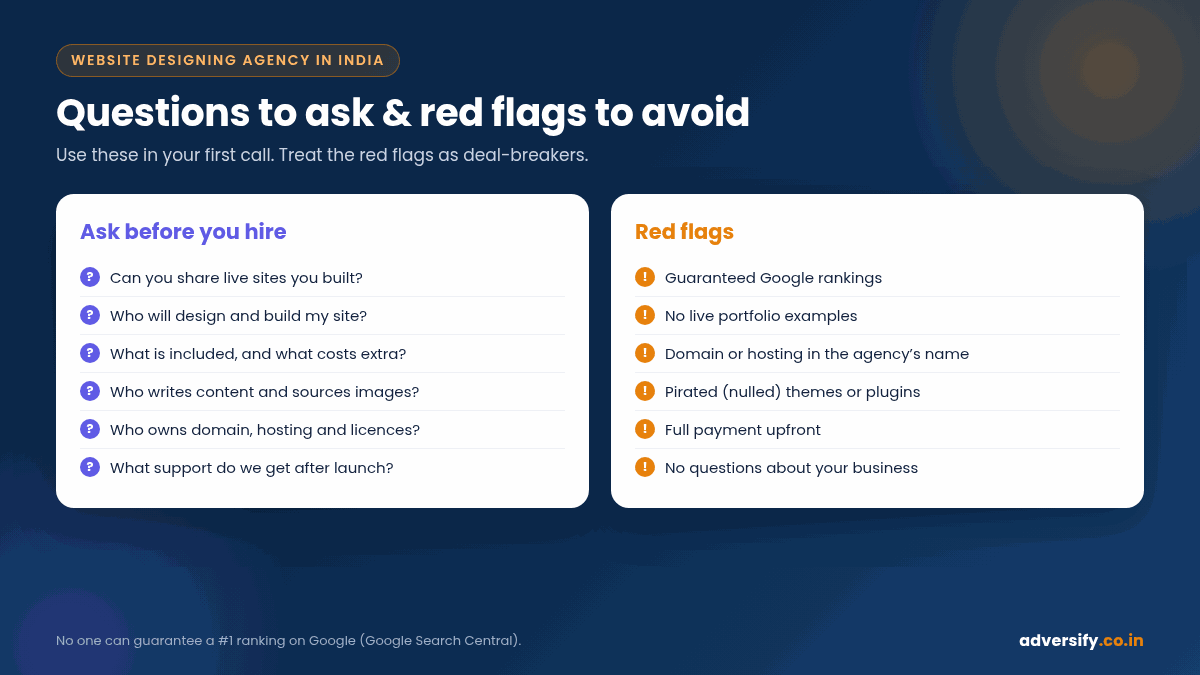
- Can you share links to live websites you have built, ideally in my industry? Screenshots are easy to fake; live sites are not.
- Who will actually design and build my site? In-house team, freelancers or outsourced? Any is fine if they are honest.
- What exactly is included, and what costs extra? Get it in writing.
- Who writes the content and sources the images? Also ask whether stock images are licensed.
- Which SEO basics are part of the build? Titles, meta descriptions, headings, schema where relevant, sitemap, Search Console and redirects.
- How will you test speed and mobile behaviour before launch?
- Who will own the domain, hosting, files and licences? The only acceptable answer is “you”.
- What happens after launch? Warranty period, bug fixes, updates, backups and the cost of ongoing maintenance.
- How will we communicate, and how often? A named contact and a weekly update rhythm prevent most project stress.
Step 7: Red flags that should end the conversation
- Guaranteed rankings. Google states plainly that no one can guarantee a #1 ranking on Google (Google Search Central). A designer who promises page one with a new site is either uninformed or misleading you.
- No live examples. Only mock-ups, or portfolio links that no longer work.
- Domain or hosting in the agency’s name. This makes you hostage if the relationship ends.
- Pirated (“nulled”) themes or plugins. They can carry malware and never receive security updates.
- Full payment upfront for a multi-week project.
- No questions about your business. An agency that quotes in five minutes without asking about goals is selling a template, not a solution.
- Spammy link offers bundled with design. Buying links to manipulate rankings is against Google’s spam policies (Google Search Central).
Step 8: Contract terms that protect you
| Clause | What it should say |
|---|---|
| Scope | Pages, templates, features and integrations listed explicitly, with change-request rates for extras |
| Ownership and IP | On final payment, you own the design files, code, content and all accounts |
| Licences | Paid themes, plugins and fonts registered to you or transferred at handover |
| Timeline | Milestones, your input deadlines and what happens if either side is late |
| Payments | Linked to milestones such as design sign-off, staging review and launch |
| Warranty | A defined period after launch for fixing bugs at no cost |
| Access | Admin logins, hosting, domain registrar, analytics and Search Console handed over |
| Exit | How files and accounts are transferred if the engagement ends early |
India-specific points to keep in mind
- Mobile data and mid-range phones. Many of your visitors will browse on mobile networks and budget devices, so page weight and image sizes matter more than heavy animations.
- Click-to-call and WhatsApp. For many Indian businesses, calls and chats convert better than long forms. Make sure these are tracked as conversions.
- Languages. If you serve customers in Hindi or other regional languages, plan multilingual pages from the start rather than bolting them on later.
- Local search. If you serve specific cities, the site should support a well-maintained Google Business Profile with consistent name, address and phone details. Our local SEO services cover this side.
- Payment gateways. For e-commerce, confirm which Indian payment gateways the agency has integrated before, and who handles the gateway account setup.
Freelancer, studio or full-service agency?
| Option | Strengths | Limitations | Best for |
|---|---|---|---|
| Freelancer | Lower cost, direct contact | Single point of failure; limited skills range | Small brochure sites |
| Design studio | Strong visual design | May not cover SEO, ads or long-term support | Brand-led projects |
| Full-service digital agency | Design, development, SEO and marketing under one roof | Higher cost than a freelancer | Businesses that want the site to generate leads |
If your website’s job is to bring in enquiries, the strongest choice is usually a team that understands both design and search, so the best website development agency in India for you is the one whose process matches your goals, not the one with the flashiest homepage.
After launch: what good looks like in the first 90 days
- Week 1: Submit the XML sitemap in Google Search Console, confirm analytics and conversion tracking, and test every form and button again on live.
- Weeks 2 to 4: Fix any crawl or indexing issues Search Console reports, and check Core Web Vitals once real-user data starts to appear.
- Months 2 to 3: Review which pages get impressions and enquiries, improve weak service pages, and start a steady content plan if SEO is part of your growth strategy.
- Ongoing: Keep WordPress core, themes and plugins updated, and keep regular off-site backups. A website maintenance plan takes this off your plate.
How Adversify approaches website projects
At Adversify we build websites with search in mind from the first sitemap. Our web design and development service covers discovery, design, WordPress development, on-page SEO foundations, speed optimisation, testing and handover, and you own every account and file. Because our team also runs SEO services, the site is ready for ongoing growth rather than needing rework later. As one real example of what steady SEO work can do once the foundations are right, our client ERA Global reached 1,200+ visits and 32 page-one keywords in 4 months. Results always vary by industry, competition and starting point, and we never guarantee rankings.
Related reading: how to design responsive websites and website redesign services in India.
Frequently asked questions
How long does it take a web design company in India to build a website?
It depends on page count, features and how quickly content and feedback arrive. A small brochure site is often a matter of weeks, while e-commerce or custom builds take longer. Ask for a milestone plan that shows which steps depend on your inputs.
Should my website designing company also handle SEO?
At minimum, the build should include on-page SEO basics such as titles, meta descriptions, headings, a sitemap, Search Console setup and redirects. Ongoing SEO is a separate, continuing service. Having one team handle both avoids gaps between design and search.
Who should own the domain and hosting?
You should. Register the domain and hosting in your business name with your own email, and give the agency access. This protects you if the relationship ends.
Is WordPress a good choice for Indian small businesses?
For many service businesses and content-led sites, yes, because it is flexible and widely supported. It does need regular updates, backups and security care. Hosted platforms or custom builds can suit other needs.
Can a web design company guarantee my site will rank on Google?
No. Google states that no one can guarantee a #1 ranking. A good agency can build a technically sound, fast, crawlable site with strong content, which gives you the best foundation to compete.
What should I prepare before contacting agencies?
A one-page brief covering your goal, audience, page list, features, content responsibility, platform preference, reference sites, budget range and target launch date.
Ready to plan your website?
If you are comparing web design companies in India, send us your brief or ask for a free consultation. We will review your goals, suggest a sensible scope and give you a clear, itemised proposal you can compare with others. Contact Adversify or request a free website and SEO audit.