Meta lead ads can fill your inbox with enquiries in a day. The hard part is making sure those enquiries are real people who want to buy. A complaint we often hear from businesses running Facebook and Instagram lead generation: lots of leads, wrong phone numbers, people who do not remember filling the form and a sales team that gives up calling. The problem is rarely the platform itself. It is usually the form, the follow-up and the signal you send back to Meta.
This guide explains how to run Meta lead ads that bring quality leads: choosing the Leads objective and conversion location, picking the right instant form type, writing qualifying questions, syncing leads to a CRM and calling fast, and using the Conversions API so Meta optimises for leads that actually convert. We finish with creative and audience basics, common mistakes and a launch checklist. All platform details link to Meta’s official Business Help Center or developer documentation, because Meta updates these features often.
Key takeaways
- Meta lead ads use the Leads objective. Instant forms let people submit details without leaving Facebook or Instagram, with name, email and phone often prefilled.
- “More volume” forms are quick to submit; “Higher intent” forms add a follow-up notice and a review screen, which helps filter out marginal interest.
- One or two well-chosen qualifying questions usually improve lead quality more than a long form.
- Speed matters: connect a CRM or use Leads Center so your team can follow up quickly. Leads can only be downloaded from Meta for 90 days.
- Sending CRM outcomes back through the Conversions API lets Meta optimise for qualified leads, not just form fills.
What are Meta lead ads?
Meta describes lead ads as ads designed to help you find people who may be interested in your products or services and collect their information. There are three main types:
- Lead ads with instant form: people fill out a form inside Facebook or Instagram.
- Lead ads with calling: people call your business directly from the ad.
- Lead ads that click to message: people start a conversation with you in Messenger, Instagram or WhatsApp.
Lead ads can appear in Facebook and Instagram Feeds and Stories, reels, Marketplace and other placements. This guide focuses mainly on instant forms, because that is where most quality problems start and where the biggest improvements are possible.
Instant forms vs website forms
With an instant form, the form opens inside the app and contact details such as name, email address and phone number may be prefilled if the person has already shared them with Meta. That makes submission fast on mobile, which is great for volume, but it also makes it easy to submit without much thought. A website form asks people to visit your landing page first, which adds friction but also gives them more information before they enquire. Many businesses test both.
| Option | Strengths | Watch out for | Good fit |
|---|---|---|---|
| Instant form | Fast, mobile-friendly, prefilled fields, no landing page needed | Easy to submit casually; needs qualifying questions and fast follow-up | Consultations, quotes, site visits, admissions enquiries |
| Website form | More context before enquiring; full control of the page | Needs a fast landing page and the Meta Pixel plus Conversions API | Complex services, booking systems, detailed product pages |
| Click to WhatsApp or Messenger | Instant two-way conversation | Someone must reply quickly, including evenings | Local services, retail, businesses already selling on WhatsApp |
| Calls | High intent, immediate conversation | Only works when phones are staffed | Urgent services, appointments |
Step 1: Set up the campaign with the Leads objective
In Meta Ads Manager, the Leads objective is the one designed to collect leads through messages, calls or sign-ups. Meta’s guide to creating a lead ad in Ads Manager outlines the flow:
- Click Create and choose Leads as the campaign objective.
- At ad set level, in the Conversion section, choose your conversion location: Instant forms, Website, Website and instant forms, Messenger, Instagram, WhatsApp, Calls or App.
- Choose a performance goal, such as Maximize number of leads or Maximize number of qualified leads (covered below).
- Set your audience, placements, schedule and budget.
- At ad level, add your creative and create or choose your instant form.
- Set up tracking, preview everything and publish.
Before you start, Meta recommends having your questions reviewed against the Lead Ads Terms and its Advertising Standards. If you advertise housing, employment, financial products and services, or social issues and politics, you must also choose the correct Special Ad Category, which can limit targeting options.
Step 2: Choose the right instant form type (more volume vs higher intent)
When you create an instant form, Meta offers three form types:
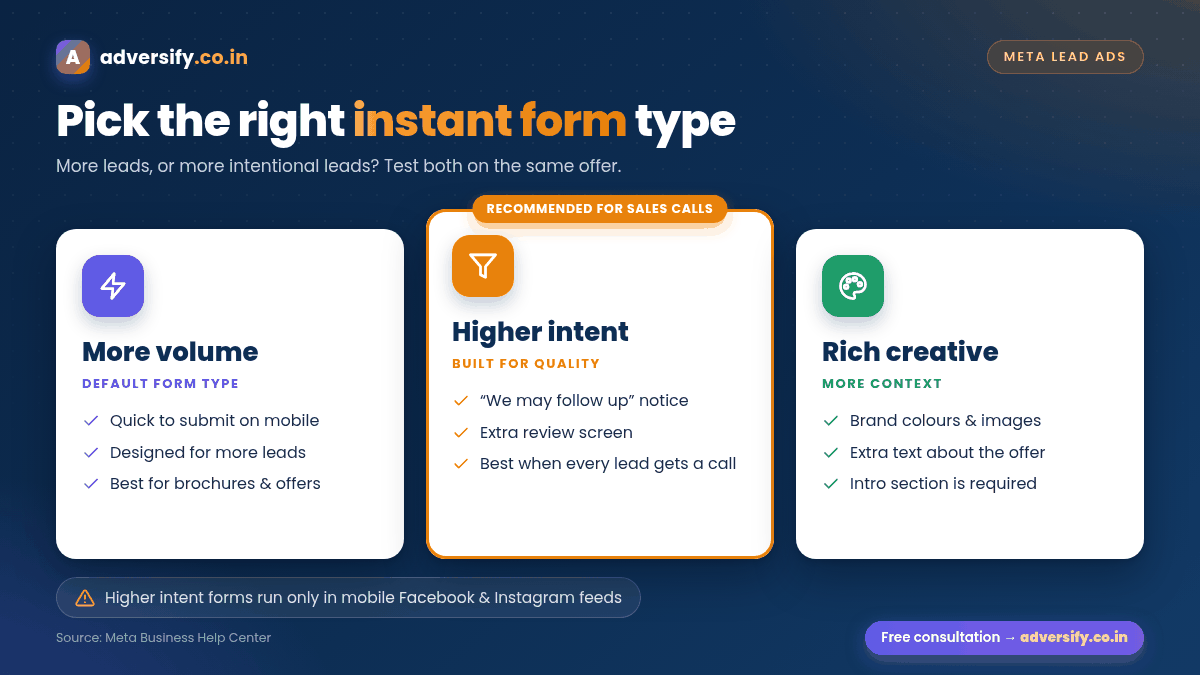
- More volume (default): makes it easy to submit quickly on a mobile device and is designed to generate a larger number of leads.
- Higher intent: adds inline text under the contact fields saying your business may follow up, plus an extra review screen where people confirm their information. Meta says this helps you receive more intentional submissions. Higher intent forms are delivered only to Facebook Feed and Instagram feed on mobile devices.
- Rich creative: lets you change the colour scheme, add images and add more text such as product descriptions, so the form carries more context. The intro section is mandatory for this type.
Which one should you use?
Ask what happens after someone submits. If a salesperson will call every lead, or each lead needs further qualification, Meta itself suggests a higher intent form may make more sense. The review screen is a small extra step that removes many accidental or casual submissions. If the next step is automated, such as sending a brochure or a discount code, more volume is often fine. Meta does not publish how many fewer leads a higher intent form produces, so the honest answer is to test both on the same offer and compare how many leads your team could actually reach and convert, not just the number of form fills.
Step 3: Build a form that qualifies leads
An instant form has four main sections: form type, an optional intro, questions (at least one is required) and an ending screen, plus a privacy policy link, which Meta’s instant form article says is required. Each section can help or hurt quality.
Write a clear intro
Use the intro section to tell people exactly what happens next: “Our team will call you within one working day to discuss your requirements.” The headline can be up to 60 characters. Setting expectations up front is one of the simplest ways to reduce “I never filled any form” responses.
Ask one or two qualifying questions
Prefilled questions (name, phone, email) make the form fast. Custom questions slow it down slightly, which is the point: they filter. Meta’s guide to asking the right questions gives examples by business goal. Good qualifying questions are multiple choice and easy to answer:
- Which service are you interested in? (list your main services)
- When are you planning to start? (this month, in 1-3 months, just researching)
- Which city or area are you in? (useful if you only serve certain locations)
- What is the best time to call you?
Avoid long open-ended questions. Meta’s own best practices recommend keeping forms easy to complete. You can also use conditional answers so later options depend on earlier answers.
Use the built-in quality features
Meta lists several lead quality features for instant forms created in Ads Manager, including custom questions, conditional logic, phone number verification by one-time password, work email validation and the option to chat with leads in Messenger. Phone verification is especially useful for businesses that call every lead.
Know what you cannot ask
Meta prohibits certain questions in instant forms, including financial information such as income or credit score, government ID numbers, health information, criminal history, political affiliation, religious beliefs, race or ethnicity and sexual orientation. Breaking these rules can get ads rejected. Add a link to your privacy policy and a clear notice of how you will use the information, as Meta’s requirements and recommendations describe.
Step 4: Sync leads to a CRM and follow up fast
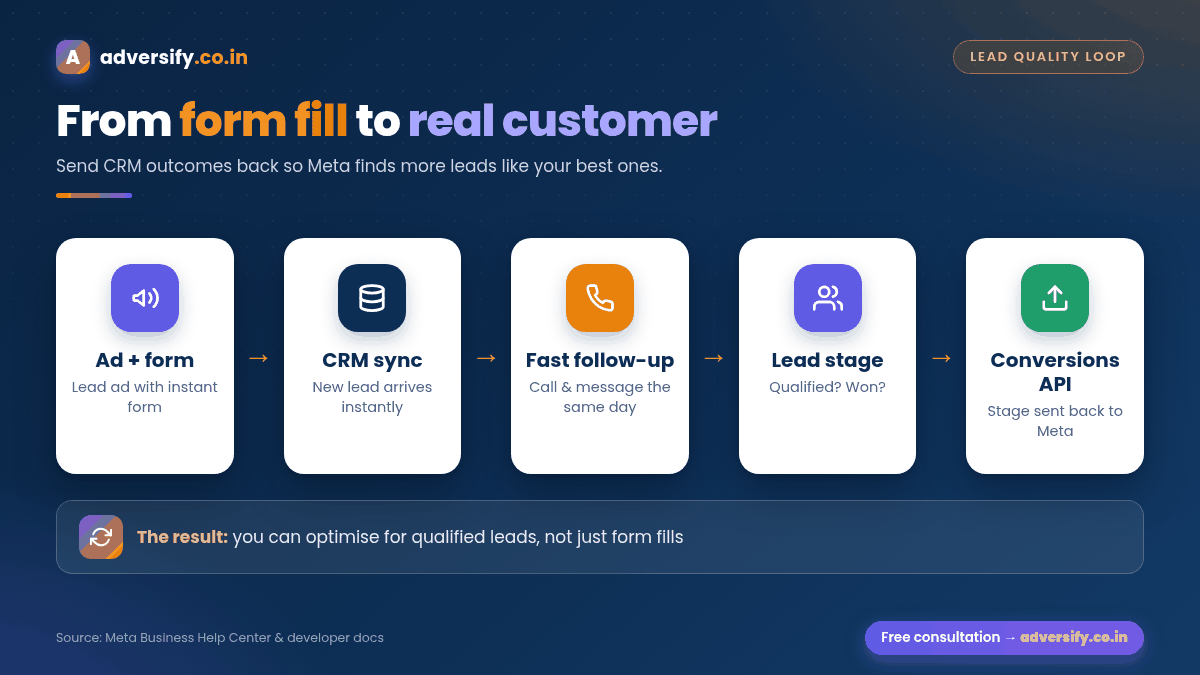
The fastest way to waste a lead is to download a spreadsheet once a week. Meta’s best practices for responding to leads recommend capturing leads immediately with an integrated CRM or Leads Center, because reducing the time to follow up can improve lead quality.
Your options for receiving leads
- Leads Center in Meta Business Suite: view, filter and manage leads in one place (About Leads Center).
- CRM integration: connect a supported CRM in Meta Business Suite so new leads arrive automatically, or connect through a tool such as Zapier.
- API and webhooks: developers can retrieve leads in real time through the Lead Ads API.
- CSV download: from Ads Manager or Business Suite. Fine for testing, but slow for daily work.
Whatever you choose, remember that Meta makes leads data available for download for only 90 days from submission. A CRM keeps your data safe beyond that window.
Build a follow-up routine
- Run ads mainly during hours when your team can respond, as Meta suggests, using ad scheduling where available.
- Send an instant acknowledgement by WhatsApp, SMS or email saying who will call and when.
- Call as soon as possible, ideally the same day, and try more than once at different times.
- Record the outcome of every lead in your CRM: not reachable, not interested, qualified, meeting booked, won.
- Review those outcomes weekly by ad, audience and form to see what brings real customers.
Step 5: Optimise for quality with the Conversions API
By default, the Maximize number of leads goal shows your ads to people most likely to submit a form. That is not the same as people most likely to become customers. Meta’s performance goals for lead ads include Maximize number of qualified leads, which shows ads to people most likely to convert after sharing their details.
To learn what “qualified” means for your business, Meta needs data from your CRM. This is where the Conversions API comes in. Meta’s Conversions API for CRM integration (still called conversion leads in the developer docs) lets you send lead-stage events, such as qualified, opportunity or customer, back to Meta.
Is your business a good fit?
Meta’s developer documentation lists guidelines for this integration, including:
- You use Facebook or Instagram lead ads with instant forms.
- You store the Meta lead ID in your CRM (recommended), or can send other identifiers such as email or phone.
- You generate at least 200 leads per month.
- You can upload data at least once a day.
- The stage you want to optimise for happens within 28 days of the lead, and converts at between 1% and 40% of leads.
Important update: Meta’s help center states that from April 2026 the qualified leads performance goal is no longer available for new campaigns without Conversions API integration, with existing campaigns affected from August 2026. Meta’s help page also shares its own comparison showing better lead quality efficiency for this setup; treat any such figure as Meta’s average, not a promise for your account. You can start the setup from Events Manager or while creating a lead ad, as described in Set up your CRM for qualified leads.
If you are not ready for a full integration yet, at least record outcomes in a spreadsheet or CRM. The habit of tracking which leads became customers is what makes the later integration valuable.
Creative and audience basics
Creative that pre-qualifies
Meta’s best practices to create lead ads recommend an engaging image or video and a clear call to action that explains why people should fill out the form. For quality, also make the ad specific: who the offer is for, where you serve and what happens after they enquire. Vague “Get a free quote” ads attract vague leads. Use real photos of your work, team or location where possible, and test a few angles rather than one ad.
Audiences
- Placements: Meta recommends Advantage+ placements to reach people across Facebook, Instagram and WhatsApp. Higher intent forms only show in mobile Feeds.
- Lookalikes from customers: Meta suggests building lookalike audiences from existing customers rather than everyone who submitted a form.
- Re-engage form openers: create an engagement custom audience of people who opened your form but did not submit.
- Location: keep it to areas you actually serve. Leads from outside your service area are a common hidden cause of “poor quality”.
Not sure whether Meta or Google suits your business better? Our comparison of Google Ads vs Meta Ads explains how intent differs on each platform.
Common Meta lead ads mistakes
| Mistake | What happens | Better approach |
|---|---|---|
| Only contact fields, no qualifying question | High volume, many casual or irrelevant leads | Add one or two multiple-choice qualifying questions |
| Judging success by number of leads alone | Meta optimises for form fillers, not buyers | Track qualified leads and sales per campaign |
| Calling leads days later | People forget the enquiry or choose a competitor | CRM sync, instant acknowledgement and same-day calls |
| No intro or expectation setting | “I never filled any form” responses | Say clearly who will contact them and when |
| Downloading CSVs occasionally | Leads older than 90 days are lost | Use Leads Center or a CRM integration |
| Asking prohibited questions | Ads rejected or account problems | Check Meta’s prohibited questions list before launch |
| Changing everything every day | Delivery never stabilises, results are hard to read | Make planned changes and give each test time |
Meta lead ads launch checklist
- Business portfolio, Facebook Page and Instagram account connected; privacy policy page live on your website.
- Campaign uses the Leads objective; Special Ad Category selected if your industry requires one.
- Conversion location and form type chosen deliberately (higher intent if every lead gets a call).
- Intro explains the offer and what happens next; one or two qualifying questions; no prohibited questions.
- Phone number verification considered if your team calls every lead.
- CRM or Leads Center connected and tested with a test lead before launch.
- Instant acknowledgement message and a named person responsible for follow-up.
- Lead stages defined in your CRM (new, contacted, qualified, won, lost) and recorded for every lead.
- Conversions API for CRM planned or set up so you can use the qualified leads goal.
- Ads scheduled for hours you can respond; location limited to your service area.
- Two or three creative angles ready to test; weekly review date in the calendar.
Frequently asked questions
What is the difference between more volume and higher intent forms?
More volume forms are designed for quick submission and more leads. Higher intent forms add a note that your business may follow up and a review screen to confirm details, which Meta says helps get more intentional submissions. Higher intent forms run only in Facebook and Instagram mobile Feeds.
Why are my Meta leads poor quality?
Common causes are forms with no qualifying questions, slow follow-up, unclear ads, targeting outside your service area and optimising only for the number of leads. Fix the form and follow-up first, then work towards CRM-based optimisation.
How long are leads stored by Meta?
Meta makes leads data available for download for up to 90 days after submission. Connect a CRM or download regularly so you do not lose leads.
Do I need the Conversions API for Meta lead ads?
Not to run basic lead ads. But Meta now states that the qualified leads performance goal requires Conversions API integration for new campaigns, so it is needed if you want Meta to optimise for lead quality.
Can I run lead ads on Instagram only?
Yes, you can choose placements manually, although Meta recommends Advantage+ placements. Remember that some features differ by platform and higher intent forms only show in mobile Feeds.
How do I decide my Meta lead ads budget?
It depends on your market, competition and how many leads your team can handle. Our guide to Meta Ads cost in India explains the factors that affect spend, and we can recommend a starting plan for your business.
Get help with your Meta lead generation
Adversify plans and manages Facebook and Instagram lead generation campaigns for businesses across India from our offices in Noida and New Delhi. We set up forms that qualify, connect leads to your CRM and help you feed real outcomes back to Meta. Learn more about our Meta Ads management and PPC management services, or contact our team for a free consultation.