
If you run a small business in India and have ₹20,000 or ₹50,000 a month for advertising, the first real decision is where to spend it. Google Ads and Meta Ads (Facebook and Instagram) both work. They just work in different ways, for different kinds of buyers, at different stages of the decision.
This guide compares the two platforms honestly: how each one charges, who each one reaches, which businesses tend to do better on which, and how to split a modest budget so you can find out for yourself without burning money.
Key takeaways
- Google Search ads catch people who are already looking for what you sell. Meta ads put your offer in front of people who were not searching but match your audience.
- On Google Search you usually pay per click. Meta says that, unless specified otherwise, you are usually charged based on impressions.
- Urgent, high-intent services (repairs, clinics, legal, B2B) usually start better on Google. Visual products, offers, events and new categories often start better on Meta.
- Meta ad sets usually exit the learning phase after about 50 results in the week after a significant edit, so tiny budgets can keep campaigns stuck in learning.
- For many small businesses, the best answer is a staged test on both, judged on cost per qualified lead or sale rather than cost per click.
The core difference: intent vs discovery
Think about how a customer reaches you on each platform.
On Google, a person in Lajpat Nagar types “AC service near me” because their AC has stopped cooling in May. They have a problem right now and are comparing options. Your ad appears because of what they searched.
On Meta, a person scrolling Instagram in the evening sees a reel from a new home bakery in Noida offering customised birthday cakes. They were not looking for a cake, but the ad is relevant to them, and they save it for their daughter’s birthday next month. Your ad appears because of who they are and what they engage with.
Google is strongest at capturing existing demand. Meta is strongest at creating demand and building familiarity. Neither is “better” in general; one usually fits your business better at the start.
Google Ads vs Meta Ads: side-by-side comparison
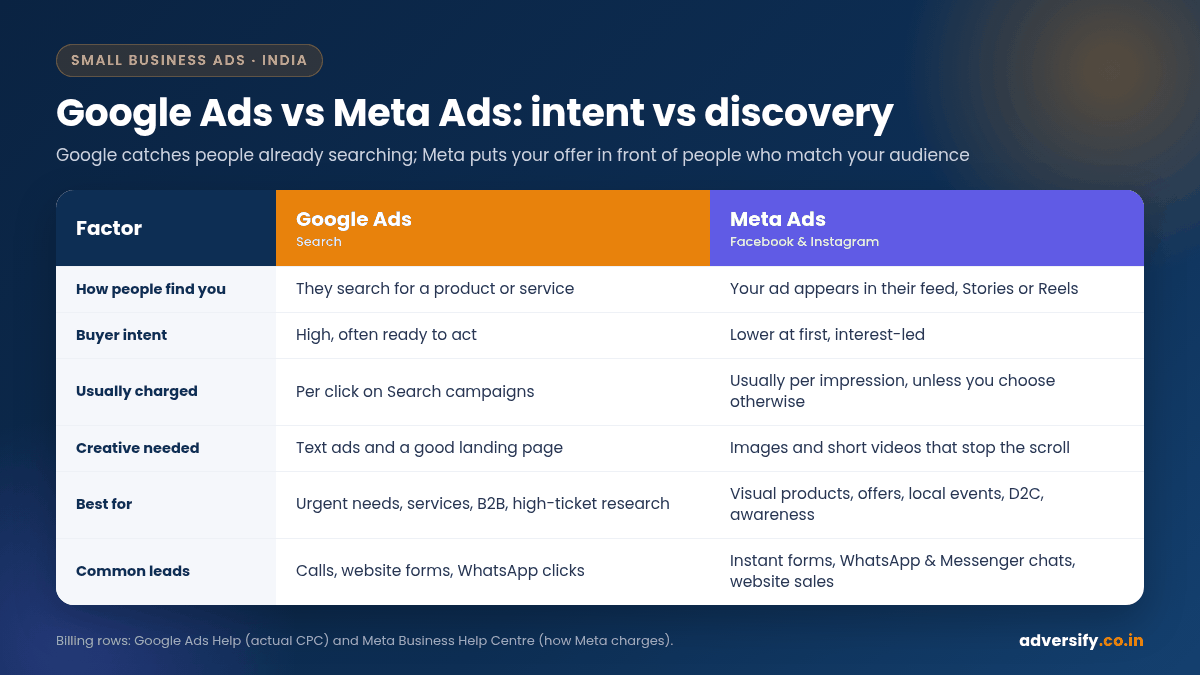
| Factor | Google Ads (Search) | Meta Ads (Facebook and Instagram) |
|---|---|---|
| How people find you | They search for a product or service | Your ad appears in their feed, Stories or Reels |
| Buyer intent | High, often ready to act | Lower at first, interest-led |
| How you are usually charged | Per click on Search campaigns | Usually per impression, unless you choose another option |
| Targeting | Keywords, location, schedule, audiences | Demographics, interests, behaviours, custom and lookalike audiences, broad targeting |
| Creative needed | Mainly text ads and a good landing page | Images and short videos that stop the scroll |
| Speed to first leads | Fast once ads are approved | Fast, but needs a learning period to stabilise |
| Best for | Urgent needs, services, B2B, high-ticket research | Visual products, offers, local events, D2C brands, awareness |
| Common lead types | Calls, website forms, WhatsApp clicks | Instant forms, WhatsApp and Messenger chats, website sales |
Sources for the billing rows: Google Ads Help on actual CPC and Meta Business Help Centre: How Meta charges for ads.
How each platform decides which ad wins
Google: Ad Rank
Google runs an auction for each search. Ad Rank decides whether and where your ad shows, using factors including your bid, your competition, the context of the search and your ad quality (Google Ads Help: About Ad Rank). Relevant ads and landing pages help you compete without simply paying more.
Meta: total value
Meta also runs an auction every time there is a chance to show an ad. It picks the ad with the highest “total value”, which Meta describes as a combination of three things: your bid, the estimated action rate (how likely this person is to take the action you want) and ad quality (Meta Business Help Centre: About ad auctions). Meta states that a more relevant ad can win against ads with higher bids, and that clickbait and engagement bait do not improve performance.
The common lesson: on both platforms, relevance lowers your costs. Lazy ads cost more.
When Google Ads is usually the better first choice
Urgent or problem-solving services
Plumbers, pest control, AC repair, locksmiths, emergency dentists, car towing. When someone needs help today, they search. Meta can still work for these, but you are interrupting people who may not need you this week.
Clinics and professional services
People searching “physiotherapist in Sector 62 Noida” or “GST registration consultant in Delhi” have already decided they need the service. You are competing for the choice of provider, which suits Google well.
B2B products and services
A procurement manager looking for “industrial packaging supplier in Gurgaon” will usually search. B2B targeting on Meta exists but is less precise for niche job roles and industries.
High-ticket purchases with active research
Real estate, higher education, cars and home interiors involve weeks of searching and comparing. Google lets you appear at each research step with different keywords.
When Meta Ads is usually the better first choice
Visual and impulse-friendly products
Clothing, jewellery, home décor, cosmetics, food and gifting sell well when people can see them. A good 15-second reel can do what a text ad cannot.
New products nobody is searching for yet
If you have launched a new kind of product, there may be little or no search volume for it. Meta lets you reach likely buyers before they know the category exists.
Local offers and events
A café launching a weekend brunch, a gym running a festive membership offer, or a salon promoting a bridal package. Meta’s location and audience options suit time-bound local promotions.
Brand building and remarketing
Meta is a strong place to stay visible to people who visited your website or engaged with your Instagram profile but did not buy. Repeated, low-cost exposure builds familiarity before the next purchase.
Industry-by-industry starting guide
These are general starting points, not rules. Your competition, offer and creative quality can easily change the answer.
| Business type | Usually start with | Why | Watch out for |
|---|---|---|---|
| Dental or skin clinic | Google Search | People search for treatments and “near me” terms | Medical ad policies on both platforms |
| Home bakery or cloud kitchen | Meta | Food is visual; impulse and occasion-driven | Delivery radius and order handling capacity |
| Coaching institute | Both | Google for “coaching near me”, Meta for parents and students in the area | Lead quality from instant forms |
| Real estate project | Both | Google for active buyers, Meta for project awareness | High CPCs and lots of unqualified enquiries |
| D2C fashion brand | Meta | Visual product, strong for discovery and remarketing | Creative fatigue; needs fresh ads often |
| B2B manufacturer | Google Search | Buyers search for specific products and suppliers | Long sales cycles; track leads in a CRM |
| Packers and movers, AC repair | Google Search | Urgent, high-intent searches | Aggregators raising CPCs; use negatives |
| Salon or spa | Both | Google for bookings, Meta for offers and new services | Discount-only customers who never return |
Budgeting on each platform
How Google spends your budget
Google can spend up to twice your average daily budget on a given day, but over a month you will not be charged more than 30.4 times that daily budget (Google Ads Help). A ₹1,000 daily budget therefore caps at ₹30,400 a month for that campaign, before GST.
How Meta spends your budget
Meta treats a daily budget as an average over the week, not a hard daily cap. Its help centre explains that on some days it may spend up to 75% more than your daily budget and less on others, but it will not spend more than seven times your daily budget across a calendar week. Meta notes it is rolling this extra daily flexibility out gradually, so not every account has it yet. Lifetime budgets, by contrast, are a hard cap (Meta Business Help Centre: About budgets).
Why tiny Meta budgets struggle
Meta’s delivery system goes through a learning phase whenever you launch or significantly edit an ad set. Meta says ad sets usually exit learning after about 50 results in the week after the last significant edit, and that performance is less stable and cost per result usually higher during this phase (Meta Business Help Centre: About the learning phase).
That gives you a simple budgeting check. If you expect a lead to cost about ₹250, getting 50 leads in a week needs roughly ₹12,500 a week for that ad set, or about ₹1,800 a day. If your budget is much lower, consider optimising for a more frequent event, combining ad sets, or accepting that the ad set may stay in “Learning limited” for a while. These figures are illustrative; plug in your own expected cost per result.
Taxes on both
Ad spend on both platforms is subject to GST in India. Google states 18% GST applies to its India-billed ads (Google Ads Help: Taxes). Meta states that ads billed by Meta India are subject to GST and TDS, and that GST and TDS are added whenever you are charged (Meta Business Help Centre: India GST). Check your invoices for the exact rate applied and ask your CA about input tax credit.
A step-by-step test plan for a ₹30,000 monthly budget
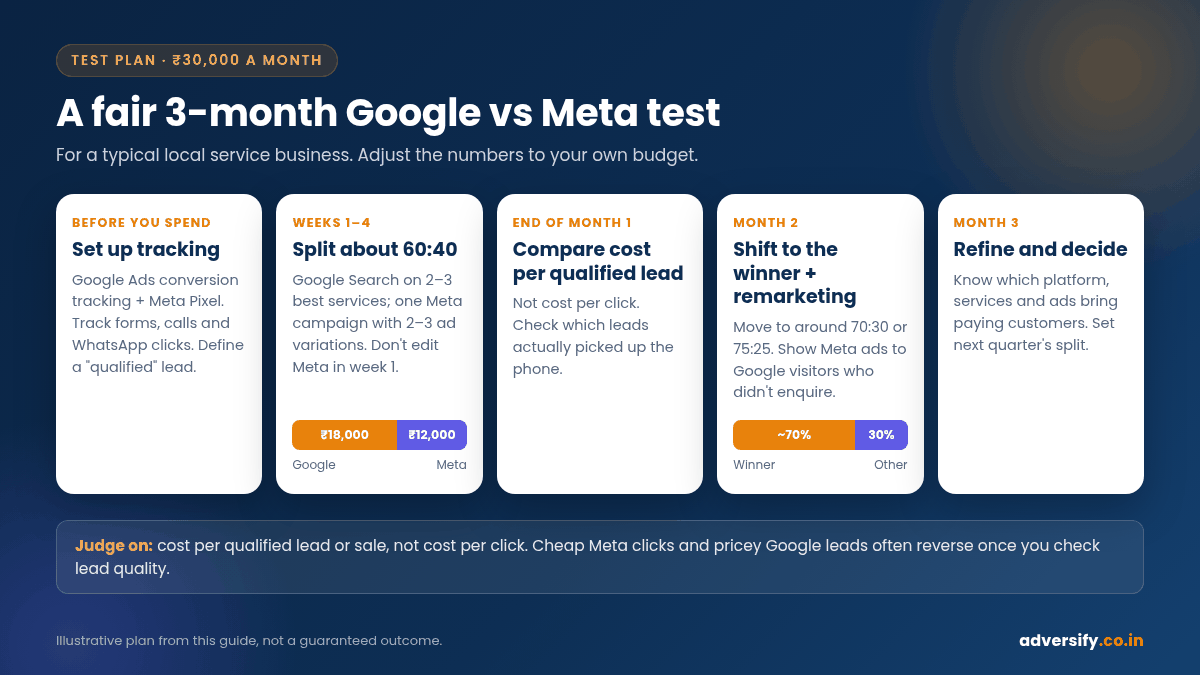
Here is how we would structure a fair three-month test for a typical local service business with ₹30,000 a month in ad spend. Adjust the numbers to your own budget.
- Before spending anything: set up tracking. Install Google Ads conversion tracking and the Meta Pixel, track form submissions, calls and WhatsApp clicks, and decide what counts as a “qualified” lead. Keep a simple sheet or CRM where your team marks each lead as qualified, unqualified or converted.
- Weeks 1 to 4: split about 60:40. Put around ₹18,000 into Google Search on your two or three most profitable services, and around ₹12,000 into one Meta campaign with two or three ad variations (for example, a reel, a carousel and a single image).
- Don’t touch Meta for the first week. Frequent edits reset learning. Check that ads are delivering, but avoid changing targeting or budget daily.
- End of month 1: compare cost per qualified lead, not cost per click. Meta clicks may look cheap, Google leads may look expensive, and the truth often reverses once you check which leads actually picked up the phone.
- Month 2: shift budget towards the winner. If Google produced qualified leads at ₹500 and Meta at ₹900, move to around 70:30 or 75:25. Keep the weaker platform running at a lower level to see if creative improvements change the picture.
- Month 2: add remarketing. Show Meta ads to people who visited your site from Google but did not enquire. This is often one of the most efficient ways to use both platforms together.
- Month 3: refine and decide. By now you should know which platform, services and ads bring paying customers. Set the next quarter’s split on that basis.
How to measure the two fairly
Comparing platforms is harder than it looks, because each one reports conversions in its own way and can count the same customer differently. A few habits help:
- Use one source of truth. Your CRM, lead sheet or sales register decides what counts, not each platform’s dashboard.
- Ask every new customer how they found you. It is simple, imperfect and still very useful.
- Track WhatsApp properly. Many Indian customers prefer WhatsApp to forms. If you only count form fills, you may undervalue the platform that drives chats.
- Judge on revenue where possible. A platform that brings fewer but larger orders may be the better one.
- Give each test enough time. A few days of data on either platform rarely tells you much.
Common mistakes small businesses make
- Boosting posts instead of running campaigns. The “Boost” button is easy, but Ads Manager gives far more control over objective, audience and placements.
- Using broad Google keywords with no negatives. Without negatives, “interior designer” may trigger ads for “interior designer course” and “interior designer salary”.
- Sending all traffic to the homepage. Each service or offer deserves a focused landing page with one clear action.
- Judging Meta in three days. The learning phase alone can take longer than that.
- Ignoring lead follow-up. Leads from instant forms go cold fast. Call within the hour where you can.
- Running the same creative for months. On Meta especially, people stop noticing ads they have seen many times. Refresh regularly.
Should you run both?
Once you have a working setup on one platform, adding the other is usually worth testing. They complement each other well: Google captures people searching now, Meta builds awareness and brings back people who did not convert. It also helps to support paid ads with organic social media marketing, so that people who click through from an ad find an active, credible profile.
If you would rather have one team run both, our Google Ads management and Meta Ads management plans are scoped by number of campaigns, with month-to-month contracts and ad budgets planned separately.
Frequently asked questions
Is Meta cheaper than Google Ads?
Clicks and impressions on Meta often look cheaper, but that does not always mean cheaper customers. Compare cost per qualified lead or cost per sale on your own data before deciding.
Which is better for a new local business?
If people already search for your service, start with Google Search. If your business is visual, offer-led or new to the area, Meta is often a good first step. Many local businesses end up using both.
How much should I spend to test Meta Ads?
Enough for your main ad set to get close to the roughly 50 results a week that Meta mentions for exiting learning. Multiply your expected cost per result by 50 to get a weekly figure.
Do Instagram ads need a separate budget from Facebook ads?
No. Both run through Meta Ads Manager, and one campaign can deliver across Facebook, Instagram and other Meta placements.
Can I run Google Ads and Meta Ads without a website?
Meta can collect leads through instant forms or WhatsApp without a website. Google Search ads need a website or landing page to send people to. Either way, a fast, focused page usually improves results on both.
Not sure where to start?
Tell us your budget, your services and the area you serve, and we will suggest how to split spend between Google and Meta for your first three months. Our team in Noida and Hauz Khas, New Delhi works with small businesses across India. Book a free consultation and we will reply within one business day.