
Search “dentist near me” or “CA in Sector 62” from a phone in Noida and you will see a map with three businesses before any regular website. That map is where many customers decide who to call, message or visit. Getting into them is not luck. It comes from doing a long list of small things properly and keeping them up to date.
This local SEO checklist is written for Noida and Greater Noida businesses: clinics, coaching centres, restaurants, salons, showrooms, real estate offices, CA firms and service businesses that travel to customers. It follows Google’s own Business Profile guidelines, which we link to throughout, and it reflects the order in which we work through local SEO for a new client.
Key takeaways
- Google says local results are mainly based on relevance, distance and prominence. You can’t change distance, so the checklist focuses on relevance (complete, accurate information) and prominence (reviews, links and mentions).
- Your Google Business Profile must reflect your real-world business: real name, precise address or service area, local phone number, accurate hours and the fewest categories that describe your core business.
- Keep your name, address and phone number (NAP) identical on your website, Google, directories and social profiles.
- Ask every genuine customer for a review, reply to reviews, and never offer incentives or ask only happy customers. Google treats both as policy violations.
- Build useful local pages and LocalBusiness structured data on your website, but avoid near-duplicate “sector pages” made only to rank.
- There is no way to pay Google for a better local ranking, and no honest agency can guarantee a top-three map position.
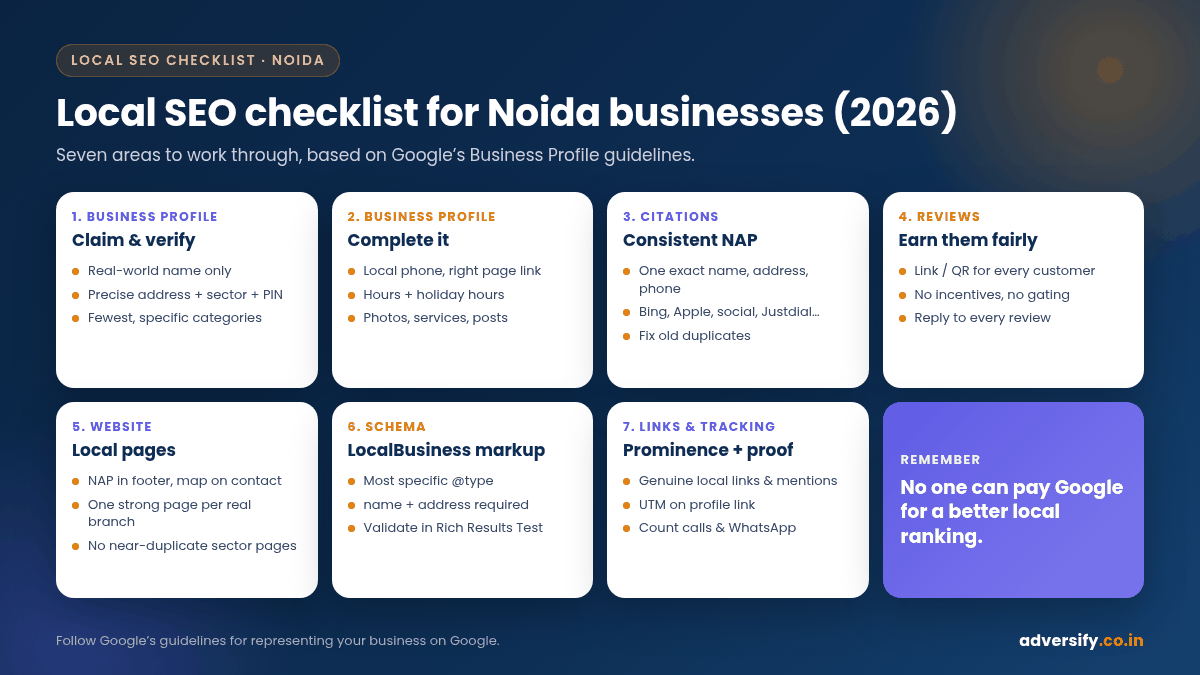
How Google ranks local businesses
Google’s Business Profile help centre says local results are mainly based on three factors (Google Business Profile Help: Tips to improve your local ranking):
- Relevance: how well your profile matches what someone searched for. Complete, detailed information helps Google understand what you do.
- Distance: how far your business is from the searcher, or from the location in their search.
- Prominence: how well-known your business is, including information such as how many websites link to you and how many reviews you have. Google notes that more reviews and positive ratings can help.
Google also states that there is no way to request or pay for a better local ranking. Everything in this checklist is about earning it.
For Noida, distance has a particular effect. The city is laid out in sectors, and someone searching from Sector 18 will often see different map results from someone in Sector 137 or Noida Extension. That is normal. Your job is to be the most relevant and prominent choice near your real location.
Part 1: Google Business Profile checklist
Your Business Profile is the core of local SEO. Before you change anything, read Google’s guidelines for representing your business on Google. Profiles that break them can be suspended.
1. Claim and verify the profile
Search for your business on Google Maps first. If a profile already exists, claim it rather than creating a second one; Google says there should be only one profile per business. Verification tells Google you are authorised to manage the business and makes it more likely to show in results (Google Business Profile Help: Verify your business).
2. Use your real business name, nothing more
Your profile name should match your signage, website and stationery. Google’s guidelines list what must not be added: marketing taglines, service or product keywords, location information, phone numbers, URLs and business hours. “Sharma Dental Clinic” is fine. “Sharma Dental Clinic, Best Dentist in Noida Sector 50” is not. Google warns that adding unnecessary information to the name could get the profile suspended.
3. Get the address exactly right
- Use a precise, real address. Include the shop or office number, floor, building or tower, block, sector and PIN code, for example “Shop 12, Ground Floor, XYZ Plaza, Block C, Sector 18, Noida, Uttar Pradesh 201301”.
- Google allows landmarks and cross-streets only where the official address doesn’t pinpoint the location accurately. In some Noida markets and villages this is genuinely needed; elsewhere, keep it out.
- Drag the map pin to your actual entrance if Google places it wrongly.
- Virtual offices aren’t eligible. A co-working office qualifies only if it has clear signage, receives customers during business hours and is staffed by your team during those hours.
4. Set a service area if you travel to customers
If you are a plumber, pest-control service, home tutor or interior designer who works at customers’ locations and doesn’t receive them at your address, Google says you should hide your address and set a service area instead. Google also says the overall service area shouldn’t extend farther than about two hours’ driving time from where the business is based. A Noida business might list Noida, Greater Noida, Ghaziabad and parts of East Delhi, rather than “all of India”.
5. Choose the fewest, most specific categories
Google advises using as few categories as possible to describe your core business, and choosing ones that complete the sentence “This business IS a…”, not “This business HAS a…”. A physiotherapy clinic should pick the closest specific match, such as “Physiotherapist”, as its primary category, not a long list of every treatment.
6. Add a local phone number and the right website link
Google prefers a phone number that connects to your individual location, under your direct control, rather than a central call centre. Link to the most relevant page on your website: your home page for a single-location business, or the specific location page for each branch.
7. Keep hours accurate, including holidays
Set your regular customer-facing hours and add special hours for Diwali, Holi and other closures. Wrong hours lead to frustrated customers and negative reviews.
8. Write a useful business description
Describe what you offer, who you serve and what makes you different. Google’s guidelines don’t allow links in the description, and the description shouldn’t focus on promotions or prices.
9. Fill in services, products, attributes and photos
Google lists photos and videos, business attributes and complete information among the ways to improve local ranking. Upload real photos of your storefront, signage, interior, team and work. A clear photo of the entrance board helps first-time visitors find you in a busy market or mall.
10. Post updates regularly
Use posts for offers, events, new services and seasonal updates. They keep the profile fresh and give searchers a reason to choose you.
Part 2: NAP consistency and local citations
NAP stands for name, address and phone number. When your details are the same everywhere, Google and customers can trust them. When one directory lists an old number and another shows a previous address, confidence drops.
- Decide on one exact format for your name, address and phone number, and save it in a document your team can copy from.
- Update your website first: footer, contact page and any location pages.
- Update major platforms: Google Business Profile, Bing Places, Apple Business Connect, Facebook and Instagram, LinkedIn (for B2B).
- Update Indian directories relevant to you: commonly Justdial, Sulekha and IndiaMART, plus industry platforms such as Practo for doctors or Zomato for restaurants.
- Join local listings with real value: trade associations, your market or mall’s tenant directory, the industrial association if you are in a Noida industrial sector, and local chambers of commerce.
- Find and fix duplicates. Search your phone number and business name; old listings often survive office moves.
Quality matters more than volume. Fifteen accurate, relevant listings are more useful than 300 low-quality directory submissions.
Part 3: Reviews checklist
Reviews feed directly into prominence and they heavily influence whether a searcher calls you or the next business. Google’s rules are strict, so follow them carefully.
- Ask every genuine customer. Google suggests sharing a review link or QR code with customers (Google Business Profile Help: Tips to get more reviews). Put the QR code at the billing counter and send the link on WhatsApp after the job is done.
- Never offer incentives. Discounts, freebies or payment in exchange for reviews, or for changing or removing negative ones, are prohibited.
- Don’t review-gate. Google’s Maps content policy says merchants must not discourage negative reviews or selectively ask only happy customers (Google Maps: Prohibited and restricted content).
- No staff, family or competitor reviews. Conflict-of-interest reviews are not allowed.
- Don’t pressure customers on the spot or ask them to include specific wording or staff names. Google’s policy calls this out directly.
- Reply to reviews. Thank people, answer questions and respond calmly to complaints. Google says replies show you value feedback and that positive reviews and helpful replies can help your business stand out.
If you are dealing with a fake or abusive review, our guide on how to handle negative Google reviews explains the options, including flagging reviews that break Google’s policies.

Part 4: Website and local page checklist
Your website supports your profile. Google says it can detect category information from your website and from mentions of your business across the web, so the two should tell the same story.
- Put NAP in the footer and on the contact page, in the same format as your profile.
- Embed a Google Map on the contact page and add simple directions from well-known landmarks such as the nearest metro station.
- Create one strong page per real location. If you have branches in Sector 18 and Greater Noida West, each gets its own page with its own address, hours, photos, team and directions.
- Write service pages with local context. “Physiotherapy in Noida” should explain your treatments, who they suit, prices or price ranges if you share them, and how to reach you, not just repeat the city name.
- Avoid doorway pages. Twenty near-identical pages for “AC repair in Sector 1”, “Sector 2”, “Sector 3” with only the sector name changed is exactly what Google’s spam policies describe as doorway abuse (Google Search Central: Spam policies). Build area pages only where you genuinely have something different to say.
- Make it fast and mobile-friendly. Many local searches happen on phones, and a slow site wastes the visit your profile earned.
- Add click-to-call and WhatsApp buttons that work on mobile.
Part 5: Local schema (structured data) checklist
LocalBusiness structured data tells Google your business details in a machine-readable format. Google’s documentation lists name and address as required properties, and recommends properties such as telephone, url, geo (latitude and longitude with at least five decimal places), openingHoursSpecification and priceRange (Google Search Central: Local business structured data).
| Property | Required or recommended | Noida example |
|---|---|---|
@type | Use the most specific type | Dentist, Restaurant, AccountingService rather than plain LocalBusiness |
name | Required | Exactly as on your Business Profile |
address | Required | Street address, addressLocality “Noida”, addressRegion “Uttar Pradesh”, postalCode, addressCountry “IN” |
telephone | Recommended | Include the country code, for example +91 |
geo | Recommended | Latitude and longitude to five decimal places |
openingHoursSpecification | Recommended | Match your profile hours |
url | Recommended | The page for that specific location |
One important detail: Google says aggregateRating and review are only recommended for sites that capture reviews about other local businesses. Don’t mark up your own Google rating on your own site as if it were a review snippet. Validate your code with the Rich Results Test, and see our guide on how to add schema for a WordPress walkthrough. Google also notes that it doesn’t guarantee structured data will produce any special display in results.
Part 6: Local links and mentions
Since prominence includes how many websites link to your business, local links help. The best ones come from real relationships:
- Local news coverage of an event, launch or community activity.
- Sponsoring a school event, sports tournament or residents’ welfare association programme in your sector.
- Membership listings with trade bodies and professional associations.
- Partner and supplier websites that list where their products are available.
- Guest articles or expert quotes on genuinely relevant Indian websites.
Avoid paid link packages and link networks; they break Google’s spam policies and the risk isn’t worth it.
Part 7: Tracking and monthly routine
- Business Profile performance: calls, direction requests, website clicks and the searches that showed your profile.
- Google Search Console: clicks and impressions for local terms and location pages.
- UTM tags on your profile’s website link, so profile visits show separately in Google Analytics.
- Call and WhatsApp tracking, so you can count enquiries rather than just rankings.
A simple monthly routine: check that your profile details haven’t been changed by suggested edits, reply to every new review, add new photos, publish two or three posts, fix any citation errors you find, and review the enquiry numbers. Local SEO often moves faster than national SEO, but it still takes consistent work; our article on how long SEO takes sets realistic expectations.
The complete local SEO checklist at a glance
| Area | Task | Done? |
|---|---|---|
| Business Profile | Claimed, verified, only one profile per location | ☐ |
| Business Profile | Real-world name with no added keywords | ☐ |
| Business Profile | Precise address with sector and PIN, or hidden address plus service area | ☐ |
| Business Profile | Fewest, most specific categories; hours and holiday hours set | ☐ |
| Business Profile | Description, services, attributes, real photos, regular posts | ☐ |
| Citations | Identical NAP on website, Bing, Apple, social and key Indian directories | ☐ |
| Reviews | Review link and QR code shared with every customer; no incentives or gating | ☐ |
| Reviews | Every review answered | ☐ |
| Website | NAP in footer, map on contact page, one strong page per real location | ☐ |
| Website | Fast, mobile-friendly, click-to-call and WhatsApp buttons | ☐ |
| Schema | LocalBusiness markup with the most specific type, validated | ☐ |
| Links | Genuine local links and mentions, no paid link schemes | ☐ |
| Tracking | Profile insights, Search Console, UTM tags, call tracking | ☐ |
Frequently asked questions
Can I rank in Noida if my office is in Delhi?
Your Business Profile appears for searches near your actual address, so a Delhi office will usually show more for Delhi searches. A service-area business can list Noida in its service area if it genuinely serves customers there, within Google’s guidance on service area size. Your website can still rank organically for Noida terms with good, relevant content.
Should I add “Noida” to my business name on Google?
Only if it is genuinely part of your registered, real-world business name that appears on your signage. Google’s guidelines don’t allow adding location information to the name otherwise, and doing so risks suspension.
How many reviews do I need to rank?
There is no fixed number. Google says more reviews and positive ratings can help prominence. Focus on a steady flow of genuine reviews and helpful replies rather than a target count.
Can I have more than one Business Profile?
Only one per real location. Separate branches with their own staff and address can each have a profile. Duplicate profiles for the same location aren’t allowed.
Is local SEO different from regular SEO?
It overlaps a lot, but local SEO adds the Business Profile, map results, reviews, citations and location signals on top of normal website SEO.
Can an agency guarantee a top-three map ranking?
No. Google itself says there is no way to request or pay for a better local ranking. An honest agency will show you the work, the reasoning and the enquiry numbers.
Want a local SEO audit for your Noida business?
We are based in Sector 73, Noida, with a second office in Hauz Khas, New Delhi, and we work with local businesses across Delhi NCR. Our local SEO services cover Business Profile optimisation, citations, reviews, local pages and schema. Request your free SEO audit and we will check your profile and website against this checklist and tell you what to fix first.
3 Responses