
A large share of Indian searches never use “proper” English. People type ac service charge kitna hai, gst registration kaise kare, आटा चक्की के पास or a mix of all three. If your keyword list only contains clean English phrases, you are missing real demand, and you are probably writing pages that do not answer the way your customers actually ask. Hindi keyword research fixes that: it finds the Hindi (Devanagari), Romanised Hindi and Hinglish queries your customers use, groups the spelling variants, and maps each group to the right page.
This step-by-step guide is for Indian business owners, marketers and content teams. It covers how Google treats these searches, which free tools to use (autocomplete, Google Keyword Planner, Google Trends and Search Console), how to cluster messy spellings, when you need a separate Hindi page and when you don’t, and why hreflang is only needed in specific situations.
Key takeaways
- Indian users search in three ways: Hindi in Devanagari, Hindi typed in Latin letters (Romanised Hindi) and Hinglish, a mix of Hindi and English words. Research all three.
- Google says a person in India may search in Hindi using Latin rather than Devanagari characters and still want Hindi results written either way. Treat Roman-script Hindi as real demand, not noise.
- Romanised queries have many spellings (kaise kare, kaise karen, kese kare). Group them into one cluster and one page; never build a page per spelling.
- Search Console’s regex filter can isolate Devanagari and Hinglish queries you already get impressions for. That is often the best data you have.
- Use hreflang only when you publish the same page in more than one language at different URLs. A Hinglish FAQ on an English page does not need it.
What counts as a Hindi or Hinglish search?
Before opening any tool, agree on what you are looking for. In practice you will meet four kinds of queries:
| Query type | Example | What the searcher usually wants |
|---|---|---|
| Hindi in Devanagari | जीएसटी रजिस्ट्रेशन कैसे करें | An answer written in Hindi |
| Romanised Hindi | gst registration kaise kare | Usually the same answer; may accept Hindi or simple English |
| Hinglish (code-mixed) | best ac service near me sasta | A local, practical result; often fine in English with Hindi-friendly wording |
| Indian English with local terms | atta chakki price, kurta set for wedding | An English page that uses the local term people know |
The lines blur, and that is fine. The point is to stop treating anything that is not textbook English as a typo. These are real customers describing real needs in their own words.
How Google handles Hindi and Roman-script searches
Google explained its approach in a Search Central blog post, How Google Search handles multilingual searches. Three points matter for Indian businesses:
- Results are not forced to match the display language. Google says about half the people searching with Google are multilingual and often search in a language that does not match their settings, so it considers several signals to decide which languages to show.
- Roman-script Hindi is recognised. Google’s own example: because of typing difficulty on some keyboards, a person in India might search in Hindi using Latin rather than Devanagari characters but want and receive Hindi results written either way.
- Google encourages content in the languages people use. The same post asks publishers in multilingual areas to create content in those languages, and to follow its technical guidance on localised versions.
Google’s guide to multilingual sites adds a technical detail that surprises many site owners: Google uses the visible content of a page to determine its language and does not use code-level information such as lang attributes or the URL. In other words, a page is “Hindi” to Google because its text is Hindi, not because a tag says so.
Before you start: decide what your site will publish
Keyword research is only useful if you can act on it. Answer these questions first:
- Who are your customers? A wholesaler in Uttar Pradesh, a coaching centre in Delhi and a SaaS company selling to Indian SMEs will see very different language mixes.
- Can you publish good Hindi? If nobody on the team writes natural Hindi, plan to hire or commission a writer before committing to Hindi pages. Weak Hindi content does more harm than none.
- Which pages earn money? Start research around service, product and location pages, then move to informational topics.
Step-by-step Hindi keyword research
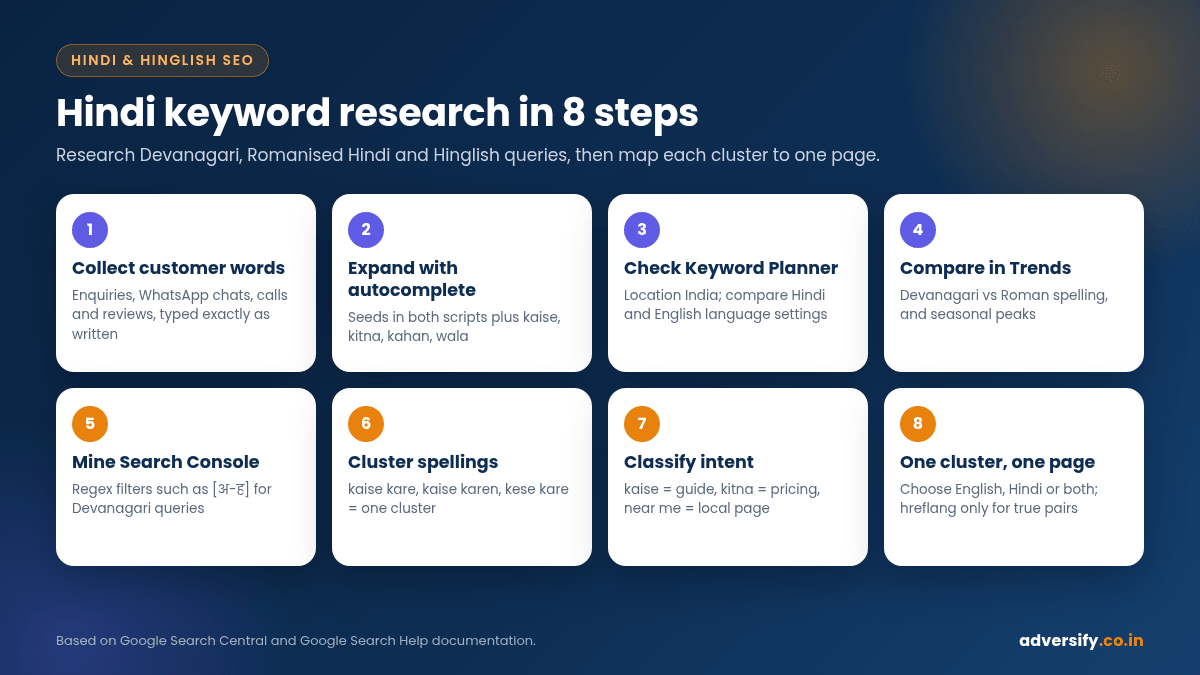
Step 1: Collect the words customers already use
The best seed keywords are not in any tool. Export a month of enquiry forms, WhatsApp chats, call notes, Google Business Profile questions and reviews. Highlight every phrase that describes a need: “chakki ka aata”, “AC gas refill kitne ka”, “EMI pe milega”. Ask your sales or counter staff what customers say on the phone. Write the phrases exactly as typed, including spelling mistakes, because that is how people search too.
Step 2: Expand with Google autocomplete in both scripts
Type your seeds into Google search and note the predictions. According to Google’s help page on how autocomplete predictions work, predictions reflect real searches and take into account the language of the query, the location it comes from, trending interest and the user’s past searches. That makes autocomplete useful, but also personal, so:
- Search in a private or signed-out browser window to reduce personalisation.
- Type each seed twice: once in Devanagari (use a Hindi keyboard or Google Input Tools) and once in Roman letters.
- Add common Hindi question words and modifiers after the seed: kaise, kya, kitna, kahan, kab, kaun sa, wala, sasta, ke liye, ka rate, and their Devanagari forms (कैसे, क्या, कितना, कहाँ).
- Try the “alphabet” method: seed plus a, b, c and so on, to surface longer variants.
Step 3: Check volume and ideas in Google Keyword Planner
Google Keyword Planner is free inside a Google Ads account. Use “Discover new keywords” with your seeds, set the location to India (or your state or city) and run the research twice, once with Hindi and once with English as the language setting, then compare the idea lists.
Keep its limits in mind. Google notes that keywords with very low search volumes are not discoverable or forecastable, and many Romanised spellings are long-tail by nature. Depending on your account, average monthly searches may also appear as broad ranges rather than exact figures. Use Keyword Planner to rank clusters against each other, not as an exact count of searches.
Step 4: Compare scripts and seasons in Google Trends
Google Trends shows relative interest, not absolute volume (see Google’s guide to getting started with Trends). It is ideal for two questions: which version of a term is more popular (for example the Devanagari phrase versus its Roman spelling), and when demand peaks, such as festival or wedding seasons. Set the region to India or a specific state.
Step 5: Mine Search Console with regex filters
If your site already has some traffic, Google Search Console is the most reliable source, because it shows searches that actually triggered your pages. In the Performance report, add a Query filter, choose Custom (regex) and paste a pattern. Search Console uses RE2 syntax and, by default, partial and case-insensitive matching, as explained in Google’s help page on advanced filtering.
| What you want to see | Regex to try | Notes |
|---|---|---|
| Queries containing Devanagari letters | [अ-ह] | Matches any query with a Hindi vowel or consonant in Devanagari |
| Likely Romanised Hindi or Hinglish queries | (kaise|kya|kitna|kitne|kahan|wala|wale|sasta|ke liye|ka rate) | Extend the list with words from your own customers |
| Questions in any script | (kaise|kya|kyon|kyu|कैसे|क्या|क्यों|how|what|why) | Useful for FAQ and blog planning |
| Everything except English-only brand searches | “Doesn’t match regex” with your brand names | Removes navigational noise |
Export the results with the Pages dimension as well. You will often find Hindi or Hinglish queries already landing on English pages, which tells you exactly which pages need better answers.
Step 6: Cluster spelling variants
Romanised Hindi has no fixed spelling, so the same need appears in many forms. Put them in one cluster with a single “primary” phrase for planning:
| Cluster (primary phrase) | Variants you might find | Devanagari form |
|---|---|---|
| gst registration kaise kare | gst registration kaise karen, gst registration kese kare, gst ka registration kaise hota hai | जीएसटी रजिस्ट्रेशन कैसे करें |
| ac service charge kitna hai | ac service kitne ka hota hai, ac servicing rate, ac service ka charge | एसी सर्विस चार्ज कितना है |
| atta chakki near me | aata chakki near me, atta chakki pass mein, chakki wala | आटा चक्की |
The rows above are illustrative examples of how variants group together, not measured search data.
A simple spreadsheet works: one row per query, columns for script, cluster, intent, monthly range and the page it maps to. Sort by cluster, not by individual keyword.
Step 7: Classify search intent
Hindi modifiers are strong intent signals. Use them to decide what kind of page answers each cluster:
| Modifier | Typical intent | Best page type |
|---|---|---|
| kaise kare, kya hai, kyon (कैसे करें, क्या है, क्यों) | Informational | Guide, blog post or FAQ |
| kitna, kitne ka, rate, price, charge | Commercial research | Service or product page with clear pricing guidance |
| near me, pass mein, [area name], wala | Local, ready to buy | Location page plus Google Business Profile |
| sasta, best, kaun sa | Comparison | Comparison page or buying guide |
Step 8: Map each cluster to one page
This is where most projects go wrong. The rule is simple: one cluster, one page. Spelling variants belong on the same page, written naturally. The decision for each cluster is which language that page should be in:
| Situation | What to publish |
|---|---|
| Mostly Roman-script or Hinglish queries, customers comfortable with simple English | An English page written in plain language, using the local terms (atta, chakki, EMI) and a short FAQ that echoes how people ask |
| Strong Devanagari demand and a Hindi-reading audience | A dedicated Hindi page written natively in Devanagari |
| Both audiences are large and you can maintain two versions | An English page and a Hindi page at separate URLs, linked with hreflang |
| Very low or unclear demand | Add a section or FAQ to an existing page; revisit after three months of Search Console data |
Writing pages for Hindi and Hinglish searchers
Hindi (Devanagari) pages
- Write, don’t just translate. Google’s spam policies list generating many pages through automated transformations such as translating, where little value is provided, as an example of scaled content abuse. Machine translation can be a starting draft, but a fluent person must edit every page.
- Keep the whole page in one language. Google advises using a single language for content and navigation on each page and avoiding side-by-side translations. Translate the menu, buttons and form labels on Hindi pages too.
- Use the words people actually use. Everyday Hindi borrows many English words (रजिस्ट्रेशन, सर्विस, ऑनलाइन). Overly formal, Sanskritised Hindi can read as unnatural and miss the queries.
- Title and meta in Hindi. Write the title tag and meta description in the same language and script as the page.
English pages targeting Hinglish queries
- Use the local term in headings and the first paragraph (for example “rice flour (chawal ka atta)”).
- Add an FAQ written the way people ask: “AC service ka charge kitna hota hai?” can be answered in clear English.
- Do not stuff spelling variants into the text. One natural mention of the main phrase and the local term is enough; Google matches variants.
URLs
Google’s multilingual guide says it is fine to use localised words in URLs, as long as you use UTF-8 and escape them properly. Devanagari URLs become long percent-encoded strings when copied and shared, so many Indian sites prefer short Roman-script slugs even for Hindi pages. Either works; pick one convention and keep it consistent.
hreflang: only where it is truly relevant
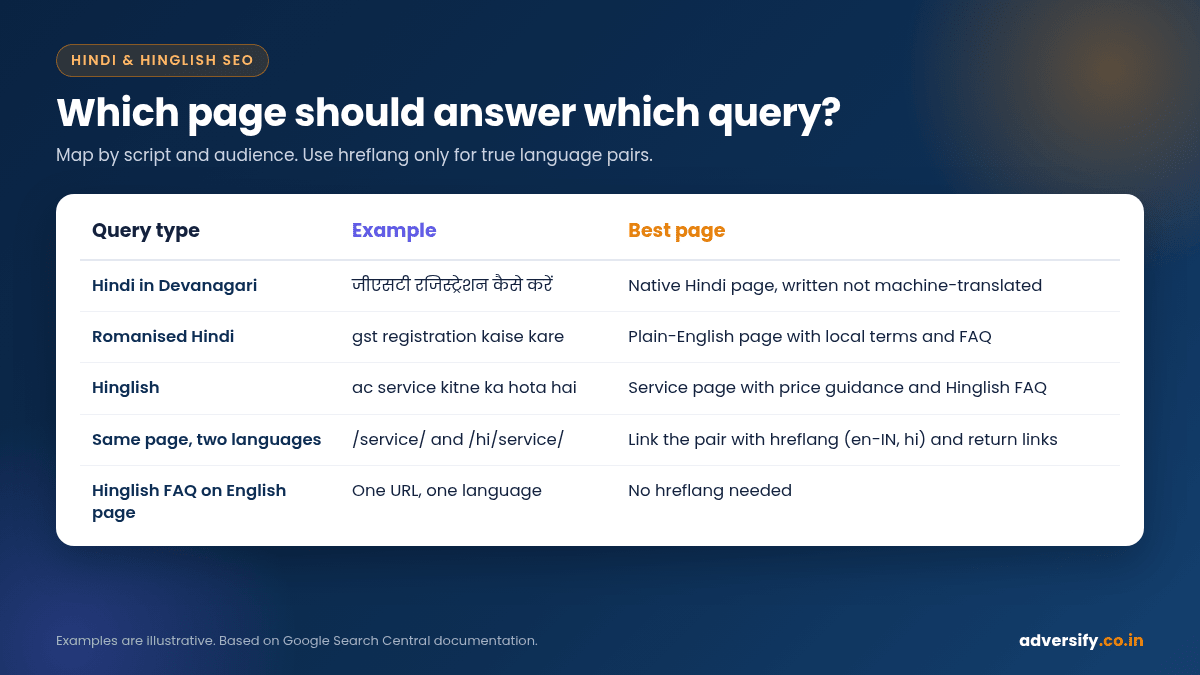
hreflang tells Google that two or more URLs are versions of the same content for different languages or regions. Google’s documentation on localised versions of your pages explains the rules. For most Indian SMEs the honest answer is that you need it less often than you think.
| Your setup | Need hreflang? |
|---|---|
| English page with a Hinglish FAQ section | No. It is one page in one main language. |
| Separate Hindi blog posts on different topics from your English posts | No. They are not versions of the same page. |
| The same service page in English and in Hindi at different URLs | Yes. Link the pair with hreflang (for example en-IN and hi or hi-IN). |
| Hindi content shown by cookie or browser setting on one URL | Change the setup. Google recommends different URLs for different language versions. |
If you do use hreflang, follow Google’s rules: every version must list all versions including itself, return links are mandatory (if page X points to page Y, page Y must point back), language codes use ISO 639-1 (hi for Hindi) with an optional ISO 3166-1 Alpha-2 region (IN), and an x-default can point to a fallback such as a language selector. Google’s documentation shows script subtags too (its example is zh-Hant), but there is no separate language code for “Hinglish”, and a Romanised copy of a Hindi page is rarely worth creating. Also avoid automatically redirecting visitors to a language version based on guesses about their language; Google advises against it and suggests offering links to switch instead.
On WordPress, multilingual plugins can generate hreflang tags for you. Check the output in the page source after setup and confirm the return links.
A worked example (illustrative)
The following is a hypothetical example to show the process, not a client case study. Imagine an AC repair business in Noida with an English website.
- Customer words: call notes show “AC gas bharwana hai”, “service kitne ka”, “AC thanda nahi kar raha”.
- Autocomplete and Keyword Planner confirm clusters around service charges, gas refilling and cooling problems, in both scripts.
- Search Console regex shows Hinglish queries already landing on the generic services page.
- Mapping: the “AC service charge” cluster goes to the existing service page, which gets a clear price-guidance section and a Hinglish-style FAQ; the “AC thanda nahi kar raha” cluster gets a new troubleshooting guide in plain English; Devanagari demand is checked again after three months before any Hindi page is commissioned.
- Local: the Google Business Profile services and description are updated with the same terms customers use.
How to measure Hindi keyword research
| Metric | Where to find it | What good looks like |
|---|---|---|
| Impressions and clicks for Devanagari and Hinglish queries | Search Console with the regex filters above | Growing for the clusters you targeted |
| Queries per page | Search Console, Pages plus Queries | Each cluster mainly lands on its mapped page |
| Enquiries from those pages | GA4 conversions, call tracking, CRM | Leads, not just visits |
| Engagement on Hindi pages | GA4 | Comparable to English pages; low engagement may signal poor-quality Hindi |
Review these monthly; our guide to a monthly SEO report shows how to turn the numbers into next steps. Rankings take time, and nobody can promise a specific position for a keyword in any language.
Common mistakes to avoid
- Creating separate pages for “kaise kare”, “kaise karen” and “kese kare”. It splits relevance and looks like doorway content.
- Publishing raw machine-translated Hindi pages in bulk.
- Mixing Hindi and English paragraphs side by side on one page, making the language unclear.
- Adding hreflang to pages that have no alternate language version, or forgetting return links.
- Relying only on Keyword Planner and discarding low-volume Roman-script phrases that customers clearly use.
- Forgetting internal links. New Hindi or Hinglish-friendly pages need links from related pages; see our guide to internal linking for WordPress.
Hindi keywords in paid search
If you run Google Ads, your search terms report is a fast source of real Hinglish queries, and Keyword Planner ideas from Step 3 can seed campaigns. Feed converting terms back into your SEO keyword map and use them to prioritise content. Our Google Ads management team can help you set up campaigns that test demand before you invest in new pages.
Frequently asked questions
Is Hindi keyword research different from English keyword research?
The process is the same (seeds, expansion, volume, intent, mapping), but you research two scripts, deal with many spellings of the same phrase, and decide which language each page should be in.
Should I target Devanagari or Roman-script keywords?
Usually both, through different means. Roman-script and Hinglish demand can often be served by clear English pages with local terms, while strong Devanagari demand from a Hindi-reading audience deserves native Hindi pages. Let your Search Console and Keyword Planner data decide.
Does Google understand Hinglish?
Google has said that people in India may search in Hindi using Latin characters and still want Hindi results in either script, and its systems try to match results to the language intent. Clear, natural content remains the best way to be understood.
Do I need hreflang for a Hindi blog?
Only if the Hindi posts are versions of English pages at different URLs. Independent Hindi articles on their own topics do not need hreflang.
Can I use AI to create Hindi content?
You can use tools to help draft, but Google’s spam policies treat mass-produced, automatically translated pages with little value as scaled content abuse. Have a fluent writer edit and fact-check every page.
Get help with Hindi and Hinglish SEO
If your customers search in Hindi or Hinglish and your website only speaks formal English, there is likely demand you are not capturing. Our SEO services and local SEO services include keyword research in both scripts, content mapping and transparent monthly reporting, with no ranking guarantees. Request a free SEO audit or contact our team to discuss your market.