
WordPress powers a huge share of business websites, and it can be fast. But a typical business site collects a heavy theme, a page builder, a slider, several marketing scripts and a dozen plugins, and before long pages feel slow on a mid-range phone over mobile data. Google measures that real-world experience with Core Web Vitals, and Search Console reports it for your own site. This guide explains Core Web Vitals for WordPress in plain language: what LCP, INP and CLS measure, the official thresholds, where to find your real data and, most importantly, the practical fixes that work on WordPress and Elementor sites.
We link to Google’s own documentation on web.dev and Google Search Central for every threshold and definition, so you can check the source. One honest note before we start: good Core Web Vitals are part of page experience, not a shortcut to the top of Google. Relevant, helpful content still matters most.
Key takeaways
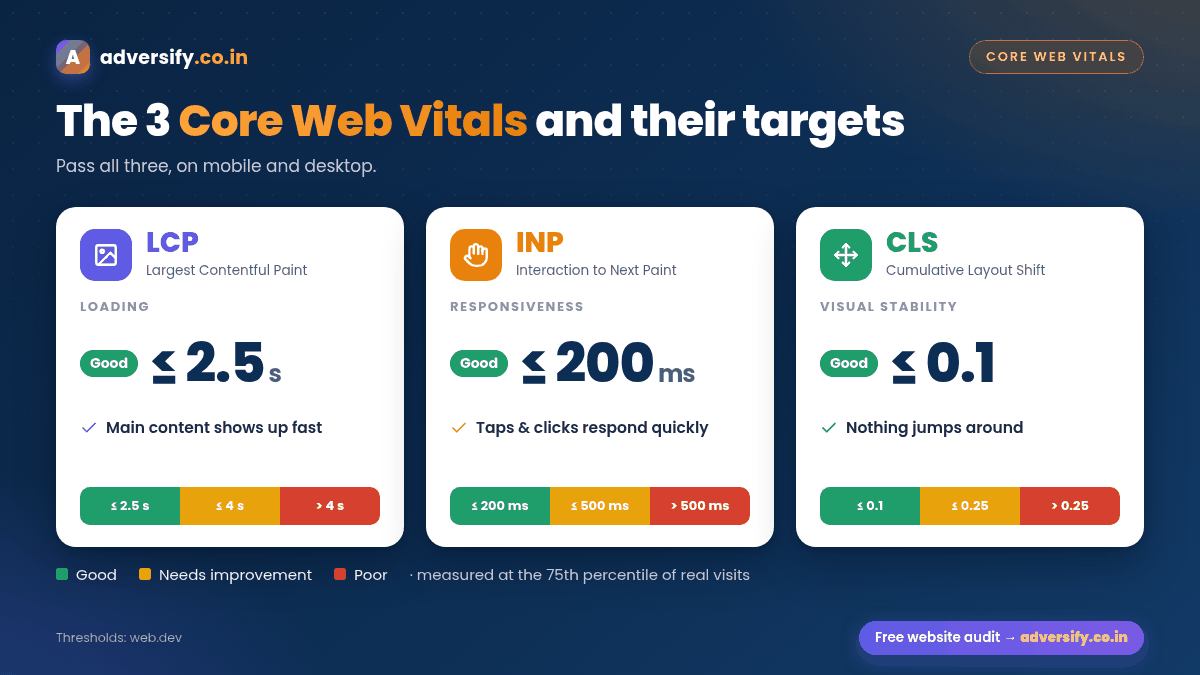
- Core Web Vitals are three metrics: LCP (loading), INP (responsiveness) and CLS (visual stability). Good scores are LCP 2.5 seconds or less, INP 200 milliseconds or less and CLS 0.1 or less, measured at the 75th percentile of real visits.
- INP replaced First Input Delay (FID) as a Core Web Vital on 12 March 2024.
- Field data from real Chrome users (CrUX) is what Search Console reports. Lab scores in Lighthouse are for debugging, not the final verdict.
- On WordPress, most problems come from heavy hero images, slow hosting, no caching, bloated themes and page builders, and too many third-party scripts.
- Fix in order: hosting and caching, the LCP image, layout shifts, then JavaScript and plugins. Re-measure after each change.
What are Core Web Vitals?
Core Web Vitals are a subset of Google’s Web Vitals that measure three aspects of real-world user experience. Google’s Web Vitals overview on web.dev defines them as loading performance, interactivity and visual stability, and Google Search Central’s Core Web Vitals documentation says Google highly recommends site owners achieve good Core Web Vitals for success with Search and for a good user experience generally.
LCP: Largest Contentful Paint (loading)
LCP measures how long it takes for the largest image or text block in the viewport to render. On most WordPress pages, the LCP element is the hero image, a large heading, or a background image set in the page builder.
INP: Interaction to Next Paint (responsiveness)
INP observes the latency of clicks, taps and keyboard interactions throughout a visit and reports a value that nearly all interactions fall below. A slow INP feels like a menu that hesitates when tapped or a form that freezes while typing. It is usually caused by heavy JavaScript.
CLS: Cumulative Layout Shift (visual stability)
CLS measures unexpected layout movement: text jumping when an image or banner loads late, or a button moving just as someone taps it.
Core Web Vitals thresholds (verified on web.dev)
Google classifies each metric as good, needs improvement or poor. The thresholds below come from web.dev’s article on how the Core Web Vitals thresholds were defined:
| Metric | Measures | Good | Needs improvement | Poor |
|---|---|---|---|---|
| LCP | Loading | 2.5 s or less | Over 2.5 s up to 4 s | Over 4 s |
| INP | Responsiveness | 200 ms or less | Over 200 ms up to 500 ms | Over 500 ms |
| CLS | Visual stability | 0.1 or less | Over 0.1 up to 0.25 | Over 0.25 |
Two details matter. First, the score is assessed at the 75th percentile of page loads, segmented by mobile and desktop, so most of your visitors need a good experience, not just you on office Wi-Fi. Second, a page passes only if all three metrics are good.
INP replaced FID in March 2024
The original responsiveness metric was First Input Delay (FID), which only measured the delay before the browser started handling the first interaction. Google’s Search Central announcement introduced INP as its replacement, and web.dev confirmed that INP became a Core Web Vital and replaced FID on 12 March 2024. INP is stricter because it looks at all interactions during a visit, so sites with heavy JavaScript that passed FID can fail INP.
Field data vs lab data: which numbers count?
This is where many WordPress site owners get confused. There are two kinds of data:
- Field data comes from real Chrome users through the Chrome User Experience Report (CrUX). It reflects real devices, networks and locations.
- Lab data comes from a simulated test, usually Lighthouse, on one device profile and network. It is repeatable and great for debugging, but it is not what your visitors actually experienced.
web.dev has a full article on why lab and field data can be different. Lab tools such as Lighthouse cannot measure INP, because no real user interacts with the page; web.dev suggests Total Blocking Time (TBT) as a lab proxy.
The three tools to use
| Tool | Data type | Best used for |
|---|---|---|
| PageSpeed Insights | Field (CrUX, previous 28 days) plus lab (Lighthouse) | Checking one URL or the whole origin, and getting diagnostics |
| Search Console Core Web Vitals report | Field (CrUX), grouped into similar URLs | Seeing which page templates fail across the whole site |
| Chrome DevTools Performance panel | Lab, on your own device | Finding the exact script or element causing a problem |
According to Google’s PageSpeed Insights documentation, if a page does not have enough real-user data, PSI falls back to origin-level data for the whole site, and new or low-traffic sites may show no field data at all. In that case, use lab data as a guide and keep checking Search Console as traffic grows. The Search Console report groups similar URLs and gives each group the status of its worst metric, which is why fixing one page template (for example, all blog posts) often fixes hundreds of URLs at once.
Why WordPress sites often fail Core Web Vitals
In our experience, the same causes come up again and again on WordPress sites:
- Oversized hero images: a large JPG or PNG uploaded straight from a phone or design tool, often set as a CSS background in the page builder.
- Slow server response: overloaded shared hosting, an old PHP version or no page caching, so every visit rebuilds the page from the database.
- Heavy themes and page builders: multipurpose themes and builder add-ons that load CSS and JavaScript for widgets the page does not use.
- Too many plugins and third-party scripts: chat widgets, sliders, pop-ups, social feeds, tracking pixels and heatmaps all compete for the main thread.
- Layout shifts from late content: images without dimensions, web fonts swapping in, cookie banners and ads pushing content down.
How to improve LCP on WordPress
web.dev’s guide to optimising LCP breaks the metric into server response time, resource load delay, resource load time and render delay. On WordPress, that translates into these fixes:
1. Speed up the server response
- Use good-quality hosting with a current, supported PHP version. web.dev’s article on Time to First Byte explains why server response is the foundation of every loading metric.
- Enable full-page caching through your host or a reputable caching plugin, so most visitors get a ready-made HTML page.
- Use a CDN if a meaningful share of your visitors are far from your server.
2. Optimise the hero (LCP) image
- Resize images to the size they are displayed at and compress them. Modern formats such as WebP or AVIF are usually much smaller than PNG or JPG for photos.
- Use a normal image element for the hero rather than a CSS background where you can, so the browser discovers it early.
- Never lazy-load the LCP image. WordPress added native lazy-loading in version 5.5, and later releases improved how it skips images in the first viewport. WordPress 6.3 also began adding
fetchpriority="high"automatically to the image most likely to be the LCP element, as explained in the WordPress 6.3 image performance dev note. Check that a plugin or your theme is not overriding this. web.dev’s guide to Fetch Priority explains how the attribute works.
3. Remove render-blocking resources
- Reduce unused CSS and JavaScript loaded on every page, especially from sliders, icon libraries and builder add-ons.
- Limit web fonts to the weights you actually use, and host them locally where possible.
- Defer non-critical scripts so they do not block the first render. Test carefully: aggressive “combine and defer everything” settings can break menus and forms.
How to improve INP on WordPress
INP problems are almost always JavaScript problems. web.dev’s guide to optimising INP focuses on reducing long tasks and the work done in response to each interaction. Practical WordPress steps:
- Audit third-party scripts. List every chat widget, pixel, heatmap, social embed and pop-up tool. Remove what nobody uses, and load the rest only where needed.
- Delay non-essential scripts until interaction where your caching or performance plugin supports it, but exclude scripts your menus, forms and checkout depend on.
- Cut plugin overlap. Two slider plugins, two form plugins or several “addon packs” for the page builder multiply the JavaScript on every page.
- Simplify heavy interactive elements: mega menus, filters, carousels and animated counters often run expensive code on every tap.
- Test on a real mid-range Android phone, because that is where INP problems show up first.
How to improve CLS on WordPress
web.dev’s guide to optimising CLS lists the usual causes: images without dimensions, ads and embeds, late-loading content and web fonts. On WordPress:
- Make sure images and video embeds have width and height attributes (WordPress adds these for images inserted through the editor; custom theme code and some builder widgets may not).
- Reserve space for ad slots, embeds, cookie banners and announcement bars instead of letting them push content down.
- Avoid inserting content above existing content after load, such as a promo bar that appears a second later.
- Use
font-displaysettings and preloaded fonts carefully so text does not reflow when the web font arrives. - Check sticky headers and mobile menus, which often cause shifts on scroll.
Elementor and page builder tips
Many business sites, including ours, are built with Elementor, and it is entirely possible to pass Core Web Vitals with a page builder. The key is restraint:
- Turn on the performance-related features in Elementor’s settings (they have changed names between versions, so check the current options and test each one on staging).
- Use fewer nested sections and containers. Deep nesting increases DOM size, which slows rendering and interactions.
- Avoid entrance animations on above-the-fold elements, especially the hero heading and image.
- Prefer a real image widget for the hero over a section background image.
- Remove unused add-on packs; each can load its own CSS and JavaScript site-wide.
- Build reusable templates for headers, footers and post layouts, so fixing one template fixes every page that uses it.
WordPress’s own performance team also publishes the Performance Lab plugin, a collection of feature plugins (such as modern image formats and speculative loading) that are candidates for WordPress core. Test them on staging first.
A step-by-step plan to improve Core Web Vitals on WordPress
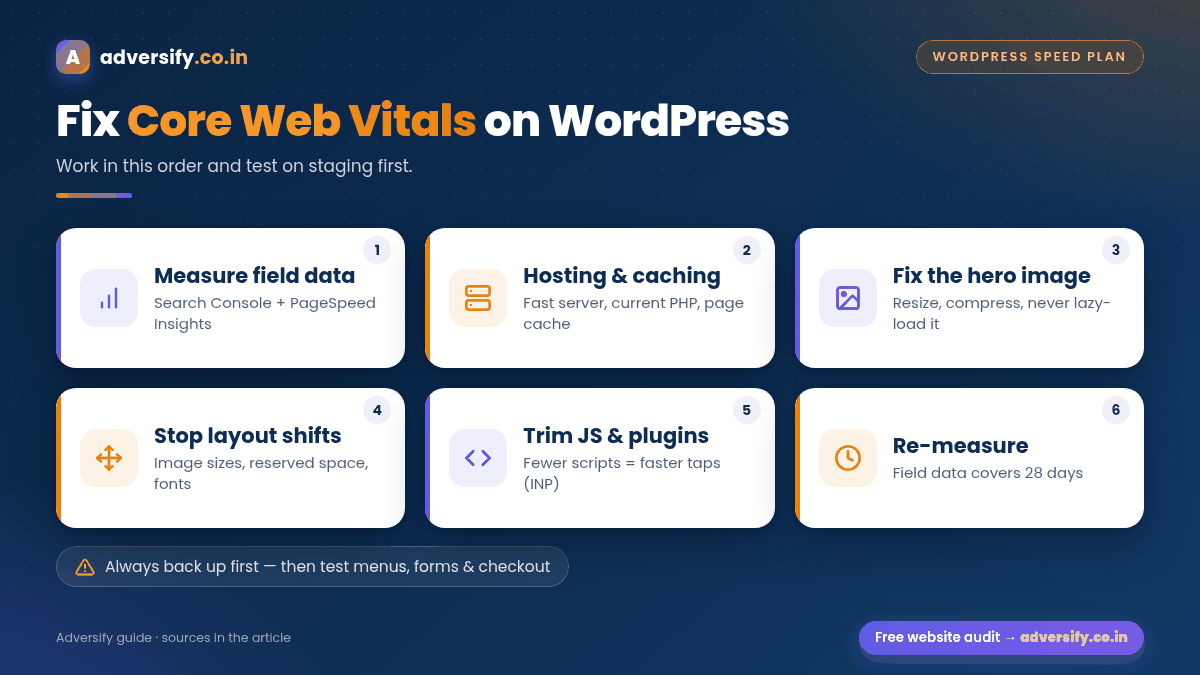
- Measure field data. Open the Core Web Vitals report in Search Console and note which URL groups fail on mobile and desktop, and which metric fails.
- Pick representative pages. Choose one example per template: home page, service page, blog post, product or category page.
- Run PageSpeed Insights on each and note the LCP element, layout-shift sources and long JavaScript tasks.
- Take a full backup and use staging. Performance changes can break layouts and forms. Our WordPress maintenance checklist covers safe updates and backups.
- Fix hosting, PHP and caching first. These improve every page at once.
- Fix the LCP image on each template. Resize, compress, convert, remove lazy-loading from it, and make sure it is discoverable early.
- Stop layout shifts. Add dimensions, reserve space for banners and embeds, and tidy font loading.
- Trim JavaScript and plugins for INP: remove unused plugins and scripts, delay non-essential ones, simplify heavy widgets.
- Test key journeys: menus, forms, WhatsApp and call buttons, checkout, on a real phone.
- Re-measure. Lab scores change immediately, but field data in PageSpeed Insights covers the previous 28 days, so allow about four weeks before judging the result, then validate the fix in Search Console.
Common mistakes to avoid
| Mistake | Why it hurts | Better approach |
|---|---|---|
| Chasing a perfect Lighthouse score | Lab scores are not what Search Console reports | Focus on passing field data at the 75th percentile |
| Installing several optimisation plugins at once | Overlapping caching and minification can conflict and break pages | Use one well-configured caching or performance solution |
| Lazy-loading every image, including the hero | Delays the LCP element | Exclude above-the-fold images from lazy-loading |
| Testing only on desktop | Mobile usually has the worst field data | Check mobile in Search Console and on a real phone |
| Ignoring third-party scripts | Chat, pixel and pop-up scripts are common INP culprits | Audit and remove or delay non-essential scripts |
| Fixing once and forgetting | New plugins, banners and redesigns can undo the work | Re-check after every major site change |
Do Core Web Vitals affect rankings?
Google’s page experience documentation says its core ranking systems look to reward content that provides a good page experience, and it advises site owners not to focus on only one or two aspects. Core Web Vitals are one of those aspects, alongside things like HTTPS, mobile-friendliness and avoiding intrusive ads. In practice, faster pages tend to keep more visitors and convert better, which is reason enough to improve them, but nobody can honestly promise a ranking jump from speed work alone. If rankings are the goal, combine performance work with strong content and technical SEO.
Frequently asked questions
What is a good Core Web Vitals score for WordPress?
The same as for any site: LCP of 2.5 seconds or less, INP of 200 milliseconds or less and CLS of 0.1 or less, at the 75th percentile of real visits on both mobile and desktop.
Why does PageSpeed Insights show different results every time?
The lab test (Lighthouse) runs a fresh simulation each time, so network and server variations change the result. The field data section is based on 28 days of real visits and is more stable.
Why does Search Console say “No data available”?
Your site may not have enough real Chrome visits for CrUX yet, or the property may be new in Search Console. Use lab tests meanwhile, and check again as traffic grows.
Is Elementor bad for Core Web Vitals?
Not by itself. Elementor sites can pass Core Web Vitals when they use fewer nested containers, optimised hero images, limited add-ons and sensible caching. Problems usually come from how the page was built, not the builder alone.
Will a caching plugin fix Core Web Vitals?
Caching mainly improves server response and helps LCP. It does not fix oversized images, layout shifts or heavy JavaScript, so it is one step of the plan, not the whole plan.
How long does it take for improvements to show in Search Console?
Field data is a rolling 28-day window, so expect around four weeks before the report fully reflects your changes. You can start validation in Search Console once you have fixed an issue.
Get a free Core Web Vitals check
Adversify designs, maintains and optimises WordPress and Elementor websites for businesses across India from our offices in Noida and New Delhi. If your site is failing Core Web Vitals, we can review your field data, hosting, images, plugins and scripts and give you a prioritised fix list, then help with the work through our website maintenance, web design and SEO services. Request a free website and SEO audit or contact our team to discuss your site.