
Google Ads has no fixed price list. You can run a campaign in India on ₹300 a day or ₹3 lakh a day, and a click can cost ₹4 or ₹400 depending on what you sell and who you are bidding against. That flexibility is useful, but it also makes budgeting confusing for first-time advertisers.
This guide explains how Google Ads pricing actually works, gives indicative cost-per-click (CPC) ranges for common Indian industries, shows how to plan a monthly budget from your lead targets, and covers what agencies charge to manage campaigns. Every Google rule we quote links back to Google’s own help pages so you can check it yourself.
Key takeaways
- Google Ads runs on an auction. You set a maximum bid, but Google says your actual CPC is often lower than that maximum.
- CPCs in India vary enormously by industry, city, keyword and season. Treat any industry table, including ours, as a planning starting point and check live estimates in Keyword Planner.
- Your monthly spend per campaign will not exceed 30.4 times your average daily budget, even though Google can spend up to twice the daily budget on a single day.
- Google charges 18% GST on ad spend billed in India (CGST plus SGST or IGST, depending on your billing state).
- Management fees are separate from ad spend. Common models are a flat monthly fee, a percentage of spend, or a mix.
The short answer
For most small and medium businesses in India, a realistic starting point for Google Search ads is somewhere around ₹15,000 to ₹60,000 a month in ad spend, plus GST and any management fee. Very local businesses with cheap keywords can test with less. Competitive sectors such as loans, insurance, education admissions and real estate often need more to get enough clicks to learn anything.
That range is a planning guide based on how CPCs and conversion rates typically behave, not a published benchmark. The right figure for you depends on your CPC, your conversion rate and how many leads you need, which we will work out step by step below.
How Google Ads pricing works
The auction and Ad Rank
Every time someone searches, Google runs an auction among advertisers bidding on matching keywords. Google uses Ad Rank to decide whether your ad shows and in what position. According to Google, Ad Rank is calculated from several factors including your bid, your competition, the context of the search and your ad quality at that moment (Google Ads Help: About Ad Rank).
The practical meaning: the highest bidder does not automatically win. A well-written ad pointing to a relevant, fast landing page can beat a competitor with a bigger bid.
Max CPC vs actual CPC
Your maximum CPC is the most you are typically willing to pay for a click. Google explains that your actual CPC is often less, because you only pay what is needed to clear the Ad Rank thresholds and beat the advertiser immediately below you (Google Ads Help: Actual cost-per-click). If you set a max CPC of ₹50, you might pay ₹32 on one click and ₹47 on another.
Quality Score
Quality Score is a 1 to 10 diagnostic at keyword level, based on expected click-through rate, ad relevance and landing page experience (Google Ads Help: About Quality Score). Google is clear that Quality Score itself is not an input in the auction, but the things it measures reflect the ad quality that does affect Ad Rank. Low scores are a useful sign that your ads or landing pages need work, and better ad quality can help you win positions without simply raising bids.
What you pay for
On Search campaigns you mostly pay when someone clicks. Display and video campaigns can also be charged on impressions or views depending on the bidding option you choose. For most small businesses starting out, Search with cost-per-click bidding is the simplest to understand and control.
Indicative CPC ranges by industry in India
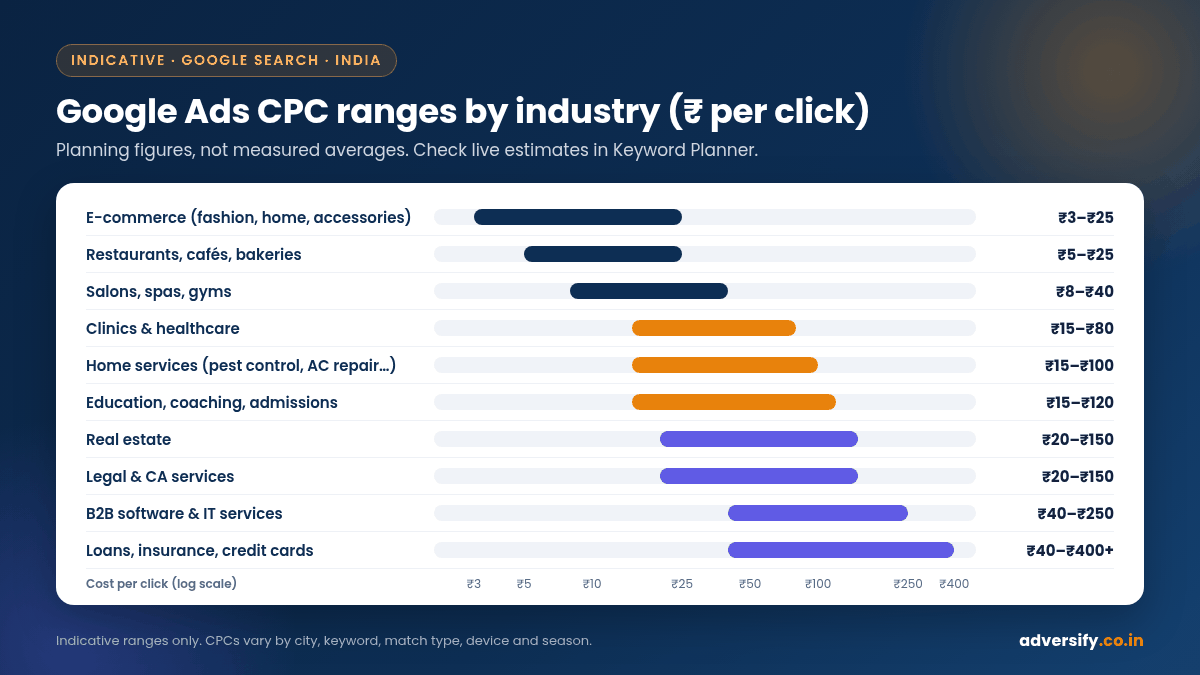
Google does not publish official CPC averages for India by industry. The ranges below are indicative planning figures for Search campaigns, reflecting the broad spread advertisers commonly see. They are not measured averages. Actual CPCs swing widely with city (Delhi, Mumbai and Bengaluru are usually costlier than smaller cities), keyword wording, match type, device and time of year.
| Industry | Indicative CPC range (INR) | Why it sits there |
|---|---|---|
| E-commerce (fashion, home, accessories) | ₹3 to ₹25 | Lots of product searches, many competitors, low order values on average |
| Restaurants, cafés, bakeries | ₹5 to ₹25 | Local searches, low ticket size, heavy competition from delivery apps |
| Salons, spas, gyms | ₹8 to ₹40 | Local and recurring customers, moderate competition |
| Clinics and healthcare (dental, physio, skin) | ₹15 to ₹80 | High patient value, strong local competition |
| Home services (pest control, packers and movers, AC repair) | ₹15 to ₹100 | Urgent intent, many aggregators and lead sellers bidding |
| Education, coaching, admissions | ₹15 to ₹120 | High course fees and strong seasonal spikes around admissions |
| Real estate | ₹20 to ₹150 | Very high ticket values, builders and portals competing |
| Legal and CA services | ₹20 to ₹150 | High client value, specialist terms can be expensive |
| B2B software and IT services | ₹40 to ₹250 | Long sales cycles, high contract values, global competitors |
| Loans, insurance, credit cards | ₹40 to ₹400+ | Among the most competitive categories, large banks and fintechs bidding |
Use this table to get a rough feel, then replace it with real numbers from your own Keyword Planner research (steps below) or, better still, from two to four weeks of live campaign data.
What pushes your CPC up or down
Location targeting
Bidding across all of Delhi NCR costs more than targeting a 5 km radius around your Noida clinic, and the tighter radius usually brings better leads too. Many local businesses waste money showing ads to people who will never travel to them.
Keyword choice and match type
Broad keywords like “lawyer” attract students, job seekers and people looking for free advice. Specific terms like “property lawyer in Saket” cost more per click in some cases but convert far better. Phrase and exact match give tighter control than broad match, especially on a small budget.
Seasonality
CPCs move with demand. Education keywords tend to get busier around admission cycles, gifting and e-commerce terms around Diwali and other festive sales, and AC repair in the summer months. Plan for these swings rather than being surprised by them.
Ad quality and landing page experience
A relevant ad leading to a fast, mobile-friendly page with a clear call or WhatsApp button helps on two fronts: better ad quality supports Ad Rank, and more visitors become leads. If your landing page is slow or generic, consider fixing it before raising bids. Our web design team builds landing pages with this in mind.
Competitor activity
When a large competitor enters or pushes harder on your keywords, CPCs rise. There is not much you can do about this except improve quality, sharpen targeting and focus on terms they ignore.
How Google Ads budgets work: the 30.4 rule
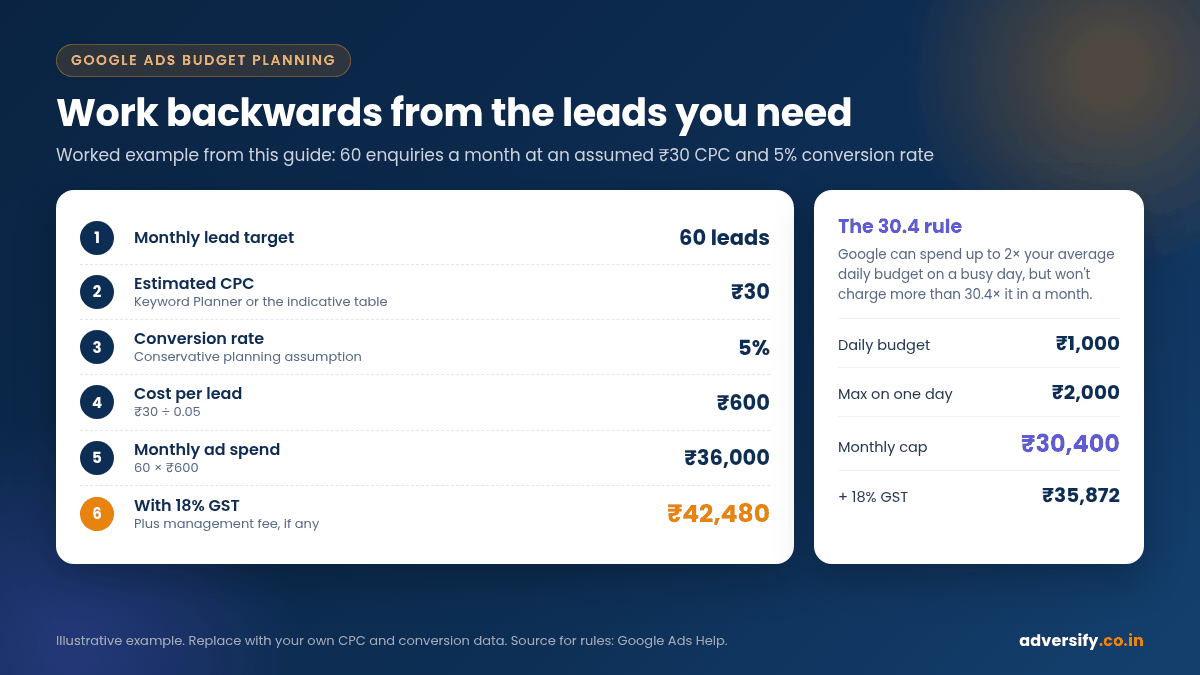
You set an average daily budget per campaign. Google explains that on some days it can spend up to twice that amount to take advantage of traffic fluctuations, but across the month you will not be charged more than 30.4 times your average daily budget (Google Ads Help: About average daily budgets). The figure 30.4 is the average number of days in a month.
So if you set ₹1,000 a day:
- On a busy Monday, the campaign might spend up to ₹2,000.
- Over the month, ad spend will not go above ₹30,400.
- GST is added on top of that. Google states it charges 18% GST on purchases billed in India, as CGST plus SGST for billing addresses in Haryana and IGST elsewhere (Google Ads Help: Taxes in your country). On ₹30,400 that is ₹5,472, taking the total to ₹35,872.
If you are GST-registered, add your GSTIN in your Google Ads payments profile so the invoice carries it. Whether you can claim input tax credit is a question for your CA, as Google notes it cannot give tax advice.
How to plan your Google Ads budget, step by step
The cleanest way to set a budget is to work backwards from the number of leads you need.
- Set a monthly lead target. For example, 60 enquiries a month.
- Estimate your CPC. Use Keyword Planner or the table above. Say ₹30.
- Estimate your conversion rate. The share of clicks that become a call, form or WhatsApp enquiry. If you have no history, assume a conservative figure such as 5% for planning and correct it once real data arrives.
- Work out cost per lead. CPC divided by conversion rate. ₹30 / 0.05 = ₹600 per lead.
- Multiply by your lead target. 60 × ₹600 = ₹36,000 a month in ad spend.
- Add GST and management. ₹36,000 + 18% GST = ₹42,480, plus your agency fee if you use one.
- Sanity-check against customer value. If you close 1 in 6 leads, each customer costs about ₹3,600 in ad spend before GST. Is that acceptable for what a customer is worth to you?
If the numbers do not work, you have four levers: improve the conversion rate (better landing page, faster follow-up), lower the CPC (tighter targeting, better ads), lower the lead target to start, or choose a different channel for now.
Illustrative starting budgets
These are hypothetical starting points to test with, not recommendations for every business. They assume Search campaigns and indicative CPCs.
| Business type | Illustrative starting ad spend / month | What it buys at indicative CPCs |
|---|---|---|
| Local café or bakery, one outlet | ₹10,000 to ₹15,000 | Roughly 600 to 1,500 clicks in a tight radius |
| Dental or physio clinic, one location | ₹20,000 to ₹40,000 | Enough volume to test 2 or 3 treatment-focused ad groups |
| Coaching institute | ₹30,000 to ₹75,000 | Higher in admission season, lower off-season |
| Real estate project | ₹75,000 and up | High CPCs mean small budgets produce too few leads to judge |
| B2B IT services | ₹50,000 and up | Fewer but higher-value leads; longer test periods needed |
Using Keyword Planner to estimate your own costs
Google’s Keyword Planner is free inside a Google Ads account and shows estimated monthly searches and bid ranges for keywords you enter.
- Sign in to Google Ads and open Tools, then Keyword Planner.
- Choose “Discover new keywords” and enter three to five services you sell, plus your website.
- Set the location to the exact cities or areas you serve, not all of India, and set the language.
- Look at the “Top of page bid (low range)” and “Top of page bid (high range)” columns. These indicate what advertisers have historically paid for top positions.
- Remove irrelevant keywords and note the bid range for your most commercial terms.
- Use “Get forecasts” to see estimated clicks and costs at different budgets.
Keyword Planner estimates are a useful guide but they are estimates. Your first few weeks of live data are always more accurate.
Google Ads management fees in India
Ad spend goes to Google. Management fees go to whoever builds and runs the campaigns. Agencies in India usually charge in one of these ways. The ranges are typical figures you will see in quotes and vary between agencies.
| Fee model | How it works | Typical range | Good for |
|---|---|---|---|
| Flat monthly fee | Fixed fee regardless of spend, scoped by campaigns and services | Often ₹10,000 to ₹50,000+ a month | Predictable costs, small to mid budgets |
| Percentage of ad spend | Fee is a share of monthly spend | Commonly around 10% to 20%, often with a minimum fee | Larger budgets that change month to month |
| Hybrid | Base fee plus a lower percentage above a spend threshold | Varies | Growing accounts |
| Setup fee | One-time charge for account build, tracking and landing page advice | Varies; some agencies waive it | New accounts |
Be careful with pure percentage models on small budgets: an agency taking 15% of ₹15,000 earns ₹2,250 a month, which buys very little real attention. On the other hand, percentage fees on large budgets can grow faster than the actual work.
How Adversify structures Google Ads management
Our Google Ads management plans are scoped by the number of campaigns and the level of optimisation, and are quoted after we understand your goals. Your ad budget is planned separately.
- Bronze: up to 2 campaigns, Google Search setup and management, 1 ad A/B test a month, monthly reporting.
- Silver: up to 4 campaigns, Search plus remarketing, 2 A/B tests a month, monthly reporting.
- Gold: up to 6 campaigns, Search, Display and remarketing, 4 A/B tests a month, fortnightly reporting.
- Platinum: up to 10 campaigns, full-account management including lead-gen campaigns, 6 A/B tests a month, weekly reporting.
All plans include keyword research, ad copy, conversion tracking setup, audience targeting, bidding and budget optimisation, landing page recommendations and competitor reviews. The minimum contract is month to month. If you need broader paid media help, see our PPC services.
Hidden costs to plan for
- GST at 18% on ad spend, as explained above.
- Landing pages. Sending ads to your homepage usually wastes money. A dedicated page may be a one-time design cost.
- Conversion tracking. Without tracking calls, forms and WhatsApp clicks, you cannot tell which keywords make money. Setup takes time, even if the tools are free.
- Learning period. The first two to four weeks of a new account often cost more per lead while you find what works.
- Your team’s time. Leads that are not called back within an hour or two tend to go cold. Slow follow-up is one of the most expensive hidden costs in paid ads.
Practical ways to lower your cost per lead
- Add negative keywords from day one. Words like “free”, “jobs”, “course”, “salary” and “DIY” block a lot of junk clicks for service businesses.
- Tighten location targeting. Use a radius or specific pin codes, and target people located in your area rather than people who are just interested in it, where that option fits.
- Schedule ads for the hours you can answer. If no one picks up the phone after 8 pm, consider pausing call-focused ads then.
- Split ad groups by service. “Root canal” and “teeth whitening” need different ads and landing pages.
- Fix the landing page first. Speed, a clear offer, a visible phone number and a short form matter more than a few rupees on bids.
- Let automated bidding work only once you have data. Smart Bidding strategies rely on conversion data. Start with tracking in place and give the system time before judging it.
Google Ads or SEO: which costs less?
Google Ads buys immediate visibility. You pay for every click and traffic stops when the budget does. SEO costs a monthly fee, takes months to build, and keeps producing traffic without per-click charges once it ranks. Google also states that advertising with Google won’t affect your presence in organic search results (Google Search Central), so the two need to be managed separately. Most growing businesses use ads for quick leads while SEO builds a cheaper long-term source.
Frequently asked questions
What is the minimum budget for Google Ads in India?
Google does not set a high minimum for standard campaigns, so you can technically start with a few hundred rupees a day. In practice, the budget needs to buy enough clicks to produce leads you can learn from. For many local businesses that means at least ₹10,000 to ₹20,000 a month in ad spend.
Does Google charge GST on ads in India?
Yes. Google’s help centre states 18% GST applies to purchases billed in India: CGST 9% plus SGST 9% for billing addresses in Haryana, and IGST 18% elsewhere. SEZ advertisers are charged 0%.
Why is my actual CPC lower than my bid?
Because Google charges only what is needed to beat the advertiser below you and clear its thresholds, which is often less than your maximum bid.
Can Google spend more than my daily budget?
On individual days, yes, up to twice your average daily budget. Over a month, though, you will not be charged more than 30.4 times the daily budget for that campaign.
How long before Google Ads starts bringing leads?
Ads can start showing once they are approved, so clicks can begin within hours. Getting a steady, affordable cost per lead usually takes a few weeks of testing and refining.
Should I manage Google Ads myself or hire an agency?
If your budget is small and you have time to learn, managing it yourself is possible. Once spend grows or results stall, a specialist usually pays for themselves through lower wasted spend.
Plan your Google Ads budget with us
If you want a realistic budget before spending a rupee, we can review your keywords, competitors and landing pages and suggest a starting spend for your goals. Our team in Noida and Hauz Khas, New Delhi works with businesses across India. Book a free consultation and we will reply within one business day.